PLC PID Control Explained Simply

A PID controller is the brain behind many automated processes. It helps a system automatically maintain a specific target, or “setpoint,” with great accuracy.

Unlike a simple ON/OFF switch, which can cause large swings, a PID uses a clever formula to make smooth, precise adjustments.

 In industrial settings, PID control is often run by a Programmable Logic Controller (PLC).

The PLC executes the PID algorithm and translates its calculations into commands that control machinery. 

This article will explain the core concepts of PLC PID control. It will break down how the “Proportional,” “Integral,” and “Derivative” terms work together to create a feedback loop that achieves and maintains a setpoint. 

We will explore the common challenge of “tuning” and provide practical examples of how PLC PID control is used in the real world. 

PLC PID Control Explained Simply

The Problem with Simple Control

Let’s begin with a relatable example: controlling the temperature in an oven. In the simplest system, this works like a light switch:

  • The oven’s setpoint is the desired temperature.
  • A sensor measures the current, actual temperature.
  • If the temperature is too low, the controller turns the heater ON.
  • If the temperature is too high, the controller turns the heater OFF.

This strategy is known as ON/OFF control. It is simple, but it has a big problem. It causes constant swings above and below the setpoint. The heater overshoots, then shuts off, then undershoots, and the cycle repeats.

This leads to inefficiency. The equipment experiences more stress and wears out faster.

For processes where high precision matters, like chemical reactions or semiconductor manufacturing, this is unacceptable.

That is why industries use PID control. It takes a smarter approach, one that reduces oscillations and provides smoother, more accurate control.

The Foundation: The Feedback Loop

At the heart of PID control lies a feedback loop. This is the continuous cycle where the system checks itself, compares values, and makes corrections.

There are four key parts to understand:

Setpoint (SP)

The target value. For example, keeping an oven at exactly 100 °C.

Process Variable (PV)

The actual measured value. This comes from a sensor, like a thermometer.

Error (E)

The difference between the setpoint and the process variable. Formula: E = SP – PV.

Control Variable (CV)

The output signal calculated by the PID algorithm and sent by the PLC to the equipment. For an oven, this could be the amount of power delivered to the heater.

The goal of the PID controller is simple in theory: make the error as close to zero as possible.

But in practice, achieving that balance requires the three components: P, I, and D — to work together. Each has a unique role in shaping how the system reacts.

The P, I, and D Explained

Proportional Term (P) – Reacting to the Present

The Proportional term is the most direct part of the equation. It creates a correction that is proportional to the size of the error.

  • If the error is big, the correction is big.
  • If the error is small, the correction is small.
  • As you approach the setpoint, the adjustment becomes gentler.

You can compare it to pressing the gas pedal in a car. If you are far from your target speed, you press harder. As you get close, you ease off.

But proportional control has a weakness. It often leaves a small, constant error known as offset.

This happens because the controller always needs some error to generate an output. The system gets close to the setpoint, but not exactly there.

Integral Term (I) – Learning from the Past

The Integral term solves the offset problem. It looks at the error not just in the present, but over time.

  • It adds up the error history, essentially remembering how long and how large the error has been.
  • If a small error keeps occurring, the integral term grows until it pushes the system to eliminate it completely.
  • Over time, this ensures the process reaches the exact setpoint.

But there is a catch. If the integral is set too strong, the system can overshoot. This means it goes past the setpoint and swings back, sometimes several times.

A related issue is integral windup, where the integral keeps building even when the actuator is already at maximum output.

Derivative Term (D) – Predicting the Future

The Derivative term acts like a predictor. It looks at how quickly the error is changing and estimates where it is headed.

  • If the error is rising fast, the derivative provides a damping force to slow it down.
  • This prevents overshoot and improves stability.
  • It is especially useful in fast-moving processes, like speed control in motors.

However, derivative control is sensitive to noise. If the sensor signal is noisy, the derivative will amplify it, causing jerky outputs. For this reason, many industries use just PI control instead of full PID.

The Role of the PLC

In the past, engineers had to build dedicated hardware for PID control. Today, modern PLCs make it much easier. They come with built-in PID function blocks.

Integration

A PLC connects the sensor inputs (PV) and the actuators that carry out the control variable (CV).

Programming

In the PLC software, you simply insert a PID block, connect the PV and SP signals, and link the output to the device.

Tuning

The PLC stores the gain values for P, I, and D. You can adjust them directly through the interface.

This makes PID implementation more accessible. Even technicians who are not control theory experts can use PLC software to set up and tune loops.

Tuning Your PID Loop

Tuning is the art of adjusting the P, I, and D parameters until the system behaves well. The perfect settings depend on the process.

Start with P

Begin with only proportional control. Increase the gain until the system starts to oscillate, then reduce it to about half.

Add I

Introduce a small integral value. This removes steady-state error. Increase it slowly until the error disappears without causing big swings.

Add D (if necessary)

If your process reacts quickly or tends to overshoot, add a little derivative action for damping.

Auto-tune

Many modern PLCs have an auto-tune feature. The system runs a test, observes behavior, and automatically suggests PID values.

Good tuning balances speed, accuracy, and stability. Poor tuning causes overshoot, oscillations, or sluggish response.

Real-World Examples

Let’s look at where PID control in PLCs is actually used:

Temperature Control

In an industrial oven, the PLC reads temperature from a thermocouple (PV). It compares it to the setpoint (SP). The PID output adjusts gas or electric heaters. The result is precise, stable heating.

Flow Control

In pipelines, a PLC measures flow rate with a flow meter. The PID loop adjusts a motorized valve. This keeps the liquid flowing at the correct rate.

Pressure Control

In compressed air systems, a PID loop keeps tank pressure constant. It does this by controlling a compressor or a pressure valve.

Level Control

In tanks, the PLC monitors liquid level with a sensor. The PID loop controls pumps or valves to maintain the level.

Speed Control

Conveyor belts often require consistent speeds. A PID loop uses feedback from an encoder and adjusts the motor drive to hold steady speed.

Key Takeaways: PLC PID Control Explained Simply

PLC PID control is one of the most important tools in industrial automation. It is flexible, powerful, and surprisingly simple once you understand the basics.

Instead of crude ON/OFF control, a PID controller gives you three smart strategies — Proportional, Integral, and Derivative.

Together, they make the system respond not only to the present error, but also to past trends and future predictions.

A well-tuned PID loop can handle small drifts, sudden disturbances, and long-term stability.

Thanks to modern PLCs, implementing PID is easier than ever. Built-in blocks and auto-tuning make advanced control accessible even for non-specialists.

The payoff is huge: stable processes, better quality products, reduced wear on equipment, and more efficient energy use.

With a strong grasp of PID basics, you can start unlocking the full power of your automated systems.

FAQ: PLC PID Control Explained Simply

What does “PID” stand for in a PID controller?

PID stands for Proportional, Integral, and Derivative. These are the three control actions or terms that combine to determine the controller’s output based on how far, how long, and how fast the system error is changing.

What is a PID controller’s basic purpose?

A PID controller continuously compares a process variable (PV) with a desired setpoint (SP).

It then calculates an error (SP − PV), and uses the P, I, and D terms to adjust the output in order to reduce that error. The goal is to bring the process variable to the setpoint and keep it stable.

What does each term (P, I, D) do?

Proportional (P): Reacts to the current error. Larger error → larger correction. Helps reduce rise time but can leave a steady-state error.

Integral (I): Accumulates error over time. It addresses steady error or offset that P alone cannot eliminate.

Derivative (D): Looks at the rate at which error is changing. It acts to dampen or slow the controller’s response to prevent overshoot or oscillations. It’s like anticipating what might happen next.

Why is PID tuning important, and what are some common tuning methods?

Tuning means selecting or adjusting the gains (or time constants) of P, I, and D so the controlled process responds nicely (fast, stable, minimal overshoot, minimal steady error).

Without good tuning, the system might oscillate, respond too slowly, or constantly overshoot. 

Common tuning methods include: Manual tuning, by observing system behavior (e.g. increase P until borderline oscillation, then adjust I and D).

Auto-tuning, where the controller itself runs experiments to estimate good gains; Empirical rules like Ziegler-Nichols method.

What is “integral windup”, and how can it be prevented?

Integral windup occurs when the integral term builds up too much error — for example while the output is saturated (at its maximum or minimum limit) and cannot respond further.

When the constraint is removed, this “built up” integral can lead to overshoot or long settling times.

Prevention strategies include: Limiting or bounding the integral term; Using anti-windup logic (e.g. disabling integration when output is saturated or using back-calculation).

Can a PID controller have a simple ON/OFF output?

Yes, though that depends on application. The core PID algorithm usually produces an analog or continuously varying output.

But in some systems, that analog output is converted (via things like PWM or duty cycling) into ON/OFF switching to control physical devices (like heaters) that can’t respond continuously. 

What are the limitations of PID control?

Some limitations include: Sensitivity to noise, especially in the derivative term. Difficulties with non-linear systems or processes whose behavior changes with operating conditions.

Challenges in responding to large or sudden disturbances or changes in setpoint. If the system has long delays (dead time), PID can struggle; Potential overshoot or oscillations if tuning is not done properly. 

What is a “control loop” and what types are there?

A control loop refers to the cycle where the system measures a variable (PV), compares it with the desired value (SP), computes the error, uses a controller to adjust an actuator (CV), and affects the process, which feeds back into PV. This happens continuously.

Types include: Open loop, where no feedback is used — the controller doesn’t see the output; Closed loop, which is what PID control is — feedback is used to adjust continuously. 

How does the derivative term affect stability?

The derivative term adds damping. It helps reduce overshoot and smooth out fast changes.

That improves stability when things are changing rapidly. However, if derivative gain is too large, or if the sensor signal is noisy, it can cause erratic controller output or instability. 

What is “dead time” and how does it impact PID control?

Dead time (or delay) is the time lag between when the controller output changes and when its effect is first observed in the process variable. Long dead times make control harder because the system reacts slowly.

They can degrade performance, cause overshoot or oscillation, or make tuning more difficult. 

When might you use PI control instead of full PID?

PI (Proportional + Integral) control is often enough when the process is slower, or derivative action is not helpful (for example because of sensor noise, or small benefit versus complexity).

Many industrial applications omit the derivative term to simplify control and avoid amplifying noise. 

Dedicated PID devices vs. using a PLC for PID loops — which is better?

It depends on scale and complexity: Dedicated devices (stand-alone PID controllers) are good for simple, localized control (one loop, local HMI), fast deployment, less programming overhead.

PLCs are better when you need multiple loops, integration with other automation logic, data logging, supervising, HMI, alarms, etc.

They offer flexibility, communication, easier maintenance when multiple loops or complexity are involved.

What is a PLC Input Module?

Programmable Logic Controllers (PLCs), are the heart of modern automation. They control machines, manage processes, and keep factories running smoothly. One of the most important parts of a PLC system is the input module. 

Without inputs, the PLC would not know what is happening in the real world. Inputs are the “eyes and ears” of the controller.

They bring signals from sensors, switches, and other devices into the PLC so it can act.

This article explains what a PLC input module is, how it works, why it matters, and where it is used.

It also covers different types, wiring considerations, and practical examples. By the end, you will understand the vital role of PLC input modules in automation.

The Role of a PLC in Automation

A PLC is a special industrial computer. It is built to survive harsh environments, like hot factory floors or dusty production lines.

Its main job is to take in information, make decisions based on programmed logic, and send out commands.

The cycle is:

  • Inputs come in from the field.
  • The PLC processes those signals.
  • Outputs are activated to control machines.

Inputs tell the PLC what conditions exist. Outputs allow the PLC to change things. If the input side fails, the whole system fails. That is why the input module is so critical.

What is a PLC Input Module?

An input module is a hardware component of the PLC. It is designed to receive electrical signals from external devices.

These signals can be digital (ON/OFF) or analog (variable values). The module translates the external signals into a format the PLC’s CPU can understand.

Think of it as a translator. Machines and sensors speak the language of voltage and current.

The PLC CPU speaks binary data. The input module sits in the middle and makes communication possible.

Types of Input Signals

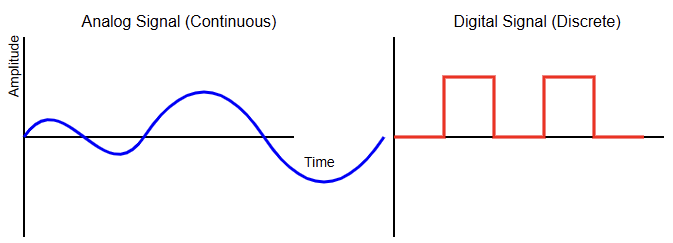
Based on time and magnitude, inputs can be divided into two broad categories.

Digital Inputs

Digital inputs are simple. They can only be ON or OFF. A push button is pressed or released.

A limit switch is open or closed. A sensor detects an object or not. The input module reads these states and passes them to the PLC CPU as 1 or 0.

For example:

  • A float switch shows if a tank is full.
  • A proximity sensor detects a metal part.
  • A start button sends a signal when pressed.

Digital inputs are the most common in automation.

Analog Inputs

Analog inputs handle values which are continue in time and continue in magnitude.

Instead of just ON or OFF, they measure a range. They can read temperature, pressure, speed, or level. These values are usually represented as a voltage (0–10 V) or current (4–20 mA).

For example:

  • A flow meter outputs a current based on flow rate.
  • A pressure transducer shows how much pressure is in a pipe.
  • A temperature sensor sends a varying signal.

Analog input modules must convert these signals into numbers the CPU can process. This is done through an Analog-to-Digital Converter (ADC).

How Input Modules Work

The operation of an input module may seem simple, but it involves several steps.

Signal Detection

The module receives a signal from the field device. This could be voltage from a switch or current from a sensor.

Conditioning

The signal is adjusted. For digital inputs, noise may be filtered out. For analog inputs, scaling and isolation are applied.

Conversion

In the case of analog inputs, the signal is converted from analog to digital.

Communication

The processed signal is sent to the CPU. The CPU then updates its memory with the input state or value.

The entire process happens quickly. PLCs scan inputs, process logic, and update outputs many times per second. This ensures real-time control of machines.

Importance of Input Modules

The input module is the only way the PLC knows what is happening in the system. Without accurate inputs, the controller is blind. Imagine driving a car with no dashboard, no speedometer, and no fuel gauge. 

You would not know when to accelerate or stop. That is how a PLC feels without inputs.

Reliable inputs ensure safe and efficient operation. They prevent accidents, reduce downtime, and improve productivity.

If an input fails, machines may run out of sequence or cause damage. That is why input modules are built with high reliability.

Types of Input Modules

There are many types of input modules. The type depends on the signals they handle.

Analog Input Modules

Handle continuous signals like 0–10 V or 4–20 mA.

Digital Input Modules

Handle binary signals like 24 V DC or 120 V AC.

High-Speed Input Modules

Handle fast signals, such as from encoders.

Specialty Modules

Designed for specific sensors, like thermocouples or RTDs.

Each type is chosen based on the application. For example, a packaging line may use mostly digital inputs, while a chemical process may use many analog inputs.

Input Voltage Levels

Different industries use different voltage standards. Common levels for digital inputs include:

  • 48 V DC or 230 V AC: less common but used in some cases.
  • 120 V AC: common in older systems.
  • 24 V DC: most common in industry.

The input module must match the field voltage. Connecting the wrong voltage can damage the module.

For analog inputs, the standard signals are:

  • 0–10 V
  • ±10 V
  • 4–20 mA

The 4–20 mA current loop is very popular because it resists noise and allows long cable runs.

Security in Input Modules

Input modules often include electrical isolation. This is usually done with optocouplers or transformers.

Isolation protects the CPU from voltage spikes and noise. It also prevents ground loops.

Without isolation, a fault in a sensor could damage the entire PLC. With isolation, the fault is contained. This makes systems safer and more reliable.

Wiring Considerations

Correct wiring is essential for input modules. For digital inputs, each sensor or switch must be wired to the correct terminal.

Polarity must be respected for DC signals. For AC signals, the line and neutral must be connected properly.

For analog inputs, shielding is often used. Shielded cables reduce electrical noise. Grounding must be done correctly to avoid interference. In current loops, the loop must be complete for the signal to be read.

Poor wiring can cause false signals, noise, or even damage. Careful installation prevents these issues.

Diagnostics and Indicators

Modern input modules include diagnostic features. Each input channel often has an LED indicator. This shows if the input is active. This helps technicians during troubleshooting.

Some advanced modules can detect wiring errors, short circuits, or broken sensors.

They send diagnostic data to the CPU. This reduces downtime and improves maintenance.

Input Modules in Redundant Systems

In critical industries, redundancy is used. This means having two input modules for the same signals.

If one fails, the other continues working. Redundancy is common in power plants, oil and gas, or aerospace systems.

Evolution of Input Modules

Input modules have evolved with technology. Early PLCs had simple digital input cards.

Today, modules are smarter. They can filter noise, scale analog values, and provide diagnostics.

Some even support hot swapping, meaning they can be replaced while the PLC is running.

With Industry 4.0, input modules are also becoming networked. They can communicate over Ethernet and send data directly to higher-level systems.

Safety Input Modules

Safety is critical in automation. Special safety input modules are used for emergency stop buttons, light curtains, and safety mats.

These modules are designed to meet strict safety standards. They often use redundancy and self-checking. This ensures that faults are detected quickly.

Cost and Selection

The cost of input modules depends on type and features. Digital input modules are cheaper than analog ones.

High-speed or safety modules cost more. When selecting, engineers must balance cost with reliability and function.

Key factors include:

  • Number of inputs required.
  • Voltage levels.
  • Need for analog or digital.
  • Diagnostic features.
  • Safety requirements.

Maintenance and Troubleshooting

Maintaining input modules involves regular checks. Technicians should verify LED indicators, measure voltages, and check wiring.

Faulty sensors or loose connections are common issues. Modern PLC software also helps. It shows live input status on the screen, making troubleshooting easier.

Key Takeaways: What is a PLC Input Module?

This article explained what a PLC input module is, how it works, why it matters, and where it is used.

It also detailed different types, wiring considerations, and practical examples. 

From the discussion, we are able to say that the PLC input module may look simple, but it is the foundation of automation.

It connects the real world to the digital brain of the PLC. Without it, machines cannot be controlled, and processes cannot be automated.

Digital inputs bring simple signals like ON or OFF. Analog inputs bring continuous measurements like temperature or pressure.

Together, they give the PLC the information it needs. Input modules protect, condition, and translate these signals reliably.

From conveyor belts to water plants, input modules are everywhere. They make automation safe, efficient, and productive.

As technology evolves, input modules will only become smarter and more connected. But their basic role will remain the same: to be the eyes and ears of the PLC.

FAQ: What is a PLC Input Module?

What is a PLC Input Module?

Hardware component within a PLC that receives signals—digital or analog—from field devices like switches and sensors, and converts them into a format the PLC’s CPU can process.

Why is it important?

It acts as the PLC’s “eyes and ears.” Without it, the PLC cannot detect changes in its environment, making accurate control of machines or processes impossible.

What types of input modules are there?

There are three primary types: Digital (Discrete) Modules – Handle ON/OFF signals like buttons or limit switches.; Analog Modules – Handle continuous signals such as temperature, pressure, or flow, converting them via built-in ADCs.; Network I/O Modules – Handle I/O communication over industrial networks like Ethernet or Profibus. 

How does an input module function?

For digital inputs, it detects ON/OFF states and sends binary signals to the CPU. For analog inputs, it receives continuous voltage or current and converts it into digital form for CPU interpretation.

Many modules also include LED indicators and built-in diagnostics to aid troubleshooting.

What voltage levels do input modules support?

  • Digital input modules typically support ranges such as 12–24 V DC or 120 V AC. 
  • Analog modules usually support ranges like 0–10 V or 4–20 mA

Why is electrical isolation important in input modules?

Isolation (e.g., using optocouplers) protects the PLC CPU from voltage spikes, reduces noise, and prevents grounding issues.

In systems with multiple power sources, isolated modules help avoid ground loops and interference.

What are high-density and high-speed modules?

High-density modules pack many channels (e.g., up to 32) into one module—ideal for compact installations.

High-speed modules are designed for fast-changing inputs, such as encoder pulses or rapid sensor signals. 

Can I/O modules be specialized?

Yes. Beyond standard digital and analog, there are modules designed for applications such as:

  • High-speed counting
  • Temperature measurement (e.g., RTDs, thermocouples)
  • Position control or other specialized sensor interfaces

How do you choose the right input module?

Consider: Type of signal (digital vs. analog); Voltage/current range; Channel count; Speed of signal changes; Diagnostic and isolation needs; Compatibility with the PLC system

Can input modules handle multiple power sources?

Yes, isolated modules provide separate commons for each channel or group, allowing safe connection to external power supplies without interference or ground loops.

Are there diagnostic features built into modules?

Many modern modules include LEDs for channel status and diagnostics to detect wiring faults, short circuits, or device failures—greatly simplifying troubleshooting.

How do input modules fit into a PLC system?

Modules are typically placed in a modular rack or chassis, interfacing via the backplane. The CPU reads input states during each scan cycle.

What is Hot-Swapping in PLCs?

Hot-swapping is the ability to replace or insert components in a system while it is still running and powered. This means there is no need to turn OFF the system or interrupt the process.

In the world of Programmable Logic Controllers (PLCs), this function is mostly applied to Input/Output (I/O) modules.

These are the modules that connect the PLC to sensors, actuators, and field devices.

Normally, when a module becomes faulty, the system would need to be stopped, and the power disconnected before replacing the damaged unit. This can cause downtime, lost production, and high costs.

With hot-swapping, however, a technician can pull out the faulty module and slide in a new one while the PLC continues to operate as usual.

This article explains the concept of hot-swapping. It shows its procedures, applications, risks, and finally its advantages and disadvantages.

The Concept of Hot-Swapping

Hot-swapping refers to changing parts of a system while it is still powered on and functioning.

It allows modules to be removed or added without switching off the entire unit. This is very different from cold-swapping.

Cold-swapping requires that the system be completely powered down before any changes are made.

The idea of hot-swapping is not limited to PLCs. It is actually a widely used concept in modern technology. 

For example, every time you plug a USB device into your computer while it is running, you are doing a hot-swap. The computer instantly detects the device and makes it available. 

Servers and data centers also rely heavily on this feature. They use hot-swappable hard drives, power supplies, and network cards to maintain continuous operation. In PLCs, the function is built into the chassis and the modules. 

The modules and their connectors are designed to safely handle insertion and removal while powered. This ensures that the system remains stable and does not crash during the process.

How Hot-Swapping Works in a PLC

For a PLC to allow hot-swapping, both its hardware and software must be specially designed.

It is not something that can be done on just any PLC system. There are several key features that make this possible.

Staggered Pins

Connectors in hot-swappable modules are not uniform. They have pins of different lengths. The ground and power pins are slightly longer.

This ensures they make contact before any data pins do. When inserting a module, the system first gets a stable ground and power connection.

Only then are the data and communication lines connected. Similarly, when removing a module, the data pins disconnect first, preventing corrupted signals or unexpected shutdowns.

Backplane Design

The modules are connected to the CPU through a backplane or communication bus.

In hot-swappable PLCs, this backplane is carefully engineered to withstand the electrical disturbances that happen when a module is inserted or removed.

It includes circuits and controllers that regulate the process. Each module may also contain its own hot-swap controller.

This manages the way the module powers up and synchronizes with the rest of the system.

Inrush Current Control

When a new module is plugged in, it contains capacitors that are empty. The moment power reaches them, they try to charge instantly, causing a sudden surge of current called inrush current.

If not controlled, this surge could disturb or reset other modules on the backplane. A hot-swap controller inside the module limits this inrush. It ensures the current flows gradually and safely.

Software Management

Hardware alone is not enough. The PLC’s operating system and firmware must also recognize when modules are added or removed.

Some PLCs continue to run even if a module is missing. They may show a fault code but keep the program running.

This prevents the whole process from shutting down. Once a new module is inserted, the system automatically detects it, configures it, and re-establishes communication. The program then returns to normal operation without stopping.

    The Hot-Swapping Procedure

    Performing hot-swapping must always follow a clear procedure. Doing it incorrectly can lead to damage or safety hazards.

    Safety Check

    Make sure the module is actually designed for hot-swapping. Not all modules allow this.

    Use your hands only. Do not use screwdrivers or metal tools, as they may cause short circuits.

    Prepare the System

    If possible, use the PLC software to place the module in an “offline” state. For I/O modules, disconnect or de-energize the field devices connected to them. This reduces risk during the swap.

    Remove the Module

    Unlock the retaining clips or screws. Disconnect the terminal block. Gently slide the module out in a straight motion. Avoid shaking or twisting.

    Insert the New Module

    Verify that the replacement module is the same type as the original. Align it correctly with the chassis. Push it in firmly until it locks in place.

    Verify and Re-enable

    Once inserted, the PLC detects the new module. Use the software to confirm communication and function. If you disabled the I/O earlier, re-enable it now. Test to make sure it is working correctly.

      Applications of Hot-Swapping

      Hot-swapping is most common in advanced PLC systems, particularly those that are modular or rack-based. It is widely used in:

      Redundant Systems

      In critical plants, two PLCs often run together. One is active, and the other is on standby.

      If a module fails, it can be replaced while the standby system keeps things running. This avoids any interruption.

      Remote I/O

      Many plants use distributed PLC systems with remote I/O racks in different locations.

      Hot-swapping makes it possible to change a remote module without affecting the main PLC. The rest of the plant continues running normally.

      System Upgrades

      Industries often upgrade their equipment step by step. Hot-swapping allows a technician to replace old modules with newer ones while the process continues. This reduces downtime during modernization.

      Risks of Hot-Swapping

      Although the feature is very useful, it also comes with risks. These include:

      Voltage Surges

      If a module is faulty or not designed well, inserting or removing it can create spikes in voltage. These spikes may damage the module or even the backplane.

      Electromagnetic Interference (EMI)

      The process of swapping can generate electrical noise. This noise may interfere with data communication inside the PLC. It can cause temporary data loss.

      Connector Wear

      Modules that are swapped too often can wear out their connectors. The metal surfaces can corrode or oxidize over time, leading to poor connections.

      Data Integrity

      If a module is removed while it is actively transmitting data, that data may be lost or corrupted. PLC firmware must be designed to handle this situation gracefully.

      Advantages and Disadvantages of Hot-Swapping in PLCs

      This subsection gives a brief explanation of pros and cons of the hot-swapping in PLCs.

      Advantages

      Reduced Downtime

      Processes keep running with minimal interruption. This is crucial for industries that operate nonstop, such as 24/7 production lines.

      Improved Reliability

      In redundant systems, hot-swapping adds another layer of fault tolerance.

      Simplified Maintenance

      Technicians can replace or upgrade hardware without shutting down the whole system.

      Safer Work

      Technicians may not need to completely power down the PLC cabinet, which reduces time spent working in de-energized conditions. However, standard electrical hazards remain.

      Disadvantages

      Higher Cost

      Hot-swappable PLCs are more expensive. Their backplanes and modules require advanced designs.

      Complexity

      These systems are technically more complex, requiring careful engineering and support.

      Strict Procedures

      Maintenance staff must follow the right steps. Failure to do so can damage the system.

      Key Takeaways: What is Hot-Swapping in PLCs?

      Hot-swapping in PLCs is an important step forward in automation technology. It allows modules to be replaced, repaired, or upgraded without stopping the process.

      This provides higher reliability and efficiency, which is critical for industries where downtime is very costly.

      The advantages are clear: reduced downtime, better reliability, easier maintenance, and improved flexibility.

      At the same time, there are challenges. The systems are more expensive, the design is more complex, and the procedures require discipline.

      When done properly, hot-swapping offers industries a strong balance between high performance and maintenance convenience.

      As plants and factories continue to demand more uptime, hot-swapping will remain a vital feature in modern PLC systems. 

      It represents not only a technical improvement but also a practical solution for achieving continuous production and high efficiency.

      FAQ: What is Hot-Swapping in PLCs?

      What does “hot-swapping” mean in PLC systems?

      Hot-swapping in PLCs means replacing or inserting a module (often an I/O module) into a PLC rack or chassis while the system remains powered and running—without shutting the PLC (or production) down.

      How is hot-swapping different from cold-swapping?

      Cold-swapping requires power to be shut off before changing parts. Hot-swapping does not.

      With cold swapping, the system is “dead” (no power) when you perform the swap; with hot-swapping, the system continues to run.

      Which PLC modules typically support hot-swapping?

      Usually I/O modules (digital or analog), power supply modules, or in some systems, communication modules.

      Whether a specific module supports hot-swap depends on the PLC vendor and hardware design.

      Some modules are specifically built with hot-swap controllers and staggered power / ground pins. 

      What hardware features make hot-swapping possible?

      Features include:

      • Connectors with staggered pins that ensure ground and power connect first, before data or signal pins.
      • Hot-swap controllers in modules to control inrush current and protect against overcurrent.
      • Design of backplane to tolerate electrical transients and maintain stability as modules are inserted or removed.

      What are the software / firmware requirements for hot-swapping?

      The PLC firmware must detect the removal / insertion of modules. It must handle missing modules (flag faults) but keep operating if the module isn’t critical.

      Once the new module is installed, it must be re-recognized, initialized, and integrated back into the system.

      What are the benefits of hot-swapping in PLCs?

      Some of the main advantages:

      • Reduced downtime (no need to stop the whole system) allowing continuous production.
      • Easier maintenance and faster module replacement.
      • Fault tolerance and reliability: faulty modules can be replaced without fully shutting down.
      • Flexibility to upgrade or change modules with minimal disruption.

      What are some of the main risks or drawbacks?

      Some are:

      • Voltage surges or transients when inserting/removing modules, possibly damaging components. 
      • Inrush current when new module capacitors charge; if not controlled, it can cause disturbances to other modules.
      • Faults during insertion/removal (e.g. communication loss, module detection issues).
      • Wear on connectors or poor seating over time.

      Are there PLC brands or types where hot-swapping is especially common / safe?

      Yes. Higher-end modular PLC systems, rack-based designs, redundant PLC configurations often include hot-swap capable modules.

      Some specific PLCs by large vendors offer documented hot-swap I/O modules. In contrast, older or simpler/compact PLCs might not support it or only in limited slots.

      What precautions should a technician take when performing hot-swap on PLCs?

      Good practice includes:

      • Verifying the module is indeed hot-swappable.
      • De-energizing or making offline the field devices connected to the module if possible.
      • Using hands (not metal tools) to avoid shorting.
      • Ensuring the replacement module is correct type/model.
      • Monitoring that communication / diagnostic show all good after insertion.
      • Being aware of module alignment, seating, and the environment (dust, moisture).

      Can hot-swapping be done in every condition and environment?

      Not always. Conditions like dirty, wet, or otherwise harsh environments can complicate safe swapping.

      Also, if a module is deeply integrated in the process, removing it—even briefly—may cause faults or degrade performance. 

      Best PLC Brands Compared

      Programmable Logic Controllers (PLCs) act as the central command system, they collect data from sensors, process control logic, and trigger actions that keep machines and production lines running.

      From automotive plants to food processing facilities, PLCs are at the heart of reliable and efficient manufacturing.

      Although there are dozens of PLC manufacturers worldwide, the global market is dominated by a handful of well-established brands.

      Each of these brands has its own philosophy, design approach, and target audience.

      Hence, selecting the right PLC is not a matter of simply choosing the most popular brand. Instead, the choice depends on factors such as application complexity, required communication standards, industry regulations, budget, and even geographic availability of technical support.

      This article provides a detailed comparison of five leading PLC manufacturers. By exploring their features, advantages, and drawbacks, you will gain a clearer understanding of which PLC may best suit your specific industrial needs.

      Siemens: The Global Powerhouse

      Siemens, a German multinational, holds the largest global market share in the PLC industry. Their SIMATIC series has become the gold standard for reliability and robustness. 

      Siemens PLCs are commonly found in complex and large-scale industries such as automotive manufacturing, power generation, pharmaceuticals, and water treatment facilities.

      Key Features

      TIA Portal

      Siemens offers the Totally Integrated Automation (TIA) Portal, a powerful engineering software platform.

      It integrates programming, configuration, diagnostics, and visualization in one environment. Engineers value it for its efficiency and seamless workflow.

      Scalability

      The SIMATIC family ranges from compact controllers like the S7-1200, designed for smaller machines, to advanced systems like the S7-1500, built for large-scale, high-speed automation.

      Communication

      Siemens strongly promotes PROFINET, a high-speed Ethernet-based protocol, while still supporting PROFIBUS, ensuring backward compatibility with legacy systems.

      Industry 4.0 Innovation

      Siemens is at the forefront of digital transformation. Their PLCs support cloud integration, cybersecurity features, and digital twin technology.

      Advantages

      • Exceptional capability for complex projects.
      • A vast global support and service network.
      • TIA Portal is considered one of the most advanced automation software environments.

      Disadvantages

      • Higher cost compared to many competitors.
      • The learning curve for TIA Portal can be steep for beginners.

      Ideal For: Multinational corporations, industries requiring sophisticated automation, and plants with strict integration and security demands.

      Rockwell Automation (Allen-Bradley): The North American Leader

      Rockwell Automation, through its Allen-Bradley brand, dominates the PLC market in North America.

      Known for their rugged design and seamless integration with other Rockwell products, these PLCs are particularly popular in industries such as oil and gas, automotive, packaging, and pharmaceuticals.

      Key Features

      Integrated Architecture

      The ControlLogix family provides a unified platform that combines PLC functions with motion control, visualization, and safety.

      Studio 5000 Software

      Allen-Bradley PLCs are programmed using Studio 5000, which supports multiple languages, especially ladder logic, making it familiar for engineers with electrical backgrounds.

      Durability

      Designed to endure harsh industrial environments with high reliability.

      EtherNet/IP Communication

      A major strength of Rockwell PLCs is their native support for EtherNet/IP, allowing efficient integration with industrial devices.

      Advantages

      • User-friendly programming environment.
      • Excellent integration within the Rockwell ecosystem.
      • Comprehensive training and technical support across North America.

      Disadvantages

      • Premium pricing makes them more expensive than many alternatives.
      • Vendor lock-in: Heavy reliance on Rockwell products can limit flexibility with third-party devices.

      Ideal For: North American industries and applications requiring high precision, durability, and strong vendor support.

      Schneider Electric: The Versatile Innovator

      Schneider Electric, a French multinational, has a rich history in industrial automation.

      Their Modicon PLC series was among the very first PLC families introduced in the 1960s. 

      Today, Schneider is well-regarded for its innovation, focus on sustainability, and strong integration with the Internet of Things (IoT).

      Key Features

      Modicon Series

      Offers a wide portfolio ranging from compact controllers like the M221 to high-performance systems like the M580.

      EcoStruxure Platform

      A digital architecture that connects PLCs to the Industrial Internet of Things (IIoT) for data-driven insights.

      Energy Efficiency

      Many Schneider PLCs are designed with power-saving features, aligning with sustainability goals.

      Open Communication

      Supports Modbus, EtherNet/IP, and OPC UA, making it easier to connect with equipment from multiple vendors.

      Advantages

      • Highly versatile, fitting a broad spectrum of industries.
      • Strong IoT readiness, which is valuable for future-proofing automation systems.
      • Focus on energy efficiency and sustainable practices.

      Disadvantages

      • In some high-performance benchmarks, competitors like Siemens may offer faster execution speeds.
      • Variations in older software platforms can sometimes complicate user experience.

      Ideal For: Businesses seeking energy-efficient, IoT-enabled solutions across diverse industries.

      Mitsubishi Electric: The Cost-Effective Performer

      Mitsubishi Electric is a Japanese manufacturer recognized for producing reliable and cost-effective PLCs.

      Their MELSEC series is especially popular in Asia-Pacific, though it is gaining traction worldwide. 

      Mitsubishi PLCs are particularly appreciated in industries that prioritize compact size, affordability, and dependable performance.

      Key Features

      MELSEC Series

      Includes compact controllers like the FX5U and modular controllers such as the iQ-R series.

      Compact Design

      Many models are small enough for space-constrained installations.

      High-Speed Processing

      Known for quick scan cycles and precise execution.

      MELSOFT Software Suite

      Provides programming, simulation, and system monitoring tools.

      Advantages

      • Competitive pricing makes them highly attractive to small and medium businesses.
      • Excellent reliability for repetitive, high-speed processes.
      • Space-saving design suitable for compact machines.

      Disadvantages

      • Scalability is somewhat limited compared to Siemens or Rockwell.
      • Integration with third-party equipment can be less seamless.

      Ideal For: Cost-sensitive projects, small-to-medium manufacturers, and industries where compact size is a priority.

      Omron: The Compact and Integrated Specialist

      Omron, another Japanese company, is well-known for its automation solutions that combine PLCs with robotics, vision systems, and sensors.

      This integration makes Omron especially appealing in industries requiring advanced machine control and inspection capabilities.

      Key Features

      SYSMAC Platform

      Covers a wide variety of controllers, including the CP1 and CJ2 series.

      Motion and Vision Integration

      Designed to work seamlessly with Omron robots, motion systems, and vision inspection devices.

      Compact Controllers

      The CP1 series is a compact, all-in-one solution ideal for small applications.

      CX-One Software

      User-friendly environment designed for ease of programming and maintenance.

      Advantages

      • Cost-effective for small automation projects.
      • Simplified setup and maintenance.
      • Perfect integration with Omron’s robotics and vision products.

      Disadvantages

      • Less scalable for very large or complex systems.
      • Limited range of high-end models compared to Siemens or Rockwell.

      Ideal For: Small-scale projects, especially those involving robotics or vision-based automation.

      Conclusion: Making the Right Choice

      This article showed a detailed comparison of five leading PLC manufacturers.  After exploring their features, advantages, and drawbacks, we got a clearer understanding of which PLC may best suit specific industrial needs.

      In addition, from the above discussion we could say that there is no universal-best- PLC brand.

      The right choice depends on project requirements, geographic location, industry standards, and budget. 

      • Siemens is best suited for global enterprises with large-scale, complex automation needs.
      • Rockwell Automation (Allen-Bradley) is the top choice in North America, especially when reliability and vendor integration are key.
      • Schneider Electric provides versatile and sustainable solutions with excellent IoT capabilities.
      • Mitsubishi Electric balances cost-effectiveness with reliable performance, making it ideal for small-to-medium industries.
      • Omron specializes in compact, integrated solutions, particularly in applications that require motion or vision integration.

      When selecting a PLC, always assess the technical requirements, long-term scalability, and the availability of training and support.

      A well-chosen PLC can significantly improve efficiency, minimize downtime, and provide a foundation for future expansion.

      FAQ: Best PLC Brands Compared

      What is the most popular PLC brand worldwide?

      Siemens holds the largest global market share, especially in Europe and Asia.

      Why is Allen-Bradley so common in North America?

      Rockwell Automation has deep roots in the U.S. and Canada, offering excellent local support and a strong ecosystem that appeals to American industries.

      Which PLC is best for small businesses?

      Mitsubishi and Omron are both cost-effective choices for small-scale or budget-sensitive projects.

      Are all PLCs compatible with each other?

      Not always. Each brand uses its own software and often has preferred communication protocols. Some are easier to integrate than others.

      Which PLC brand focuses most on energy efficiency?

      Schneider Electric has a strong emphasis on sustainability and energy-efficient designs.

      Which PLC is easiest for beginners to learn?

      Allen-Bradley’s Studio 5000 is often praised for its user-friendly ladder logic environment, making it easier for technicians with electrical backgrounds.

      Can PLCs connect to the cloud?

      Yes. Siemens, Schneider, and Rockwell in particular provide solutions for cloud connectivity and data analytics in Industry 4.0 applications.

      What factors should I consider when choosing a PLC?

      You should evaluate performance needs, communication protocols, cost, scalability, and the availability of local support and training.

      PLC in Elevators – How It Works

      Modern elevators rely heavily on Programmable Logic Controllers (PLCs). A PLC is a digital control device that acts as the main “brain” of the elevator system. It processes signals from buttons, switches, and sensors. 

      It then executes programmed logic to control motors, doors, and displays. Older systems used hardwired relay logic.

      Those were bulky, less reliable, and harder to maintain. PLCs replaced them because they offer greater flexibility, safety, and speed. 

      The elevator PLC works continuously in a cycle. It scans inputs, executes logic, and updates outputs.

      This ensures that passengers move between floors smoothly, safely, and efficiently every second. 

      This article details the role of PLCs in modern elevators. It indicates how PLC rely elevators work, their key components, their safety features and advantages, how to program them and finally their future.

      How a PLC-based Elevator Works: A Step-by-Step Guide

      Request handling

      The PLC monitors call buttons at all times. When a passenger presses a button, the PLC detects it as an input.

      A scheduling algorithm decides which request should be served first for efficiency. The algorithm can choose based on direction, floor priority, or time of request.

      This helps reduce waiting time. It also helps save energy by avoiding unnecessary movements.

      Input scan


      The PLC checks the condition of all input devices. It reads floor requests, door sensors, and car position sensors.

      This ensures the system knows what actions are needed. Without continuous scanning, the elevator would not respond quickly.

      The input scan runs very fast. It can process hundreds of inputs in milliseconds.

      Program scan (logic execution)

      The CPU executes the elevator control program. Often, it is written in ladder logic. The program decides the next action based on inputs.

      For example, if the button for a higher floor is pressed, the PLC decides the motor must move upward.

      The logic also includes safety rules. It prevents the motor from starting if the doors are open. It also checks for overload before allowing movement.

      Output scan

      After logic execution, the PLC sends commands to output devices. These signals activate motors, door systems, and floor displays.

      The output scan translates decisions into real actions. The car moves, the indicators update, and the doors respond. This happens in real time.

      Motor control

      A motor controller or Variable Frequency Drive (VFD) receives commands from the PLC.

      It adjusts motor speed and direction. This ensures smooth acceleration and braking.

      Passengers feel safe and comfortable. Sudden jerks or stops are avoided. VFDs also save energy.

      They regulate power use and reduce wear on mechanical parts.

        Positioning

        Encoders or sensors provide continuous feedback about the car’s position. The PLC uses this information to stop the car precisely at the target floor.

        Precision is very important. Even a small misalignment can cause tripping hazards. Accurate positioning improves safety. It also improves passenger trust in the system.

        Door operation

        When the car levels with the floor, the PLC commands the doors to open. Sensors check if the doorway is clear.

        After a delay or when conditions are safe, the PLC closes the doors. Door logic prevents accidents.

        If an object blocks the doorway, the doors reopen automatically. This avoids passenger injury.

        Repeat

        The cycle restarts. The PLC scans inputs again, ensuring non-stop monitoring and control.

        This loop is continuous. It happens thousands of times each minute. The constant cycle keeps the elevator responsive at all times.

          Key Components of a PLC-based Elevator System

          PLC (Programmable Logic Controller)

          Acts as the main brain. Connects to input and output modules. Stores and executes the program. Without the PLC, the system cannot function.

          Sensors

          Detect car position, door status, and load conditions. Provide real-time data. Safety depends on reliable sensors.

          Buttons and switches

          Provide passenger requests and emergency stop inputs. Simple but essential. Every elevator ride starts with a button press.

          Motor drives/controllers

          Control the elevator motor’s speed and direction. Allow for smooth travel between floors. Extend the motor’s lifespan.

          Door operators

          Manage door opening and closing. Ensure safe passenger entry and exit. Often use sensors for obstruction detection.

          Indicator displays

          Show floor numbers and travel direction. Keep passengers informed and reduce confusion. Some displays include voice announcements.

          Human-Machine Interface (HMI)

          Helps operators monitor and troubleshoot. Provides diagnostic messages. Can be used to configure system settings.

          Advantages of Using a PLC in Elevators

          Reliability and durability

          Solid-state electronics replace mechanical relays. Fewer moving parts mean less wear. Elevators can run for years with minimal issues.

          Simplified troubleshooting

          Programs are easier to analyze than complex wiring. Technicians can connect a laptop and view real-time status. Faults are identified faster.

          Flexibility and scalability

          Functions can be upgraded by changing software. Adding more floors or new features is simple. No need for heavy rewiring.

          Cost-effectiveness

          Lower long-term maintenance costs. Initial cost is higher, but savings add up over time. Fewer breakdowns mean less downtime.

          Compact design

          Saves space compared to relay panels. More room is available in the equipment room. Ideal for modern buildings with limited space.

          Advanced functions

          Can manage multiple cars and optimize movement. Reduces passenger waiting times. Integrates with building systems for energy savings.

          PLC Programming for Elevators

          Logic rungs

          Each rung defines a condition and an action. They resemble electrical circuits. This makes ladder logic easy for engineers to understand.

          Inputs and outputs

          Left side for inputs, right side for outputs. Clear and organized. Helps link cause and effect directly.

          Sequential execution

          PLC scans each rung in order. Fast and consistent. All conditions are checked before outputs are updated.

          Timers and counters

          Control events like door delays and floor counts. Improve accuracy and passenger comfort.

          Interlocks

          Ensure safe operation by blocking unsafe actions. Prevent accidents such as moving with open doors. Interlocks are critical in every elevator program.

          Safety Features in PLC-Controlled Elevators

          Redundant systems

          Backup processors maintain safety during failure. Reliability is never compromised.

          Emergency stop

          Immediately halts movement when pressed. Available both inside the car and outside on landings.

          Door interlocks

          Prevent car movement if doors are not closed. Protects passengers from accidents.

          Overload protection

          Stops the car if weight limit is exceeded. Alerts passengers to reduce load.

          Fire service mode

          Sends cars to ground floor during fire alarms. Doors open automatically for evacuation. Firefighters then control cars manually.

          Self-diagnostics

          Continuously checks system health. Detects issues before they cause failures. Improves preventive maintenance.

          The Future of PLC in Elevator Technology

          IoT integration

          Remote monitoring and alerts for maintenance. Facility managers can track elevators from any location.

          Predictive maintenance

          Uses data to predict and prevent failures. Reduces downtime and increases safety.

          AI optimization

          Smarter dispatching and reduced wait times. Systems learn building traffic patterns. Passengers experience faster service.

          Enhanced security

          Stronger cybersecurity against threats. Protects systems connected to networks.

          Wireless communication

          Less wiring, more flexibility. Installation is faster and cheaper.

          Better HMIs

          More graphical, intuitive interfaces. Easy to use for both operators and technicians.

          Key Takeaways: PLC in Elevators

          This article explained the role of PLCs in modern elevators. It showed how PLC rely elevators work, their key components, their safety features and advantages, how to program them and finally their future trending.

          The discussion proved that the PLCs have transformed the way elevators are designed and controlled.

          They replaced outdated relay logic with a smarter, safer, and more flexible approach.

          A PLC manages every step: from receiving button inputs to controlling motors, positioning the car, and opening doors. 

          Safety features like overload protection, emergency stop, and fire service mode make modern elevators reliable for passengers.

          With IoT, AI, and predictive maintenance, PLC-controlled elevators will only become more advanced. 

          The combination of precision, flexibility, and safety ensures that PLCs remain the foundation of elevator automation now and in the future.

          Elevators are not just mechanical devices anymore. They are intelligent systems powered by advanced control logic.

          FAQ: PLC in Elevators

          Do real elevators use PLCs, or do they use something else?

          Many modern elevators use PLCs for control. Some older systems use relay-based or mechanical controllers.

          Are PLC-based elevator systems safe?

          Yes. They include safety features such as redundant circuits, emergency stop buttons, door interlocks, and overload sensors.

          Codes and standards (e.g. ASME A17.1 in the US) often require strict safety guidelines. 

          What components of elevator control are handled by the PLC?

          The PLC handles logic such as start, stop, acceleration, deceleration, motor direction, door control, position sensing, etc. It also monitors safety sensors. 

          Do repeated presses of a button do anything?

          No, pressing the same floor button multiple times usually has no additional effect once the request is registered. The lamp/light confirms reception. 

          What programming methods are used for elevator PLCs?

          Ladder logic is a common method. It represents logical conditions in rung-based format. Other methods or function blocks might be used depending on PLC type.

          Must elevator control PLCs comply with certifications or standards?

          Yes. Elevator control systems typically must meet local and international safety and building codes.

          Components like brakes, emergency stops, door locks often require certified hardware. 

          What is the role of sensors in PLC controlled elevators?

          Sensors provide feedback to the PLC about elevator position, door status (open/closed), load / overload, obstruction, etc. They are essential for safety and smooth operation.

          How is safety redundancy achieved?

          Through multiple circuits or processors, backup controllers, and redundant sensors.

          If one component fails, another can take over. Also, there may be hardwired safety circuits outside the PLC logic.

          Do elevators often use PLCs for all types (traction, hydraulic, etc.)?

          Yes. PLCs are used in different elevator types, whether traction or hydraulic. The logic and sensors differ, but the principles are similar. 

          Is there a cost benefit to using PLCs vs older relay-based systems?

          Yes. While initial investment may be higher, long-term savings come from easier maintenance, fewer hardware failures, ability to update features by software instead of rewiring.

          What happens if a PLC fails?

          In safety-critical installations, there are backup or redundant systems. The PLC usually monitors its own health.

          If a failure is detected, elevator must go into a safe state (stop, doors open, etc.). Codes often require this.

          Are there limitations to PLC-based elevator control?

          Some limitations include the requirement for rigorous safety and certification, potential complexity in programming, need for reliable sensors, and ensuring that software bugs do not lead to unsafe behavior. Also, legacy systems or older installations may not be easily upgraded.

            PLC Not Communicating with PC – How to Fix

            A Programmable Logic Controller (PLC) is one of the most critical components in industrial automation.

            It serves as the central brain for many machines and systems, constantly processing data and executing commands. 

            However, when a PLC stops communicating with a PC, serious issues can arise almost immediately.

            This failure can lead to unexpected production downtime, delayed operations, and even the loss of important process data.

            Troubleshooting such a problem requires patience, attention to detail, and a step-by-step approach.

            The causes can range from a faulty cable to misconfigured software, or even hidden network settings.

            This article provides a practical and comprehensive guide. It explains how to diagnose and fix communication issues when a PLC refuses to communicate with a PC, while also giving tips to prevent the problem from happening again.

            Initial Checks (The Basics)

            Check the power supply

            A PLC simply will not work without stable power. The first step is to check the power LED indicator on the PLC. Normally, a solid green light shows the unit is receiving power correctly. 

            If the light is off, there may be an issue. Inspect the power cord to ensure it is firmly plugged in. Also, check for blown fuses or tripped circuit breakers in the panel. 

            Using a multimeter to measure voltage levels is recommended to confirm that the supply matches the required specifications. Sometimes, even a loose terminal connection can interrupt power flow.

            Inspect the communication cables

            Communication cables are a common source of problems. They can become loose, bent, or damaged over time, especially in industrial environments where vibration is common.

            Inspect both ends of the cable and verify that the connectors are seated properly. Look closely for visible damage, such as frayed wires, bent pins, or worn insulation.

            It is also important to confirm that the cable is the right type for the protocol being used.

            For instance, Ethernet communication requires a proper Ethernet cable, while RS-232 or RS-485 uses specific serial cables. Using the wrong cable can make communication impossible.

            Verify the connection port

            A PLC often comes with several ports, including USB, Ethernet, and serial connections.

            If the cable is connected to the wrong port, communication will not work. Always make sure the port on the PC matches the one being used on the PLC.

             In some cases, the ports may look similar but serve different purposes, so double-checking is vital. Compatibility between the ports is essential for successful communication.

            Restart both devices

            Sometimes, a very simple solution works best. Restarting the PLC and PC can reset the communication process.

            Power both devices off completely, wait for about 10–20 seconds, and then turn them back on. 

            This action clears temporary glitches, resets internal buffers, and restores network settings to a fresh state.

            Many technicians underestimate the effectiveness of a reboot, but it often resolves minor communication errors quickly.

            Software and Configuration Problems

            Verify software drivers

            When connecting through a USB cable, the operating system typically requires a specific driver to recognize the PLC. If this driver is not installed correctly, the communication link will fail.

            Ensure that the driver is compatible with your version of Windows, Linux, or macOS.

            Outdated or corrupted drivers can also cause failures, so updating or reinstalling the driver may be necessary.

            Download the latest version directly from the manufacturer’s website to avoid compatibility issues.

            Match communication settings

            For serial connections, communication depends heavily on matched settings between the PLC and PC.

            These include baud rate, parity, stop bits, and data bits. If even one setting is mismatched, the connection will fail. 

            Check both the PLC’s programming software and the PC’s device manager to confirm that the values are identical.

            Many beginners overlook this step, but it is one of the most common reasons for failed communication.

            Check IP addresses and subnet mask

            When using Ethernet communication, proper IP addressing is essential. The PLC and PC must be on the same subnet to communicate successfully.

            For example, if the PLC IP address is set to 192.168.1.5, then the PC should be set to something like 192.168.1.10, with the same subnet mask (255.255.255.0).

             Use the “ipconfig” command on the PC to check its current IP address. If needed, configure a manual IP address for the PC. Subnet mismatches or conflicting addresses on the network can prevent the devices from connecting.

            Look for an enabled “autobrowse” feature

            Some PLC programming software includes an “autobrowse” or “auto-discovery” option.

            This feature allows the software to automatically search for and detect connected PLCs.

             If this feature is disabled, the PC may not detect the PLC even if the hardware connection is correct.

            Check the software settings and ensure autobrowse is enabled when available.

            Check the PLC program and logic

            In certain cases, the PLC’s program may include logic or communication instructions that control how it interacts with external devices.

            If these instructions are missing or incorrectly configured, communication will fail. 

            Review the program and confirm that the communication block or instruction is set up properly.

            For instance, if the PLC is programmed to only respond under specific conditions, ensure those conditions are being met.

            Check for software conflicts

            Sometimes, other software running on the PC can interfere with the communication link.

            This is especially true for USB devices or virtual COM ports. Close unnecessary applications and try again. 

            If problems persist, consider reinstalling the PLC programming software. Conflicts between outdated versions of software and drivers can also be a hidden cause.

            Ensure firmware is up-to-date

            Manufacturers regularly release firmware updates for PLCs. These updates can fix bugs, improve compatibility, and resolve communication issues.

            Always check the official manufacturer’s website for the latest firmware version. 

            Mixing new software with older hardware can lead to unexpected communication problems, so keeping everything updated is a good preventive measure.

            Hardware and Environmental Factors

            Inspect diagnostic LEDs

            Most modern PLCs are equipped with built-in diagnostic LEDs. These lights can provide immediate clues about the system’s status.

            For example, a blinking red LED may indicate a hardware fault, while an orange LED could signal communication errors. 

            Refer to the PLC’s manual for details on what each indicator means. Understanding these signals can save hours of troubleshooting.

            Check for electrical noise

            Industrial environments often contain large motors, welding equipment, or heavy electrical machinery.

            These can generate strong electromagnetic interference (EMI), which disrupts communication signals. 

            To minimize the impact of EMI, keep communication cables separate from power lines, use shielded cables, and install EMI filters if necessary.

            Proper cable routing and protection are key to maintaining stable communication.

            Verify ground integrity

            Poor grounding can make a system more susceptible to noise and unstable operation.

            Check that the PLC, PC, and all connected equipment are properly grounded.

            Loose or corroded ground connections can create hidden problems that interfere with communication. A secure and clean grounding system improves both safety and reliability.

            Check for component failure

            Sometimes, a hardware component itself may be at fault. A defective communication module, port, or network card can prevent successful communication.

            If other troubleshooting steps do not work, test the PLC with a replacement module or adapter.

            Many manufacturers provide diagnostic tools that can help identify faulty hardware components.

            Check environmental factors

            PLCs are designed to handle tough industrial environments, but extreme conditions can still cause failures.

            Heat, dust, and moisture are common culprits. Ensure the PLC is installed in a cool, dry location with adequate ventilation.

            If the environment is particularly harsh, use protective enclosures rated for industrial use. Regular cleaning and inspection can also extend the equipment’s life.

            Advanced Troubleshooting Techniques

            Use network monitoring tools


            For Ethernet-based communication, network analyzers or monitoring tools can provide valuable insight.

            These tools allow you to view traffic, identify packet loss, detect collisions, or measure delays.

            In complex networks with multiple devices, these tools can quickly pinpoint the source of communication issues.

            Check diagnostic buffers


            Most PLC programming environments provide access to diagnostic buffers or logs.

            These logs contain detailed information about system events, warnings, and errors.

            Reviewing the diagnostic buffer can help identify when and why communication was interrupted. This information is often more precise than LED indicators alone.

            Monitor CPU load and memory

            A PLC with an overloaded CPU or insufficient memory may struggle to maintain communication.

            Check the scan cycle time to ensure it falls within the manufacturer’s recommended range.

            High CPU load can result from inefficient programming or too many simultaneous tasks. 

            Optimizing the PLC program may improve performance and restore stable communication.

            Try a different PC

            In some cases, the issue may not be with the PLC but with the PC itself. Problems such as a faulty USB port, outdated network card driver, or even malware can block communication. 

            To test this, try connecting the PLC to a different laptop or workstation. If the new PC establishes communication successfully, the problem lies with the original computer.

            Common Communication Protocols

            Understanding the protocol is key

            Different PLCs use different communication protocols, and troubleshooting depends on understanding which one is in use.

            Each protocol has unique requirements, such as cable type, port settings, or software configuration.

            Ethernet/IP is common

            This protocol uses standard Ethernet infrastructure, such as cables, routers, and network switches.

            Correct configuration of IP addresses, subnet masks, and gateways is essential. Many modern industrial networks rely on Ethernet/IP for its speed and flexibility.

            Modbus is a popular protocol

            Widely used in industrial automation, Modbus can operate over serial or Ethernet connections.

            For Modbus RTU (serial), the baud rate, parity, and stop bits must all match between devices. For Modbus TCP (Ethernet), correct IP settings are required.

            Its simplicity makes it a favorite for connecting multiple devices across different brands.

            RS-232 and RS-485 are serial protocols

            These are older but still reliable communication standards. RS-232 supports point-to-point connections, while RS-485 supports multi-drop connections with multiple devices. Both require specific wiring and pin configurations.


            Understanding the correct pinout is critical for proper operation.

            Documentation and Best Practices

            Always keep documentation

            Maintaining up-to-date wiring diagrams, configuration notes, and network maps is essential.

            Document every change made during installation and troubleshooting. Having this information on hand saves significant time during future repairs and helps new technicians understand the system quickly.

            Back up your program

            Always create and store backups of the PLC program. This provides a safety net in case of memory corruption or accidental deletion.

            Keep backups stored securely, both locally and in cloud storage, so they are accessible whenever needed. Regularly updating backups is a habit that prevents data loss.

            Use quality materials

            High-quality communication cables, connectors, and power supplies may cost more upfront but greatly reduce the risk of failure.

            Cheap or poorly shielded cables are more likely to degrade and cause intermittent communication errors.

             Investing in good-quality components improves long-term reliability.

            Train personnel

            Human error is a common cause of communication failures. Properly training staff in installation, programming, and troubleshooting procedures is crucial.

            Training sessions should cover safety practices, use of diagnostic tools, and handling of hardware components.

            Skilled personnel can often solve issues faster and prevent mistakes before they happen.

            Perform regular maintenance

            Preventive maintenance goes a long way toward reducing unexpected failures. Periodic inspections of cabling, connectors, power supplies, and environmental conditions help detect small issues before they grow into major problems.

            Cleaning dust, tightening terminals, and checking ventilation are simple but effective maintenance steps.

            Key Takeways: PLC Not Communicating with PC – How to Fix

            This article explained how to diagnose and fix communication issues when a PLC refuses to communicate with a PC. It also gave some tips to prevent the problem from happening again.

            So, from the discussion we learned that troubleshooting a PLC that refuses to communicate with a PC requires careful observation and logical steps.

            We should begin with the basics—checking power supplies and communication cables. 

            Next, examine software drivers, IP settings, and protocol configurations. Finally, look into hardware reliability, grounding, and environmental conditions.

            A structured and systematic approach minimizes downtime and ensures faster recovery. 

            Following best practices such as documentation, program backups, and regular maintenance helps prevent many issues from occurring in the first place.

            By applying these methods, communication between PLC and PC can usually be restored quickly, allowing operations to return to normal.

            FAQ: PLC Not Communicating with PC – How to Fix

            My PC doesn’t detect the PLC—what could be wrong?

            First, check your physical connection: ensure Ethernet cables are securely connected and the link lights on your PLC are active. If LEDs aren’t active, the cable or port may be faulty.

            Ethernet is plugged in—what next?

            Verify that your PC’s network interface is configured accurately and assigned to the correct local network.

            One experienced user recommends: Ensure your PC’s network interface is plugged in and has an IP on the expected PLC subnet.

            Why does FactoryTalk Linx fail to find devices on the network?

            Confirm that your PC’s IP is on the same subnet as the PLC since the driver only searches its own subnet.

            If the driver uses the wrong network adapter (e.g. Wi-Fi instead of Ethernet), you may need to specify the correct interface under driver configuration in FactoryTalk.

            Could certificates or time settings cause connection issues (e.g., TIA Portal / HMI)?

            Yes, as in scenarios involving Siemens devices, mismatched or untrusted certificates can block communication. 

            Any special steps for USB-based connections (e.g., Schneider Modicon PLCs)?

            Yes, if your Modicon PLC isn’t recognized over USB, confirm that the “PLCUsb” Windows service is running and that the correct driver version (signed by Microsoft) is installed. 

            Could environmental or hardware issues affect connectivity?

            Absolutely. Key factors include: Power stability, EMI or electrical noiseand/orI/O module failures.

            What common communication resolutions do technical articles suggest?

            Excellent troubleshooting suggestions from Kwoco-PLC include: Inspecting and replacing damaged Ethernet cables or connectors; Verifying that configuration settings—such as IP, subnet mask, and gateways—are accurate; Ensuring protocol compatibility and keeping firmware/software updated; Using diagnostic tools and manufacturer documentation when deeper analysis is required.

            Differences between SCADA, HMI, and PLC

            In industrial automation, SCADA, HMI, and PLC are fundamental concepts that engineers, technicians, and operators encounter on a daily basis.

            Even though these three terms are often mentioned together and sometimes mistakenly used interchangeably, they each serve a distinct and critical purpose.

             A PLC is the hardware that performs the direct control actions. An HMI, is the user interface that gives the operator the ability to interact with monitor, and control a process locally. 

            Finally, SCADA system is a larger, software-driven solution that oversees entire operations or even multiple geographically spread sites from one centralized location.

            This article will explore the specific functions of each of these components, explain how they interact with each other, and clearly outline their main differences in order to remove common confusion.

            Programmable Logic Controller (PLC)

            A PLC is essentially a rugged, industrial-grade computer that has been specially designed to survive and perform reliably in harsh factory environments. It is often referred to as the “brain” at the machine or process level. 

            A PLC continuously receives information from various sensors and input devices. It executes a stored program that is based on logical decisions.

            Finally, controls outputs that drive actuators, motors, lights, pumps, or other mechanical devices.

            What is a PLC and how does it work?

            Functionality of a PLC

            Real-time control

            The primary role of a PLC is to provide reliable, consistent, and high-speed control of a specific process.

            It executes its program in what is known as a scan cycle – a rapid, repetitive loop where the PLC reads inputs, processes the program, and updates outputs almost instantaneously.

            Input processing

            A PLC is able to handle both discrete and analog signals. Discrete signals are simple on/off inputs from devices such as push buttons or limit switches.

            Analog signals, however, represent a range of values – for example, temperature readings, fluid levels, or pressure signals from sensors.

            Output control

            Once the logic is executed, the PLC sends precise commands to output devices. This may mean turning on a warning light, starting or stopping a motor, opening or closing a valve, or energizing a solenoid.

            Programming flexibility

            PLCs are programmed using specialized software provided by manufacturers. While ladder logic remains the most common programming language due to its simplicity and resemblance to electrical relay schematics, modern PLCs also support function block diagrams, structured text, and other languages.

            Key Characteristics of a PLC

            Hardware-based reliability

            A PLC is a physical device made up of a central processing unit (CPU), memory for program storage, and input/output (I/O) modules that allow communication with field devices.

            Localized scope of control

            Typically, a single PLC is responsible for controlling one machine or a localized section of a process.

            For example, one PLC may be dedicated to a packaging machine, while another manages a conveyor system.

            Industrial-grade robustness

            PLCs are designed to resist vibration, dust, heat, electrical noise, and other common hazards found in industrial settings.

            This makes them far more durable than standard commercial computers.

            Minimal data storage

            Unlike large computer systems, PLCs are optimized for real-time control. They do not usually store large amounts of historical data because their main role is to execute tasks quickly and accurately.

            Human-Machine Interface (HMI)

            An HMI is the user-friendly face of an automation system. It is a visual interface that represents the status of a machine or process in a way that is clear and easy to understand for the operator. 

            In other words, it acts as the communication bridge between humans and industrial equipment.

            HMIs come in many different forms, such as touchscreens mounted on machines, physical control panels with buttons and indicators, or software running on a computer monitor.

            Functionality of an HMI

            Visualization

            An HMI translates raw data from the PLC into a graphical, real-time display. Operators can see animations, charts, graphs, and diagrams that reflect the current condition of equipment.

            For example, an HMI might show the exact level of liquid in a tank through a virtual gauge.

            Control and operation

            Beyond monitoring, an HMI gives operators the ability to control processes. Through on-screen buttons, sliders, and menus, they can start or stop machines, adjust speed, or modify setpoints and process parameters.

            Alarms and diagnostics

            A major function of HMIs is providing alerts whenever faults or abnormal conditions occur.

            An operator might see a pop-up notification, hear an alarm sound, or view diagnostic data that helps identify the root cause of a malfunction.

            Data presentation

            While not as comprehensive as SCADA, an HMI focuses on displaying relevant data for a localized process or a specific machine.

            This makes it easier for on-site personnel to react quickly and manage tasks without needing to rely on higher-level systems.

            Key Characteristics of an HMI

            Interface for interaction

            The core purpose of an HMI is to provide a smooth, intuitive interface that enables humans to interact with machines.

            Without an HMI, operators would have to rely only on physical switches and indicators.

            Localized scope

            An HMI is usually linked to one machine or process, giving operators a direct, local view.

            Combination of software and hardware

            An HMI setup consists of both the software that creates the graphical display and the physical hardware such as screens, panels, or keyboards that operators use.

            Part of SCADA systems

            While an HMI can function independently, it can also form part of a larger SCADA system where it acts as the local operator terminal.

            Supervisory Control and Data Acquisition (SCADA)

            SCADA systems represent the highest layer of industrial automation. Unlike PLCs, which control specific processes, or HMIs, which display localized information, SCADA provides a comprehensive and centralized overview of entire plants or even geographically distributed systems.

            SCADA integrates both software and hardware to ensure supervisory monitoring and control across multiple processes.

            Functionality of SCADA

            Supervisory control

            SCADA enables operators in a central control room to oversee entire production lines, utilities, or facilities.

            They can send commands remotely to adjust operations without physically being near the machine.

            Data acquisition

            SCADA collects vast amounts of data from many different PLCs, RTUs (Remote Terminal Units), HMIs, and other field devices.

            It continuously logs this data, which is later used for analysis and optimization.

            Reporting and analysis

            With its ability to generate detailed reports, trend charts, and historical logs, SCADA helps managers and engineers detect inefficiencies, predict maintenance needs, and identify long-term patterns in system behavior.

            Alarm management

            SCADA systems feature advanced alarm mechanisms that notify operators of critical events across the entire operation.

            These alarms ensure that attention is quickly directed to the most urgent issues.

            Key Characteristics of SCADA

            System-wide scope

            SCADA systems extend across multiple machines, entire production lines, or even sites that are miles apart, connected via communication networks.

            Primarily software-based

            Although SCADA interacts with hardware, its supervisory functions are mainly handled through powerful software platforms that aggregate and visualize massive amounts of data.

            Centralized control

            SCADA provides a command center for operators to manage and monitor everything in one place.

            Historical data storage

            Unlike PLCs, SCADA is designed for large-scale data storage. It can keep years of operational data, which is invaluable for performance tracking, compliance reporting, and predictive analysis.

            How They Work Together: A Layered Approach

            In real-world industrial automation, SCADA, HMI, and PLCs do not work in isolation.

            Instead, they operate in a hierarchical and layered structure that ensures efficiency, reliability, and clarity in operations.

            The PLC (Control Layer)


            At the lowest level, PLCs are directly connected to the physical equipment. They react in real-time to input signals and execute their pre-programmed logic.

            For instance, if a sensor on a conveyor belt detects a passing product, the PLC may trigger a robotic arm to pick it up.

            The HMI (Interface Layer)

            Sitting above the PLC, the HMI gives operators an easy way to understand and interact with what the PLC is doing.

            For example, an HMI screen might show the conveyor speed or the robotic arm status, and it allows the operator to make quick local changes by pressing on-screen buttons.

            The SCADA (Supervisory Layer)

            At the highest level, SCADA communicates with all PLCs and HMIs spread across the plant or different sites.

            It gathers the data into a central database, allowing operators in a control room to monitor everything.

            If an alarm is triggered by one of the PLCs, the SCADA system logs it, displays it, and ensures the operator can take timely action.

              Comparison of SCADA, HMI, and PLC

              FeaturePLCHMISCADA
              Primary FunctionExecutes pre-programmed logic for a specific, localized task.Provides a visual interface for human-machine interaction.Manages and monitors an entire industrial process or multiple sites.
              Scope of ControlControls a single machine or process.Displays and controls a machine or process locally.Oversees the entire operation from a central point.
              Nature of DeviceHardware-based industrial computer.User interface hardware or software.Software system that interacts with hardware.
              Data HandlingProcesses real-time signals; minimal storage.Presents real-time localized data.Collects, stores, and analyzes massive data sets.
              User InteractionNot intended for direct human use.Direct operator interface.Provides dashboards for supervisory control.
              Key OutputExecutes physical control actions.Provides real-time feedback and manual inputs.Generates reports, alarms, and a central overview.
              DependencyCan run independently but often sends data to SCADA.Requires PLC/SCADA to function.Relies on PLCs and field devices for input.
              Core PurposeFast, repeatable execution of logic.Easy local operation and monitoring.High-level monitoring, optimization, and decision support.

              Key Takeaways: Differences between SCADA, HMI, and PLC

              In summary, SCADA, HMI, and PLC are three vital components of industrial automation, but they each operate at different levels of the control hierarchy.

              The PLC is the workhorse at the ground level, carrying out the detailed, real-time control logic for specific machines and processes. 

              The HMI provides the operator with immediate visual feedback and local control, making the operator’s job more intuitive and efficient.

              Finally, SCADA sits at the supervisory layer, collecting, aggregating, and analyzing datafrom all the underlying PLCs and HMIs to give a complete, high-level view of operations.

              By understanding their unique roles, it becomes clear that these technologies are not interchangeable.

              Instead, they are complementary building blocks of a powerful, integrated industrial control system that enables factories, utilities, and plants to operate safely, efficiently, and intelligently.

              FAQ: Differences between SCADA, HMI, and PLC

              What exactly is a PLC, and what does it do?

              A PLC is an industrial computer designed to control machinery and processes in real time.

              It monitors inputs (sensors, switches, etc.), executes logic according to a program, and issues outputs to actuators (motors, valves, etc.).

              What is an HMI, and how is it different from a PLC?

              HMI stands for Human-Machine Interface. It’s the interface by which humans (operators) interact with machines or machines’ control systems.

              It shows status, allows control commands, displays alarms, and visualizes processes.

              Unlike PLCs, HMIs don’t usually perform control logic themselves (or at least not extensive or safety-critical logic), but rather display data or provide local controls by sending commands to devices (often via PLCs).

              What is SCADA and what are its main functionalities?

              SCADA is Supervisory Control and Data Acquisition. It’s a system (software + hardware) that monitors, acquires, and often controls data across many devices, often over large, distributed areas.

              It allows remote supervision of multiple PLCs, RTUs (Remote Terminal Units), and HMIs.

              Key functions include: collecting large amounts of data, trending, historical logging, alarm management, centralized dashboards / control rooms, and remote-control capabilities.

              How do PLC, HMI, and SCADA relate / work together?

              PLCs control the process at the machine or equipment level. They execute logic and respond to sensors/actuators.

              The HMI presents information to operators, often locally (on the machine or nearby), and allows simple controls. It’s what the human sees and interacts with.

              SCADA ties them all together: it aggregates data from multiple PLCs/RTUs, uses HMIs (often several) to show system-wide status remotely, produces reports, handles alarms, and enables higher-level decision making.

              Can a PLC work without an HMI or SCADA?

              Yes. A PLC can operate independently, executing its logic and controlling equipment based solely on its program and local I/O. It doesn’t require an HMI or SCADA to do its primary control work.

              Can HMI and SCADA functions overlap? When does it make sense to use one vs both?

              Yes, there is overlap. Some advanced HMIs have features such as logging, trend graphs, even remote access, alarm handling—features traditionally associated with SCADA.

              But SCADA is meant for larger scale, broader monitoring/recording, remote control across multiple machines or sites.

              If you only need to control or monitor a single machine or a single local process, a robust HMI may be sufficient.

              What are some criteria for choosing between using just a PLC+HMI vs adding a SCADA system?

              Some considerations:

              Scale & geographical distribution

              If you have multiple machines, sites, or large processes spread out, SCADA gives centralized oversight. For a single machine or localized process, PLC + HMI may suffice.

              Historical data / reporting needs

              If you need long-term data storage, trends, or reporting for audits, maintenance or optimization, SCADA is designed for that.

              Remote access or control

              SCADA systems often have remote monitoring, control, alarms over communications networks. For local control only, HMI is simpler.

              Cost / complexity

              SCADA is more complex, more expensive, requires infrastructure (servers, networks, often more programming). If needs are simple, HMI + PLC is cheaper and faster to deploy.

              Integration / future growth

              If you plan to expand, integrate with enterprise systems (ERP, IIoT, etc.), or do predictive maintenance, SCADA offers better long-term scalability.

              How is SCADA different from other control systems (e.g., DCS)?

              DCS = Distributed Control System. A DCS is often used in process industries (chemical, oil & gas, etc.) where processes are continuous (not just discrete machines).

              It distributes control functions across multiple controllers (not just a central one).

              SCADA is more about supervisory monitoring and data acquisition over possibly wide areas, often including remote sites.

              DCS tends to include more advanced control loops, tighter integration, more redundant/higher safety infrastructure. SCADA may rely on PLCs/RTUs for the control loops themselves.

              What is a Solenoid Valve in Automation?

              In modern automation, machines rarely operate passively, they need to move, react, and control their environment efficiently.

              Whether it’s regulating the flow of liquids or gases, an essential component manages this task with precision and reliability: the solenoid valve. 

              What is a Solenoid Valve?

              A solenoid valve is an electromechanical device designed to convert electrical signals into a mechanical action.

              This action, in turn, opens or closes a valve to control the movement of fluids within a system.

              Solenoid valves are indispensable in automated processes because they deliver a combination of precision, speed, and reliability that manual valves cannot match. 

              In this article, we will learn what a solenoid valve is, how it operates, its types, advantages, and applications. 

              Components of a Solenoid Valve?

              A solenoid valve is essentially a combination of two key components:

              • The Solenoid: This is an electromagnet that generates a magnetic field when energized.
              • The Valve Body: This houses the mechanical components responsible for opening or closing the fluid path.

              The solenoid consists of a coil of wire wound around a ferromagnetic core. Within the core, a plunger or piston made of ferromagnetic material moves in response to the magnetic field. 

              When electricity passes through the coil, a magnetic field is generated. This magnetic field pulls the plunger, which in turn either opens or closes the valve’s orifice, regulating fluid flow.

              Mathematically, the magnetic force   acting on the plunger can be expressed as:

              Where:

              This equation shows that the plunger’s movement depends on the coil current and the geometry of the magnetic circuit.

              How a Solenoid Valve Works

              The operation of a solenoid valve is straightforward yet remarkably effective. Its functionality can be broken down into four stages:

              De-energized State:

              In this default state, a spring holds the plunger in position. In a normally closed (NC) valve, the plunger blocks the fluid path, preventing flow.

              In a normally open (NO) valve, the plunger allows fluid to flow freely without electrical input.

              Energized State:

              When an electrical current flows through the solenoid coil, a magnetic field form. This field exerts a force on the plunger, moving it against the spring’s resistance.

              Valve Actuation:

              The plunger’s movement either opens or closes the valve’s orifice. This simple mechanical action precisely controls the fluid or gas flow.

              Return to Default:

              Once the electrical signal stops, the magnetic field disappears. The spring then pushes the plunger back to its original position, returning the valve to its de-energized state.


                The entire process takes milliseconds, enabling high-speed and highly accurate control, crucial in modern automation systems.

                Key Components of a Solenoid Valve

                A solenoid valve contains multiple components working in concert:

                Valve Body

                The main housing of the valve, constructed from brass, stainless steel, or plastic. It contains the orifice, ports, and internal passages.

                Solenoid Coil

                The electromagnet generating the magnetic field to move the plunger.

                Plunger (or Piston)

                A movable component that opens or closes the valve. Its material is usually ferromagnetic.

                Spring

                Provides the restoring force to return the plunger to its default position when the coil is de-energized.

                Orifice

                The opening in the valve that the plunger covers or uncovers to control fluid flow.

                Ports

                The inlet and outlet connections for fluid or gas. The number of ports defines the valve configuration (e.g., 2-way, 3-way).

                Types of Solenoid Valves in Automation

                Solenoid valves come in several configurations, chosen according to specific application needs.

                By Operating Principle

                Direct-Acting Valves

                The solenoid directly opens or closes the valve. These are simple, fast, and ideal for low pressure and low flow rate applications. No fluid pressure difference is required to operate the valve.

                Pilot-Operated Valves

                A small solenoid controls a pilot valve, which uses the system’s fluid pressure to operate a larger main valve. These are suited for high flow rate and high-pressure systems and are more energy-efficient.

                Semi-Direct Acting Valves

                This type combines features of direct and pilot-operated valves. They can operate at low or zero pressure while handling moderate-to-high flow rates.

                Equation for Fluid Flow Through a Solenoid Valve:

                By Flow Path (Number of Ports)

                2/2-Way Valves

                Two ports and two positions, acting as a simple ON/OFF switch.

                3/2-Way Valves

                Three ports, two positions. Can direct flow to multiple paths or vent pressure, commonly used for single-acting cylinders.

                4/2, 4/3, and 5/2 Valves

                More complex configurations to control double-acting cylinders or sophisticated fluid paths.

                By Default State

                Normally Closed (NC)

                Closed when de-energized; opens when powered. Most common type.

                Normally Open (NO)

                Open when de-energized; closes when powered. Useful in fail-safe applications where uninterrupted flow is critical.

                Advantages of Solenoid Valves in Automation

                Solenoid valves bring numerous benefits to automated systems:

                Fast Response Time

                Switching occurs in milliseconds, essential for precise and high-speed operations.

                Remote Control

                Electrically actuated, allowing centralized or remote operation, ideal for inaccessible or hazardous areas.

                Reliability and Durability

                Few moving parts ensure a long service life, even in harsh industrial environments.

                Compact Design

                Small footprint allows installation in tight spaces and manifold mounting.

                Low Energy Consumption

                Modern solenoids are highly efficient, reducing operational costs compared to other actuators.

                Automation of Fluid Control

                Replaces manual valves, improving efficiency, safety, and productivity.

                Applications of Solenoid Valves in Automation

                Solenoid valves are widely used in multiple industries:

                Pneumatic Systems

                Control compressed air to operate actuators, cylinders, and tools.

                Hydraulic Systems

                Direct hydraulic fluid to control heavy machinery in manufacturing and construction.

                Water Treatment

                Manage water and chemical flow for precise dosing and processing.

                Food and Beverage Industry

                Control ingredient flow and cleaning fluids in automated dispensing and bottling systems.

                Medical Equipment

                Regulate gases and fluids in devices such as ventilators and dialysis machines.

                Automated Sprinkler Systems

                Efficient irrigation by controlling water distribution across multiple zones.

                Industrial Processes

                Used for mixing, dosing, and distributing fluids in pilot plants and full-scale production lines.

                Key Takeaway: What is a Solenoid Valve?

                In this article, we will learn what a solenoid valve is, how it operates, its types, advantages, and applications.

                Along the way, diagrams and equations will help illustrate the concepts more clearly, providing both practical and theoretical insight.

                The solenoid valve is a cornerstone component in automation. It creates a seamless link between electrical signals and fluid power, enabling precise and reliable control.

                From simple on/off functions to complex directional control, solenoid valves are versatile, fast, and efficient.

                As automation technologies evolve, the solenoid valve continues to play a critical role in industrial control systems, offering reliability, compactness, and energy efficiency.

                Its simple operating principle combined with robust performance makes it indispensable for modern industrial processes.

                FAQ: What is a Solenoid Valve?

                What is the main difference between normally open and normally closed solenoid valves?

                Normally open valves allow flow when de-energized, while normally closed valves block flow until energized.

                Can solenoid valves handle high pressures?

                Yes, especially pilot-operated and semi-direct acting valves designed for high-pressure systems.

                How fast can a solenoid valve respond?

                Many solenoid valves switch in milliseconds, suitable for high-speed automation.

                Are solenoid valves suitable for hazardous environments?

                Yes, especially explosion-proof or stainless-steel designs for corrosive or flammable environments.

                Can they be used in both liquids and gases?

                Absolutely. The design may vary slightly depending on the medium, but solenoid valves can handle air, water, oil, and other fluids.

                How to Write Your First PLC Program in Siemens TIA Portal

                A Programmable Logic Controller (PLC) is a specialized digital industrial computer. It has been designed and ruggedized to reliably handle automation and control tasks in industrial environments where dust, vibration, heat, and electrical noise are present.

                It constantly monitors the state of connected input devices, makes logical decisions using a custom user-defined program, then updates the state of output devices.  

                This article introduces the fundamental steps for programming a PLC using Totally Integrated Automation Portal (TIA Portal) software from Siemens. It explains the importance of TIA Portal as a development tool. 

                Then, it describes how to configure the software, and shows step-by-step instructions to create a program using ladder logic (LD).

                Finally, it walks through the process of downloading the program into a real PLC and verifying its operation.

                The Siemens TIA Portal

                The TIA Portal is Siemens’ flagship engineering framework. It is an all-in-one software suite that provides a single, unified platform for programming, configuring, and commissioning automation systems.

                Instead of using multiple separate tools, TIA Portal integrates all essential automation engineering functions into one environment, making it easier for engineers to work efficiently.

                Within TIA Portal, different engineering tools coexist in harmony. For PLCs, it uses STEP 7, which is the programming environment. For operator interfaces such as Human-Machine Interfaces (HMIs), it uses WinCC

                For drive systems and motion control, it integrates Startdrive. This tight integration means that an engineer can configure hardware, program logic, and design operator panels in a consistent workflow.

                Why choose TIA Portal?

                TIA Portal is widely chosen because it significantly streamlines the entire engineering process.

                It allows engineers to reduce development time, eliminate redundancies, and increase consistency across projects. 

                The intuitive user interface, powerful libraries, and drag-and-drop features help make programming accessible, even to beginners.

                Another advantage is its flexibility in supporting multiple international programming languages defined by IEC 61131-3. These include:

                • Ladder Logic (LAD) – graphical, easy to understand, resembles electrical circuits.
                • Function Block Diagram (FBD) – suited for process control and data flow.
                • Structured Control Language (SCL) – text-based, similar to high-level programming languages.

                This versatility makes TIA Portal a preferred choice for both newcomers and experienced engineers working on complex industrial automation projects.

                The Best PLC Simulation Software in 2025

                How to Write Your First PLC Program in Siemens TIA Portal

                Step 1: Planning your first program

                Define your application

                Before any code is written, the very first step in PLC programming is planning. A well-structured plan ensures that the logic is clear, the requirements are met, and unnecessary mistakes are avoided.

                Clearly define what you want the program to achieve. For beginners, it is best to start with a simple application that illustrates basic control principles.

                Example application: A motor start/stop circuit using pushbuttons and an indicator lamp.

                Requirements:

                • A start pushbutton should turn the motor ON.
                • A stop pushbutton should turn the motor OFF.
                • The motor should remain running (latched) even after the start pushbutton is released.
                • A status light should indicate when the motor is running.

                This simple yet practical example teaches the concept of latching circuits, which is fundamental in PLC programming.

                Define your inputs and outputs (I/O)

                Every PLC program is connected to real-world devices. These devices are classified as inputs (information coming into the PLC) and outputs (commands sent from the PLC).

                To avoid confusion, each device must be clearly listed, assigned a descriptive tag name, and mapped to a data type.

                DeviceTypeData TypeDescription
                Start_PBInputBOOLActivated when the start pushbutton is pressed
                Stop_PBInputBOOLActivated when the stop pushbutton is pressed
                Motor_RunningOutputBOOLControls the motor starter coil
                Motor_Light_ONOutputBOOLTurns on the lamp when the motor is running

                Step 2: Creating a new project

                Launch TIA Portal

                Open TIA Portal software from your desktop or start menu. Once the program loads, you will see the start screen with several options.

                Create a new project

                1. On the start screen, click “Create new project”.
                2. Enter a project name, such as My_First_PLC_Program.
                3. Choose a file path to save the project.
                4. Click “Create” to confirm.

                Configure a device

                1. On the “First steps” page, click “Configure a device”.
                2. Select “Add new device”.
                3. Expand the Controllers folder.
                4. Choose from the SIMATIC S7-1200 or S7-1500 series. (The S7-1200 is highly recommended for beginners due to its affordability and flexibility.)
                5. Select the exact CPU model that matches your hardware.
                6. Click “Add” to include it in the project.

                Step 3: Hardware configuration

                Assigning IP address

                1. Once the CPU is added, the device view opens.
                2. In the properties window at the bottom, select “PROFINET interface”.
                3. Under Ethernet addresses, enter an IP address for the PLC, e.g., 192.168.0.1.
                4. This address will be used later to connect the PC with the PLC.

                Configuring I/O addresses

                1. In the same properties, go to “I/O addresses”.
                2. These addresses are where the PLC program links to actual hardware inputs and outputs.
                3. By default, for an S7-1200, inputs often start at %I0.0 and outputs at %Q0.0.
                4. Verify or adjust these addresses to match your application.

                Step 4: Creating PLC tags

                Open the default tag table

                1. In the project tree, expand “PLC tags”.
                2. Double-click “Default tag table”.
                3. A table opens where you can create tags for your I/O devices.

                Add your tags

                1. Add a new tag for each I/O defined in the plan.
                2. Assign tag names and data types (all BOOL in this example).
                3. The software automatically assigns addresses, but they can be changed.
                Tag NameData TypeAddress
                Start_PBBOOL%I0.0
                Stop_PBBOOL%I0.1
                Motor_RunningBOOL%Q0.0
                Motor_Light_ONBOOL%Q0.1

                Step 5: Writing the Ladder Logic program

                Open the Main Program Block (OB1)

                1. Expand “Program blocks” in the project tree.
                2. Double-click “Main [OB1]”.
                3. This block runs cyclically and forms the backbone of the program.

                Program Network 1: Start/Stop logic

                This network contains the motor latching circuit.

                1. From the Basic Instructions panel, drag a Normally Open Contact (NO).
                2. Place another NO contact in parallel with it.
                3. Add a Normally Closed Contact (NC) in series.
                4. Place a Coil (=) at the end.

                Wiring:

                • Assign Start_PB to the first NO contact.
                • Assign Motor_Running to the parallel NO contact.
                • Assign Stop_PB to the NC contact.
                • Assign Motor_Running to the coil.

                Logic: If Start_PB is pressed OR Motor_Running is already latched, AND Stop_PB is not pressed, then Motor_Running stays ON.

                Program Network 2: Status light

                This network turns on the lamp when the motor is running.

                1. Insert an NO contact.
                2. Insert a Coil.
                3. Assign Motor_Running to the contact.
                4. Assign Motor_Light_ON to the coil.

                Logic: If Motor_Running = TRUE, then Motor_Light_ON = TRUE.

                Step 6: Simulating the program

                Start the simulation

                1. Save the project.
                2. Select the PLC in the project tree.
                3. Click “Start simulation”.
                4. Confirm the pop-up window.
                5. The program compiles and loads into the virtual PLC.
                6. Select “Start all” to begin simulation.

                Test with a watch table

                1. Expand “PLC tags”“Show all tags”.
                2. Open the watch table.
                3. Modify the Start_PB tag to True. Observe Motor_Running and Motor_Light_ON.
                4. Return Start_PB to False – the motor should remain latched.
                5. Change Stop_PB to True – the motor and lamp should turn off.

                Step 7: Downloading to a physical PLC

                Establish communication

                1. Connect PC to PLC via Ethernet.
                2. In TIA Portal, click “Go online”.
                3. Select your network adapter.
                4. Search for accessible devices.
                5. Assign an IP if required.

                Download the program

                1. Right-click CPU → “Download to device”.
                2. Select hardware + software.
                3. Confirm settings → Load.
                4. After download, choose “Start all modules”.
                5. The PLC enters RUN mode.

                Monitor and debug

                1. Open OB1.
                2. Enable Monitoring on/off.
                3. Observe green power flow lines.
                4. Use pushbuttons to test and verify outputs.

                Key Takeaways: How to Write Your First PLC Program in Siemens TIA Portal

                You have successfully gone through the process of planning, programming, simulating, and downloading a PLC program using Siemens TIA Portal.

                This motor start/stop application demonstrates a core concept: latching circuits, which are the foundation of industrial automation.

                By mastering this workflow, you now have a solid base to explore more advanced topics such as timers, counters, data blocks, and structured programming. Always remember to:

                • Plan your project carefully before coding.
                • Use descriptive tag names for clarity.
                • Simulate and test your program thoroughly before deploying.

                With experience, you will be able to create structured, scalable PLC applications that control entire production systems.

                FAQ: How to Write Your First PLC Program in Siemens TIA Portal

                What is TIA Portal used for?

                TIA Portal is Siemens’ engineering software used to program PLCs, configure HMIs, commission drives, and manage industrial networks within one integrated environment.

                Which PLCs can be programmed with TIA Portal?

                TIA Portal mainly supports Siemens PLCs such as the S7-1200, S7-1500, S7-300, and S7-400, along with related devices.

                Is ladder logic the only programming language available?

                No. TIA Portal supports LAD, FBD, SCL, and also function charts, giving engineers flexibility in programming style.

                Do I need real hardware to practice?

                Not necessarily. TIA Portal includes PLCSIM, a simulation tool that allows you to test logic without a physical PLC.

                How do I connect my PLC to TIA Portal?

                You typically connect via Ethernet, assign an IP address, and then use the “Go online” function to establish communication.

                Can I program safety PLCs with TIA Portal?

                Yes, Siemens offers Fail-Safe CPUs that can be programmed in TIA Portal with additional safety libraries.

                  What is Scan Time in PLCs?

                  A Programmable Logic Controller (PLC) is a specialized computer used in industrial applications. It is designed specifically to survive in harsh industrial environments and to control machines and processes reliably. 

                  The PLC works as the brain of automation, ensuring that every input is monitored and every output is controlled according to programmed logic.

                  The PLC needs to work quickly because industrial processes often demand immediate and precise actions.

                  To achieve this, the PLC performs a continuous loop of operations without pause. This loop is called a scan cycle, and it repeats constantly as long as the PLC is powered and in run mode. 

                  The time it takes for one full loop to complete is known as the scan time. Even though the scan time is often measured in milliseconds, it makes a huge difference in how responsive and accurate a system can be.

                  This article will explain in detail what scan time is. It will also cover why scan time matters, what factors affect it, and how engineers can optimize it for better performance.

                  The Scan Cycle: A Three-Step Process

                  The scan cycle is the heart of a PLC’s work. It is what allows the controller to continuously read inputs, make decisions, and update outputs. The process involves three main steps that repeat over and over.

                  PLC scan cycle

                  Input Scan

                  The PLC first reads the status of all input devices connected to it. These devices may include sensors, push buttons, switches, limit switches, proximity sensors, or any other type of input. 

                  The PLC checks each device almost at the same instant and takes a “snapshot” of all inputs.

                  It saves this information in its memory, usually in an internal area called the Input Image Table or Process Image Input (PII).

                  The stored data is then used throughout the rest of the scan cycle. This method prevents errors caused by inputs changing during program execution.

                  For example, if a button is pressed and released very quickly, the PLC will still register its state during the snapshot, ensuring consistency.

                  Program Execution

                  Next, the PLC runs the user program that was written and downloaded by the engineer.

                  This program is often written in ladder logic, structured text, or function block diagram depending on the application. 

                  The CPU processes the instructions step by step in the order they are arranged. During this stage, the PLC does not read the real inputs directly. Instead, it uses the values stored in the Input Image Table. 

                  This design ensures stable decision-making without interference from rapidly changing inputs.

                  Based on these values, the PLC updates a different section of memory called the Output Image Table or Process Image Output (PIO).

                  For example, the program might check if a start button is pressed and a safety sensor is clear.

                  If both conditions are true, the PLC sets a coil in the Output Image Table that will later energize a motor starter.

                  Output Scan

                  Finally, the PLC updates the output devices. It takes the data from the Output Image Table and sends the actual signals to actuators, relays, solenoids, indicator lamps, alarms, or motor drives.

                  This ensures that the physical world reflects the logic decisions made in the program.

                  For example, if the Output Image Table indicates that a motor coil should be energized, the PLC will activate the corresponding output terminal and power the motor.

                  After completing these three steps, the cycle repeats immediately. Modern PLCs can complete thousands of these cycles per second, but the exact speed depends on the PLC model and program size.

                  Why Scan Time is Important

                  Scan time is a critical performance measure because it directly affects how the PLC controls a system.

                  A small change in scan time can make a big difference in system responsiveness and reliability.

                  System Responsiveness

                  A shorter scan time means the PLC can react faster to changes in inputs. This is crucial for high-speed machinery such as packaging lines, bottling plants, or pick-and-place robots.

                  If the scan time is too slow, the PLC might not respond in time, leading to missed cycles or mechanical faults.

                  Precision Control

                  Many processes need precise and continuous adjustments. Examples include motion control systems in robotics, dosing in chemical plants, or temperature control in furnaces.

                  A shorter scan time allows the PLC to make more frequent updates and corrections, improving accuracy.

                  Performance and Safety

                  In safety-critical applications such as emergency stops or conveyor belt protection, a slow scan time can be dangerous.

                  Even a delay of a few milliseconds could prevent an emergency stop from engaging quickly enough.

                  Monitoring and managing scan time is therefore essential for operator safety.

                  Avoiding Missed Events

                  Some input signals, such as pulses from an encoder or a high-speed sensor, can occur much faster than the scan time.

                  If the PLC is not fast enough, it can miss these pulses completely. This can cause incorrect counts, positioning errors, or faulty operations.

                  Factors That Influence Scan Time

                  Many things can affect how fast a PLC completes its scan cycle. Understanding these factors helps in both troubleshooting and designing efficient programs.

                  Program Complexity

                  A simple program with a few instructions runs quickly, while a long and complex program with many nested conditions, loops, or calculations takes more time.

                  For instance, a program that includes PID control, data logging, or advanced motion functions will increase the scan time compared to a basic on/off control program.

                  Number of I/O Devices

                  Each input and output adds to the scan time because the PLC must check or update every point.

                  A system with hundreds of I/O points will naturally take longer than a system with just a handful.

                  CPU Performance

                  Just like in a computer, the processor speed of the PLC matters. A modern high-speed PLC can execute instructions in microseconds, while older models may take much longer.

                  Communication Overhead

                  Many PLCs communicate with external devices such as HMIs, SCADA systems, robots, or other controllers.

                  The time spent exchanging data can add to the scan time, especially if there is heavy network traffic.

                  Special Instructions

                  Not all instructions are equal. Floating-point calculations, trigonometric functions, or data conversions require more processing time than simple Boolean logic.

                  System Health and Diagnostics

                  The PLC also performs background tasks like memory checks, fault diagnostics, and error handling. These small tasks, though necessary, slightly increase the total scan time.

                  How to Optimize Scan Time

                  In many cases, the standard scan time provided by the PLC is enough for normal operation.

                  However, for high-speed or time-critical applications, engineers may need to optimize.

                  Use Subroutines

                  Organize your program into subroutines. You can call or skip sections of logic depending on need.

                  This prevents the PLC from wasting time on code that is not always required, reducing the average scan time.

                  Optimize Logic

                  Write programs as efficiently as possible. Avoid unnecessary instructions, repeated calculations, or redundant rungs.

                  Place the most likely conditions at the start of each rung so that the PLC can skip evaluating the rest if unnecessary.

                  Use Integers over Floats

                  Where possible, use integer data types for calculations. Integer math is much faster than floating-point math, especially on lower-end PLCs.

                  Upgrade Hardware

                  If scan time remains too long, upgrading to a modern PLC with a faster processor or more memory may be the best solution.

                  This is often necessary in applications involving robotics, high-speed packaging, or CNC systems.

                  Use Interrupts for High Speed

                  Some tasks cannot wait for the regular scan cycle. For these, PLCs provide interrupts, special events that pause the normal program and immediately execute critical logic.

                  Interrupts are commonly used for high-speed counters or emergency stop inputs.

                  Avoid Unnecessary Tasks

                  Minimize communication and background tasks that happen every scan. For example, data logging can be set to occur every second instead of every cycle. This reduces unnecessary load.

                  Key Takeaways: What is Scan Time in PLCs?

                  Scan time is a simple concept with very big implications in industrial automation. It represents the time a PLC takes to perform one complete cycle of operations: reading inputs, executing the program, and writing outputs.

                  Even though scan times are often very short, they determine how fast and accurately a system responds.

                  A short scan time is key for fast, precise, and safe control. Many factors affect scan time, including program size, I/O count, CPU speed, and communication load. By understanding these factors and applying optimization techniques, engineers can design more reliable and efficient automation systems.

                  In modern industries where milliseconds matter, mastering scan time ensures that machines perform safely, efficiently, and exactly as intended.

                  FAQ: What is Scan Time in PLCs?

                  What is PLC scan time?

                  PLC scan time refers to the duration it takes for a PLC to complete one full cycle of operations: reading inputs, executing the control program, and updating outputs. This cycle is crucial for the PLC to monitor and control industrial processes effectively.

                  How long is a typical PLC scan time?

                  PLC scan times can vary widely, typically ranging from 1 millisecond to 50 milliseconds, depending on factors such as the complexity of the control program, the number of inputs and outputs, and the processing capabilities of the PLC. 

                  What factors affect PLC scan time?

                  Several elements can influence the scan time of a PLC:

                  • Program Complexity: More complex programs with numerous instructions or loops require more processing time.
                  • Number of Inputs and Outputs: A higher count of I/O points increases the time needed to read inputs and update outputs.
                  • Processor Speed: Faster processors can execute instructions more quickly, reducing scan time.
                  • Communication Overhead: Time spent communicating with external devices or networks adds to the total scan time.
                  • Instruction Types: Certain instructions, like floating-point calculations, take longer to execute than simpler ones. 

                  Why is scan time important?

                  Scan time is critical because it determines how quickly a PLC can respond to changes in the process.

                  A shorter scan time allows for faster reaction to input changes, leading to more precise control and improved safety in time-sensitive applications.

                  How can I reduce PLC scan time?

                  To optimize scan time:

                  • Simplify the Program: Reduce unnecessary instructions and optimize logic to streamline execution.
                  • Use Efficient Data Types: Opt for integer operations over floating-point calculations where possible.
                  • Organize Code with Subroutines: Modularize the program to isolate tasks and reduce the overall scan time.
                  • Upgrade Hardware: Consider using a PLC with a faster processor or more memory to handle complex tasks more efficiently.
                  • Minimize Communication Delays: Limit the frequency and volume of data exchanges with external devices to reduce overhead. 

                  How can I monitor PLC scan time?

                  Many PLCs provide diagnostic tools or built-in functions to monitor scan time. By regularly checking this parameter, you can assess the performance of your control system and identify areas for improvement.