What is a Solenoid Valve in Automation?

In modern automation, machines rarely operate passively, they need to move, react, and control their environment efficiently.

Whether it’s regulating the flow of liquids or gases, an essential component manages this task with precision and reliability: the solenoid valve. 

What is a Solenoid Valve?

A solenoid valve is an electromechanical device designed to convert electrical signals into a mechanical action.

This action, in turn, opens or closes a valve to control the movement of fluids within a system.

Solenoid valves are indispensable in automated processes because they deliver a combination of precision, speed, and reliability that manual valves cannot match. 

In this article, we will learn what a solenoid valve is, how it operates, its types, advantages, and applications. 

What is a Solenoid Valve in Automation?

Components of a Solenoid Valve?

A solenoid valve is essentially a combination of two key components:

  • The Solenoid: This is an electromagnet that generates a magnetic field when energized.
  • The Valve Body: This houses the mechanical components responsible for opening or closing the fluid path.

The solenoid consists of a coil of wire wound around a ferromagnetic core. Within the core, a plunger or piston made of ferromagnetic material moves in response to the magnetic field. 

When electricity passes through the coil, a magnetic field is generated. This magnetic field pulls the plunger, which in turn either opens or closes the valve’s orifice, regulating fluid flow.

Mathematically, the magnetic force   acting on the plunger can be expressed as:

Where:

This equation shows that the plunger’s movement depends on the coil current and the geometry of the magnetic circuit.

How a Solenoid Valve Works

The operation of a solenoid valve is straightforward yet remarkably effective. Its functionality can be broken down into four stages:

De-energized State:

In this default state, a spring holds the plunger in position. In a normally closed (NC) valve, the plunger blocks the fluid path, preventing flow.

In a normally open (NO) valve, the plunger allows fluid to flow freely without electrical input.

Energized State:

When an electrical current flows through the solenoid coil, a magnetic field form. This field exerts a force on the plunger, moving it against the spring’s resistance.

Valve Actuation:

The plunger’s movement either opens or closes the valve’s orifice. This simple mechanical action precisely controls the fluid or gas flow.

Return to Default:

Once the electrical signal stops, the magnetic field disappears. The spring then pushes the plunger back to its original position, returning the valve to its de-energized state.


    The entire process takes milliseconds, enabling high-speed and highly accurate control, crucial in modern automation systems.

    Key Components of a Solenoid Valve

    A solenoid valve contains multiple components working in concert:

    Valve Body

    The main housing of the valve, constructed from brass, stainless steel, or plastic. It contains the orifice, ports, and internal passages.

    Solenoid Coil

    The electromagnet generating the magnetic field to move the plunger.

    Plunger (or Piston)

    A movable component that opens or closes the valve. Its material is usually ferromagnetic.

    Spring

    Provides the restoring force to return the plunger to its default position when the coil is de-energized.

    Orifice

    The opening in the valve that the plunger covers or uncovers to control fluid flow.

    Ports

    The inlet and outlet connections for fluid or gas. The number of ports defines the valve configuration (e.g., 2-way, 3-way).

    Types of Solenoid Valves in Automation

    Solenoid valves come in several configurations, chosen according to specific application needs.

    By Operating Principle

    Direct-Acting Valves

    The solenoid directly opens or closes the valve. These are simple, fast, and ideal for low pressure and low flow rate applications. No fluid pressure difference is required to operate the valve.

    Pilot-Operated Valves

    A small solenoid controls a pilot valve, which uses the system’s fluid pressure to operate a larger main valve. These are suited for high flow rate and high-pressure systems and are more energy-efficient.

    Semi-Direct Acting Valves

    This type combines features of direct and pilot-operated valves. They can operate at low or zero pressure while handling moderate-to-high flow rates.

    Equation for Fluid Flow Through a Solenoid Valve:

    By Flow Path (Number of Ports)

    2/2-Way Valves

    Two ports and two positions, acting as a simple ON/OFF switch.

    3/2-Way Valves

    Three ports, two positions. Can direct flow to multiple paths or vent pressure, commonly used for single-acting cylinders.

    4/2, 4/3, and 5/2 Valves

    More complex configurations to control double-acting cylinders or sophisticated fluid paths.

    By Default State

    Normally Closed (NC)

    Closed when de-energized; opens when powered. Most common type.

    Normally Open (NO)

    Open when de-energized; closes when powered. Useful in fail-safe applications where uninterrupted flow is critical.

    Advantages of Solenoid Valves in Automation

    Solenoid valves bring numerous benefits to automated systems:

    Fast Response Time

    Switching occurs in milliseconds, essential for precise and high-speed operations.

    Remote Control

    Electrically actuated, allowing centralized or remote operation, ideal for inaccessible or hazardous areas.

    Reliability and Durability

    Few moving parts ensure a long service life, even in harsh industrial environments.

    Compact Design

    Small footprint allows installation in tight spaces and manifold mounting.

    Low Energy Consumption

    Modern solenoids are highly efficient, reducing operational costs compared to other actuators.

    Automation of Fluid Control

    Replaces manual valves, improving efficiency, safety, and productivity.

    Applications of Solenoid Valves in Automation

    Solenoid valves are widely used in multiple industries:

    Pneumatic Systems

    Control compressed air to operate actuators, cylinders, and tools.

    Hydraulic Systems

    Direct hydraulic fluid to control heavy machinery in manufacturing and construction.

    Water Treatment

    Manage water and chemical flow for precise dosing and processing.

    Food and Beverage Industry

    Control ingredient flow and cleaning fluids in automated dispensing and bottling systems.

    Medical Equipment

    Regulate gases and fluids in devices such as ventilators and dialysis machines.

    Automated Sprinkler Systems

    Efficient irrigation by controlling water distribution across multiple zones.

    Industrial Processes

    Used for mixing, dosing, and distributing fluids in pilot plants and full-scale production lines.

    Key Takeaway: What is a Solenoid Valve?

    In this article, we will learn what a solenoid valve is, how it operates, its types, advantages, and applications.

    Along the way, diagrams and equations will help illustrate the concepts more clearly, providing both practical and theoretical insight.

    The solenoid valve is a cornerstone component in automation. It creates a seamless link between electrical signals and fluid power, enabling precise and reliable control.

    From simple on/off functions to complex directional control, solenoid valves are versatile, fast, and efficient.

    As automation technologies evolve, the solenoid valve continues to play a critical role in industrial control systems, offering reliability, compactness, and energy efficiency.

    Its simple operating principle combined with robust performance makes it indispensable for modern industrial processes.

    FAQ: What is a Solenoid Valve?

    What is the main difference between normally open and normally closed solenoid valves?

    Normally open valves allow flow when de-energized, while normally closed valves block flow until energized.

    Can solenoid valves handle high pressures?

    Yes, especially pilot-operated and semi-direct acting valves designed for high-pressure systems.

    How fast can a solenoid valve respond?

    Many solenoid valves switch in milliseconds, suitable for high-speed automation.

    Are solenoid valves suitable for hazardous environments?

    Yes, especially explosion-proof or stainless-steel designs for corrosive or flammable environments.

    Can they be used in both liquids and gases?

    Absolutely. The design may vary slightly depending on the medium, but solenoid valves can handle air, water, oil, and other fluids.

    How to Write Your First PLC Program in Siemens TIA Portal

    A Programmable Logic Controller (PLC) is a specialized digital industrial computer. It has been designed and ruggedized to reliably handle automation and control tasks in industrial environments where dust, vibration, heat, and electrical noise are present.

    It constantly monitors the state of connected input devices, makes logical decisions using a custom user-defined program, then updates the state of output devices.  

    This article introduces the fundamental steps for programming a PLC using Totally Integrated Automation Portal (TIA Portal) software from Siemens. It explains the importance of TIA Portal as a development tool. 

    Then, it describes how to configure the software, and shows step-by-step instructions to create a program using ladder logic (LD).

    Finally, it walks through the process of downloading the program into a real PLC and verifying its operation.

    The Siemens TIA Portal

    The TIA Portal is Siemens’ flagship engineering framework. It is an all-in-one software suite that provides a single, unified platform for programming, configuring, and commissioning automation systems.

    Instead of using multiple separate tools, TIA Portal integrates all essential automation engineering functions into one environment, making it easier for engineers to work efficiently.

    Within TIA Portal, different engineering tools coexist in harmony. For PLCs, it uses STEP 7, which is the programming environment. For operator interfaces such as Human-Machine Interfaces (HMIs), it uses WinCC

    For drive systems and motion control, it integrates Startdrive. This tight integration means that an engineer can configure hardware, program logic, and design operator panels in a consistent workflow.

    Why choose TIA Portal?

    TIA Portal is widely chosen because it significantly streamlines the entire engineering process.

    It allows engineers to reduce development time, eliminate redundancies, and increase consistency across projects. 

    The intuitive user interface, powerful libraries, and drag-and-drop features help make programming accessible, even to beginners.

    Another advantage is its flexibility in supporting multiple international programming languages defined by IEC 61131-3. These include:

    • Ladder Logic (LAD) – graphical, easy to understand, resembles electrical circuits.
    • Function Block Diagram (FBD) – suited for process control and data flow.
    • Structured Control Language (SCL) – text-based, similar to high-level programming languages.

    This versatility makes TIA Portal a preferred choice for both newcomers and experienced engineers working on complex industrial automation projects.

    The Best PLC Simulation Software in 2025

    How to Write Your First PLC Program in Siemens TIA Portal

    Step 1: Planning your first program

    Define your application

    Before any code is written, the very first step in PLC programming is planning. A well-structured plan ensures that the logic is clear, the requirements are met, and unnecessary mistakes are avoided.

    Clearly define what you want the program to achieve. For beginners, it is best to start with a simple application that illustrates basic control principles.

    Example application: A motor start/stop circuit using pushbuttons and an indicator lamp.

    Requirements:

    • A start pushbutton should turn the motor ON.
    • A stop pushbutton should turn the motor OFF.
    • The motor should remain running (latched) even after the start pushbutton is released.
    • A status light should indicate when the motor is running.

    This simple yet practical example teaches the concept of latching circuits, which is fundamental in PLC programming.

    Define your inputs and outputs (I/O)

    Every PLC program is connected to real-world devices. These devices are classified as inputs (information coming into the PLC) and outputs (commands sent from the PLC).

    To avoid confusion, each device must be clearly listed, assigned a descriptive tag name, and mapped to a data type.

    DeviceTypeData TypeDescription
    Start_PBInputBOOLActivated when the start pushbutton is pressed
    Stop_PBInputBOOLActivated when the stop pushbutton is pressed
    Motor_RunningOutputBOOLControls the motor starter coil
    Motor_Light_ONOutputBOOLTurns on the lamp when the motor is running

    Step 2: Creating a new project

    Launch TIA Portal

    Open TIA Portal software from your desktop or start menu. Once the program loads, you will see the start screen with several options.

    Create a new project

    1. On the start screen, click “Create new project”.
    2. Enter a project name, such as My_First_PLC_Program.
    3. Choose a file path to save the project.
    4. Click “Create” to confirm.

    Configure a device

    1. On the “First steps” page, click “Configure a device”.
    2. Select “Add new device”.
    3. Expand the Controllers folder.
    4. Choose from the SIMATIC S7-1200 or S7-1500 series. (The S7-1200 is highly recommended for beginners due to its affordability and flexibility.)
    5. Select the exact CPU model that matches your hardware.
    6. Click “Add” to include it in the project.

    Step 3: Hardware configuration

    Assigning IP address

    1. Once the CPU is added, the device view opens.
    2. In the properties window at the bottom, select “PROFINET interface”.
    3. Under Ethernet addresses, enter an IP address for the PLC, e.g., 192.168.0.1.
    4. This address will be used later to connect the PC with the PLC.

    Configuring I/O addresses

    1. In the same properties, go to “I/O addresses”.
    2. These addresses are where the PLC program links to actual hardware inputs and outputs.
    3. By default, for an S7-1200, inputs often start at %I0.0 and outputs at %Q0.0.
    4. Verify or adjust these addresses to match your application.

    Step 4: Creating PLC tags

    Open the default tag table

    1. In the project tree, expand “PLC tags”.
    2. Double-click “Default tag table”.
    3. A table opens where you can create tags for your I/O devices.

    Add your tags

    1. Add a new tag for each I/O defined in the plan.
    2. Assign tag names and data types (all BOOL in this example).
    3. The software automatically assigns addresses, but they can be changed.
    Tag NameData TypeAddress
    Start_PBBOOL%I0.0
    Stop_PBBOOL%I0.1
    Motor_RunningBOOL%Q0.0
    Motor_Light_ONBOOL%Q0.1

    Step 5: Writing the Ladder Logic program

    Open the Main Program Block (OB1)

    1. Expand “Program blocks” in the project tree.
    2. Double-click “Main [OB1]”.
    3. This block runs cyclically and forms the backbone of the program.

    Program Network 1: Start/Stop logic

    This network contains the motor latching circuit.

    1. From the Basic Instructions panel, drag a Normally Open Contact (NO).
    2. Place another NO contact in parallel with it.
    3. Add a Normally Closed Contact (NC) in series.
    4. Place a Coil (=) at the end.

    Wiring:

    • Assign Start_PB to the first NO contact.
    • Assign Motor_Running to the parallel NO contact.
    • Assign Stop_PB to the NC contact.
    • Assign Motor_Running to the coil.

    Logic: If Start_PB is pressed OR Motor_Running is already latched, AND Stop_PB is not pressed, then Motor_Running stays ON.

    Program Network 2: Status light

    This network turns on the lamp when the motor is running.

    1. Insert an NO contact.
    2. Insert a Coil.
    3. Assign Motor_Running to the contact.
    4. Assign Motor_Light_ON to the coil.

    Logic: If Motor_Running = TRUE, then Motor_Light_ON = TRUE.

    Step 6: Simulating the program

    Start the simulation

    1. Save the project.
    2. Select the PLC in the project tree.
    3. Click “Start simulation”.
    4. Confirm the pop-up window.
    5. The program compiles and loads into the virtual PLC.
    6. Select “Start all” to begin simulation.

    Test with a watch table

    1. Expand “PLC tags”“Show all tags”.
    2. Open the watch table.
    3. Modify the Start_PB tag to True. Observe Motor_Running and Motor_Light_ON.
    4. Return Start_PB to False – the motor should remain latched.
    5. Change Stop_PB to True – the motor and lamp should turn off.

    Step 7: Downloading to a physical PLC

    Establish communication

    1. Connect PC to PLC via Ethernet.
    2. In TIA Portal, click “Go online”.
    3. Select your network adapter.
    4. Search for accessible devices.
    5. Assign an IP if required.

    Download the program

    1. Right-click CPU → “Download to device”.
    2. Select hardware + software.
    3. Confirm settings → Load.
    4. After download, choose “Start all modules”.
    5. The PLC enters RUN mode.

    Monitor and debug

    1. Open OB1.
    2. Enable Monitoring on/off.
    3. Observe green power flow lines.
    4. Use pushbuttons to test and verify outputs.

    Key Takeaways: How to Write Your First PLC Program in Siemens TIA Portal

    You have successfully gone through the process of planning, programming, simulating, and downloading a PLC program using Siemens TIA Portal.

    This motor start/stop application demonstrates a core concept: latching circuits, which are the foundation of industrial automation.

    By mastering this workflow, you now have a solid base to explore more advanced topics such as timers, counters, data blocks, and structured programming. Always remember to:

    • Plan your project carefully before coding.
    • Use descriptive tag names for clarity.
    • Simulate and test your program thoroughly before deploying.

    With experience, you will be able to create structured, scalable PLC applications that control entire production systems.

    FAQ: How to Write Your First PLC Program in Siemens TIA Portal

    What is TIA Portal used for?

    TIA Portal is Siemens’ engineering software used to program PLCs, configure HMIs, commission drives, and manage industrial networks within one integrated environment.

    Which PLCs can be programmed with TIA Portal?

    TIA Portal mainly supports Siemens PLCs such as the S7-1200, S7-1500, S7-300, and S7-400, along with related devices.

    Is ladder logic the only programming language available?

    No. TIA Portal supports LAD, FBD, SCL, and also function charts, giving engineers flexibility in programming style.

    Do I need real hardware to practice?

    Not necessarily. TIA Portal includes PLCSIM, a simulation tool that allows you to test logic without a physical PLC.

    How do I connect my PLC to TIA Portal?

    You typically connect via Ethernet, assign an IP address, and then use the “Go online” function to establish communication.

    Can I program safety PLCs with TIA Portal?

    Yes, Siemens offers Fail-Safe CPUs that can be programmed in TIA Portal with additional safety libraries.

      Edge Computing in Industrial Automation

      Industrial automation is changing and factories are becoming smarter. They are using more connected devices than ever before. These devices are not only sensors and machines, but also advanced controllers, cameras, and industrial robots. 

      Each device generates large amounts of valuable data. Edge computing is a key part of this change because it processes data closer to its source.

      This is at the “edge” of the network. In factories, this means the shop floor, production line, or even individual machines. 

      Processing data locally instead of sending it far away creates faster responses, which brings many benefits for industrial automation.

      It reduces delays and improves reliability. It also supports modern applications like predictive maintenance, robotics, and energy efficiency.

      This article explains what edge computing is, its role in industrial automation, benefits, challenges, and finally, its future.

      Evolution from traditional automation → cloud computing → edge computing.

      The shift from cloud to edge

      Traditionally, data from factory sensors was sent to a central data center. This was for storage, processing, and analysis. Engineers would collect data, send it to the cloud, and wait for results.

      But this can cause delays, called latency. Latency is a big problem for real-time automation.

      Even a small delay of a few milliseconds can stop a robot arm from reacting correctly.

      It can cause defects on a fast-moving assembly line. It can even affect safety systems that need instant action.

      Cloud computing also has high costs for bandwidth. Industrial Internet of Things (IIoT) devices may produce gigabytes of data every second. Sending everything to the cloud wastes resources and money.

      Edge computing offers a different approach. It puts processing power near the data source.

      Devices like edge gateways, rugged servers, or intelligent PLCs do the work. These devices are installed directly in factories.

      This local processing reduces latency. It improves responsiveness. It allows for real-time decision-making.

      Operators and machines can act immediately based on local insights. At the same time, only important summaries or trends are sent to the cloud for higher-level use.

      Cloud-Centric vs. Edge-Centric architectures

      Architecture of industrial edge computing

      The architecture of industrial edge computing can be thought of in layers. Each layer has its own role and purpose.

      Device layer

      This is the base layer. It includes all the devices that generate data. Examples are sensors, robots, and programmable logic controllers (PLCs). These devices collect huge amounts of data every second.

      In a smart factory, hundreds of devices may be connected. They measure temperature, vibration, pressure, energy use, or product quality.

      Without processing, this raw data is too large to handle. That is why the next layer is important.

      Edge layer

      This layer is right above the device layer. It contains edge servers and gateways. These process data locally and in real-time.

      They filter out unnecessary or repetitive information. Only critical information is forwarded to the cloud.

      For example, an edge device can check vibration data from a motor. If it detects an unusual pattern, it can send an alert instantly.

      It does not need to wait for cloud approval. This layer is key for low-latency actions.

      Cloud layer

      This is the highest layer. It receives aggregated and analyzed data from the edge layer.

      It is used for long-term storage, big data analytics, and historical insights. It helps with higher-level business decisions.

      Managers can use this information for planning, forecasting, and improving efficiency. While the edge ensures fast responses, the cloud provides the big picture.

      A three-layer architecture diagram: Device Layer → Edge Layer → Cloud Layer.

      Benefits of edge computing

      Low latency and real-time control

      Speed is vital in industrial settings. Edge computing eliminates the delay of sending data to the cloud. Machines can react instantly.

      For example, a robot can stop when a worker enters its zone. A conveyor belt can pause when a defective product is detected. This is crucial for safety-critical systems.

      Optimized bandwidth

      Industrial IoT devices produce massive amounts of data. Sending all this raw data to the cloud consumes bandwidth.

      Edge computing processes data locally. It sends only relevant insights, like alarms or performance summaries, to the cloud. This reduces bandwidth usage and costs significantly.

      Enhanced security

      Processing sensitive data locally keeps it more secure. It reduces the risk of data being intercepted during transit to the cloud.

      Many factories handle confidential production processes. Keeping this information on-site helps with data privacy and compliance with regulations.

      Improved operational efficiency

      Real-time insights on the factory floor help optimize processes. Machines can adjust automatically.

      Operators can make faster decisions. This increases productivity and reduces waste.

      High reliability

      Edge systems can function even when cloud connectivity is lost. This is vital for remote sites or areas with poor internet.

      For example, a mining site or offshore platform can still operate locally. This ensures operational continuity and safety.

      Use cases in industrial automation

      Predictive maintenance

      Sensors on machines monitor performance. Edge devices analyze this data in real-time. They can detect early signs of a potential failure.

      For instance, vibration data may show that a motor bearing is wearing out. This allows maintenance to be scheduled before a breakdown occurs. The result is less downtime and lower costs.

      Automated quality control

      High-speed cameras and sensors inspect products on the assembly line. An edge device processes the images instantly.

      If it sees a defect, it can reject the product in milliseconds. This improves product quality, reduces waste, and maintains consistency.

      Robotics and autonomous systems

      Autonomous robots need to make split-second decisions. They process data from their sensors locally.

      This allows them to navigate safely and perform tasks in real-time. Without edge processing, delays could cause collisions or inefficiency.

      Supply chain optimization

      Edge devices track inventory and monitor vehicles in real-time. For example, smart tags can report stock levels instantly.

      Processing this data on-site allows for immediate adjustments. This helps optimize logistics and respond quickly to disruptions.

      Energy management

      Edge systems can monitor energy usage across a plant. They identify energy-intensive processes.

      They can automatically turn off idle machines or adjust settings to save power. This reduces energy costs and supports sustainability goals.

      Challenges of industrial edge computing

      Integration with legacy systems

      Many factories use older equipment. This equipment was not designed for modern digital architectures.

      Integrating edge solutions with these machines can be complex and expensive. Custom adapters or upgrades may be needed.

      Data management

      Factories generate huge volumes of data. Managing and storing this data locally requires robust infrastructure.

      If not planned well, local systems can become overwhelmed. Companies must design scalable storage and processing solutions.

      Security concerns

      Edge computing increases the number of potential entry points for cyberattacks. Each edge device can be a vulnerability.

      Hackers may target gateways or servers. Strong security protocols and constant monitoring are necessary.

      Skilled workforce

      Managing edge infrastructure needs specialized skills. Workers must understand networking, cybersecurity, and industrial systems.

      Many companies must invest in training or hire new personnel. Without skilled staff, projects may fail.

      Scalability

      Edge solutions must be able to grow with the business. Starting with pilot projects and planning for expansion is important.

      Companies should design architectures that can scale easily without replacing everything.

      The future of industrial edge computing

      Convergence with 5G

      5G networks offer high bandwidth and low latency. They enable seamless machine-to-machine communication.

      With 5G, mobile robots and wireless sensors can exchange data instantly. This will further enhance industrial edge applications and expand flexibility on the factory floor.

      Advancements in AI

      AI models are becoming more powerful and efficient. They can be deployed directly on edge devices.

      This will enable more intelligent and automated decision-making. For example, AI at the edge can predict quality issues, optimize robot movements, or adjust production schedules in real-time.

      Standardization

      Currently, the market has many different solutions. Each vendor provides its own hardware and software.

      Standardization is needed for easier implementation. Open standards will simplify integration, reduce costs, and accelerate adoption of edge computing.

      Key takeaways: Edge Computing in Industrial Automation

      The present article detailed what edge computing is, its role in industrial automation, benefits, challenges, and finally, the future of this edge computing.

      From this discussion, and without hesitation, we can say that edge computing is driving the next industrial revolution.

      It moves data processing closer to the source and reduces latency and improves efficiency. It also enhances security and reliability.

      Furthermore, challenges like legacy system integration and security must be addressed.

      Skilled staff and strong planning are essential. But with careful preparation, the benefits are immense.

      In addition, the future of manufacturing is autonomous and intelligent. Edge computing is a key enabler of this future. It bridges the gap between devices, people, and the cloud. It empowers industries to be faster, smarter, and more sustainable.

      FAQ: Edge Computing in Industrial Automation

      What is edge computing and how is it different from cloud computing?

      Edge computing means processing data close to where it is generated (machines, sensors, etc.), instead of sending everything to a distant cloud. This reduces latency, bandwidth usage, and often improves reliability. 

      Why is low latency important in industrial automation?

      Many industrial tasks require instant or near-instant responses — e.g. safety systems, robotics, real-time quality control.

      Delays (latency) can lead to defects, safety hazards, and inefficiencies. Edge computing helps by processing data locally so decisions happen quickly. 

      What kinds of use cases are there for edge computing in factories?

      Some common ones:

      • Predictive maintenance (monitoring machine health and detecting failures early). 
      • Quality control / visual inspection using computer vision. 
      • Robotics and autonomous systems (robots that need fast sensor feedback). 
      • Supply chain or warehouse optimization (inventory tracking, real-time visibility). 
      • Energy management (monitoring usage, shutting off idle machines, optimizing consumption). 

      What benefits can companies expect from deploying edge computing?

      • Faster response times and real-time control. 
      • Reduced bandwidth costs and lower cloud storage/transfer fees, since not all data is sent offsite. 
      • Enhanced security and data privacy (sensitive data can remain local). 
      • Improved operational resilience (able to operate even with unreliable internet). 
      • Better cost efficiency in the long run, especially when many devices are involved. 

      What are the challenges or drawbacks of edge computing in industrial settings?

      • Integration with legacy systems (older machines not built for modern connectivity) can be difficult. 
      • Limited computing resources on edge devices: less CPU, memory, storage than cloud data centers. 
      • Security risks: each edge device can be a potential attack surface. Maintaining updates, ensuring encryption, securing physical access all matter. 
      • Hardware management and maintenance are more complex when many edge devices are deployed. 
      • Scalability: ensuring solutions grow well without overhauling everything. 

      How does edge computing help with security and compliance?

      Because data can be processed locally, there is less data in transit over external networks.

      That reduces exposure to interception or external threats. It helps with data sovereignty rules, privacy laws, or industry-specific compliance.

      Is internet connectivity still needed? What happens when connectivity fails?

      Yes, connectivity helps for sending aggregated data, updates, or for cloud-based analytics.

      But edge systems are designed to continue functioning even with intermittent or no internet. They carry out local control, safety, and monitoring even when disconnected. 

      What role do AI and machine learning play at the edge?

      AI/ML enable more intelligent analytics, anomaly detection, predictive models, and automation.

      When deployed at the edge, they can act immediately on sensor data. For example, image recognition on defect detection, or anomaly detection in vibrations. 

      How does 5G interact with edge computing?

      5G offers high bandwidth and low latency wireless connectivity. It allows edge devices and sensors to communicate more reliably.

      It enables you to place edge nodes further from wired infrastructure. It also supports mobile or moving devices.

      When is edge computing not the best solution?

      • When latency is not critical and cloud-based solutions are already meeting needs.
      • When the cost of deploying and maintaining many edge devices outweighs the benefits.
      • If infrastructure (power, cooling, environmental protection) is not sufficient for edge hardware.
      • When data volumes aren’t large or when connectivity is reliable and affordable, so that cloud approaches make more sense. (In short: it depends on the use-case.) 

      How should companies plan for scaling edge computing deployments?

      • Start with pilot projects to validate use-cases.
      • Use modular, flexible architectures so you can expand.
      • Ensure hardware, software, and network standardization for interoperability.
      • Plan for device lifecycle: updates, security, maintenance.
      • Monitor total cost of ownership (TCO) including hardware, operations, and staff training. 

      What hardware is needed for edge computing in industrial automation?

      Edge computers, gateways, ruggedized servers, sensors with computing capability, PLCs with more advanced functionality.

      They often need to be durable, able to handle vibration, temperature extremes, dust, etc. Also good networking (wired and/or wireless) and sometimes specialized accelerators (GPUs, TPUs) for AI workloads.

      What standards or interoperability issues exist?

      The market has many vendors, many proprietary systems. Standards like OPC UA, TSN (Time Sensitive Networking), and cross-vendor frameworks are becoming more important. Interoperability helps reduce integration costs

      What is a Proximity Sensor in Automation?

      A proximity sensor is a device designed to detect the presence or absence of nearby objects without the need for direct physical contact.

      In other words, it can “sense” objects within a certain distance, even if it does not touch them. 

      This makes it a key element in modern industrial automation systems, where efficiency and durability are critical.

      These sensors play a central role in detecting when an object is within their detection zone. 

      Depending on the technology used, they may rely on electromagnetic fields, ultrasonic sound waves, or light beamsto identify an object. Since the process is contactless, there is less wear and tear on mechanical parts. 

      This means longer machine life, less frequent downtime, and reliable object detection.

      This article talks about proximity sensors. It details about how they work, applications, varieties, challenges and limitations, and finally, their future. 

      Different type of proximity sensor

      How Proximity Sensors Work

      Proximity sensors function by monitoring changes in their environment. When a target object enters the sensing zone, the internal circuit of the sensor detects this change.

      The sensor then generates an output signal, which can be digital (on/off) or analog (distance-related).

      The exact working principle depends on the sensor type. For instance, an inductive sensor looks for changes in electromagnetic fields, while an ultrasonic sensor measures the time delay of sound waves returning.

      In all cases, the sensor acts as a bridge between the physical world and automation systems, ensuring that machines know what is happening around them in real time.

      Flow of proximity sensor operation

      Types of Proximity Sensors

      Inductive Proximity Sensors

      Principle

      They generate an electromagnetic field. When a metallic object enters this field, it changes the inductance. The sensor detects this disturbance and produces an output signal.

      Target material

      Only metals (iron, steel, aluminum, copper).

      Applications

      Widely used in manufacturing plants to detect metallic parts on conveyors, in robotics for arm positioning, and in welding stations where heat and sparks make other sensors unreliable.

      Advantages

      Very robust and dependable. They resist dirt, oil, and moisture. They keep working in harsh environments.

      Limitations

      Cannot detect non-metallic materials such as wood, plastic, or liquids. Their detection range is short (usually a few millimeters).

      Capacitive Proximity Sensors

      Principle

      They create an electrostatic field. When an object enters, it alters the capacitance of the system. The sensor detects this variation.

      Target material

      Detects metallic and non-metallic substances. Suitable for plastics, powders, grains, liquids, and even glass.

      Applications

      Used in liquid-level monitoring (tank sensors), packaging machines, and quality checks where detection of non-metallic substances is crucial.

      Advantages

      Very versatile. Can detect objects even when hidden behind thin non-metallic walls (like a plastic tank).

      Limitations

      Sensitive to humidity, temperature, and dust. Range is also limited compared to ultrasonic or photoelectric sensors.

      Capacitive sensor placed outside a tank, detecting the liquid level inside

      Ultrasonic Proximity Sensors

      Principle

      Emit ultrasonic sound waves (above human hearing). Measure the time taken for sound to travel to the object and bounce back.

      Target material

      Can detect any material, regardless of shape, color, or transparency.

      Applications

      Used for liquid-level measurement, obstacle detection in robotics, parking sensors in vehicles, and material height detection.

      Advantages

      Longer detection ranges (up to several meters). Unaffected by dust, dirt, or surface color.

      Limitations

      Sensitive to temperature changes and air pressure variations. Have a blind zone directly in front of the sensor.

      Ultrasonic sensor sending sound waves and receiving echoes from an object

      Photoelectric Proximity Sensors

      Principle

      Rely on light beams (infrared or laser). Detection happens when the beam is interrupted or reflected by an object.

      Target material

      Wide range of materials including transparent items like glass or thin plastic.

      Types

      • Through-beam: Transmitter and receiver are separate. The object blocks the beam.
      • Retro-reflective: Uses a reflector opposite the sensor. The object breaks the reflected beam.
      • Diffuse: The sensor detects the light reflected by the object itself.

      Applications

      Counting objects on conveyors, detecting misaligned labels, ensuring packaging quality.

      Advantages

      Long sensing ranges and fast detection speed.

      Limitations

      Can be disrupted by dust, dirt, or ambient light interference. Requires clear line of sight.

      Magnetic Proximity Sensors

      Principle

      Use a magnetic field to detect magnets or magnetic objects.

      Target material

      Only magnetic materials or magnets.

      Applications

      Used in door security locks, cylinder position sensing in pneumatic/hydraulic systems, and safety interlocks.

      Advantages

      Can detect objects even through non-magnetic barriers like plastic, wood, or thin metal sheets.

      Limitations

      Useless for non-magnetic objects.

      Applications in Automation

      Proximity sensors are indispensable in industrial automation. They support productivity, safety, and precision. Common applications include:

      Conveyor systems

      Detect items moving on belts, helping control start/stop actions. This saves energy and prevents jams.

      Robotics

      Enable obstacle avoidance and navigation. Essential for autonomous robots in warehouses or assembly lines.

      Assembly lines

      Ensure correct placement of parts before welding, pressing, or fastening. Improve quality control.

      Material handling

      Used in sorting, packaging, and inventory management. Help ensure accurate product counts.

      Safety systems

      Act as protective barriers. If a person gets too close to dangerous equipment, sensors trigger emergency stops.

      Process control

      Monitor tank levels in food, chemical, and beverage industries. Maintain consistency and avoid spillage.

      Benefits of Proximity Sensors

      Using proximity sensors offers many benefits for industries:

      Non-contact detection

      No wear and tear on machines or the sensor itself. This extends life and reduces repair costs.

      High reliability

      Provide accurate and repeatable results even in demanding environments.

      Durability

      Built to handle dust, vibration, oil, and extreme temperatures.

      Fast response

      Can detect high-speed moving objects, critical in automotive and electronics manufacturing.

      Versatility

      Different types can detect metals, plastics, liquids, powders, and even transparent objects.

      Challenges and Limitations

      Despite their advantages, proximity sensors face some drawbacks:

      Short range

      Inductive and capacitive sensors have limited reach.

      Environmental sensitivity

      Dust, light, temperature, or humidity may cause errors in photoelectric or capacitive sensors.

      Target restrictions

      Some sensors work only with specific materials (e.g., inductive = metal only).

      Interference

      If multiple sensors are placed close together, signals can overlap, leading to false triggers. This requires careful design and spacing.

      Table showing limitations of each sensor type

      Future of Proximity Sensors

      The future holds exciting developments:

      IoT integration

      Sensors will connect to IoT networks for real-time data sharing and remote monitoring.

      Artificial Intelligence (AI)

      Smart sensors will adapt to changes, predict failures, and improve efficiency.

      Miniaturization

      Smaller sensors will fit into compact devices, making them suitable for wearables and micro-machines.

      Wireless sensors

      These will reduce wiring costs and allow flexible installation.

      Advanced sensing

      Combining multiple sensor technologies (sensor fusion) will provide more accurate and intelligent decisions.

      Expanding market

      As industries move toward Industry 4.0 and smart factories, the demand for advanced sensors will grow rapidly.

      Timeline diagram: Present-day → IoT → AI → miniaturization → wireless → Industry 4.0

      Conclusion

      Proximity sensors are fundamental to automation and smart industries. They detect objects without physical contact, which improves safety, reduces wear, and increases machine life. 

      With different types available, they can adapt to a wide variety of applications, from robotics and conveyors to safety and process control.

      Although they face challenges such as limited range and environmental interference, ongoing innovation in AI, IoT, and wireless technologies will overcome these barriers.

      In the future, proximity sensors will be even more central to smart factories and intelligent systems, enabling machines to interact seamlessly with their environment.

      FAQ: What is a Proximity Sensor in Automation?

      What is the difference between inductive and capacitive sensors?

      Inductive sensors detect only metals, while capacitive sensors can detect both metallic and non-metallic objects such as liquids and plastics.

      Which proximity sensor works best in dirty or oily environments?

      Inductive sensors are the most reliable in harsh and contaminated conditions.

      Can proximity sensors detect transparent objects?

      Yes, photoelectric sensors are designed to detect transparent items like glass or thin plastics.

      What industries rely most on proximity sensors?

      Automotive, robotics, packaging, food and beverage, and warehouse logistics.

      Are proximity sensors expensive?

      Prices vary depending on type and range, but they are generally affordable considering the efficiency and reliability they bring to automation systems.

      PLC in the Automotive Industry

      PLCs have remained a constant backbone of manufacturing for more than fifty years. Their robustness, ability to withstand harsh industrial environments, and versatility in programming make them indispensable in automotive plants. 

      Whether it is welding robots on the production line, conveyor belts transporting car bodies, or automated quality checks, PLCs play an essential role in ensuring reliability, precision, repeatability, and efficiency.

      This article explores the significance of PLCs in the automotive industry, their applications, benefits, challenges, and future trends shaping their role in modern vehicle production.

      Understanding PLCs in Automotive Context

      A PLC is a digital computer specifically designed to control electromechanical processes in industrial environments.

      It receives input signals from sensors, processes these signals according to a programmed logic.

      After that, it sends commands to the output devices such as motors, solenoids, robotic arms, among others.

      In automotive manufacturing, this means a PLC could take data from a proximity sensor and detecting the presence of a car chassis.

      Next, process that information, and then trigger a robotic arm to weld a joint or move the chassis to the next workstation. 

      Unlike conventional computers, PLCs are ruggedized. This helps to withstand high temperatures, dust, humidity, and electrical noise typically found in automotive plants.

      The flexibility of PLCs also makes them suitable for the dynamic nature of automotive manufacturing. 

      Production lines often need to be reconfigured for new models. So, PLCs allow engineers to adjust programming rather than rebuild entire control systems as the used to do back then in 1960s.

      Evolution of PLC Use in Automotive

      The first PLCs appeared in the late 1960s, introduced to replace hard-wired relay logic in industries such as automotive. Before PLCs, factories relied on panels full of relays and timers to sequence operations. 

      These systems were not only bulky and costly but also difficult to modify whenever a new car model was introduced.

      The automotive industry, with its high volume and frequent model changes, was among the earliest adopters of PLC technology.

      By the 1970s and 1980s, major automakers like Toyota, General Motors, and Ford had integrated PLCs into their production facilities.

      PLCs became essential for controlling stamping presses, welding machines, painting booths, and conveyor systems.

      As cars became more sophisticated and factories moved toward mass customization, PLCs evolved as well. Modern PLCs support high speed processing, advanced networking, safety protocols, and even integration with enterprise-level systems. 

      This evolution has aligned perfectly with the automotive sector’s push toward lean manufacturing and Industry 4.0.

      Key Applications of PLCs in Automotive Manufacturing

      The automotive factory is a vast and complex ecosystem that integrates mechanical, electrical, and digital systems. PLCs serve as the control nerve center across various stages of production.

      Painting and Coating

      Painting is one of the most sensitive processes in car manufacturing. PLCs regulate temperature, humidity, and spray patterns to achieve a flawless finish while minimizing material waste. 

      Assembly Line Automation

      One of the most visible applications of PLCs is in assembly line control. From moving a chassis through different stations to synchronizing robotic arms.

      PLCs ensure that every component is added at the right time and in the right sequence. 

      This coordination minimizes downtime and guarantees a smooth flow of production.

      Robotic Welding

      Modern automotive plants rely heavily on robotic welding for precision and speed. PLCs monitor welding parameters, control robot movement, and ensure safety interlocks are followed.

      With PLCs, thousands of welds on a single car body can be completed with micron-level accuracy.

      Automated paint shops rely on PLC-controlled robots to deliver consistent coating thickness and quality.

      Conveyor and Material Handling

      PLCs manage conveyor belts, lifts, and automated guided vehicles (AGVs) that move parts and assemblies across the plant.

      The precise timing and synchronization of these systems prevent bottlenecks and allow just-in-time manufacturing.

      Quality Control and Inspection

      Automotive production demands strict quality assurance. PLCs control automated testing rigs that check parameters such as engine performance, braking systems or electrical circuits.

      Then, Sensors feed real-time data into the PLC, which determines whether a component passes or fails the test.

      Safety Systems

      Worker safety is important in environments filled with heavy machinery and robotics.

      PLCs are often integrated with emergency stop systems and light curtains. Then proceeding with interlocks to immediately halt operations if unsafe conditions are detected.

      Benefits of PLCs in Automotive Industry

      The integration of PLCs into automotive plants delivers several advantages that go beyond simple automation.

      Reliability

      Automotive production requires long hours of continuous operation, and PLCs are designed to run non-stop with minimal downtime.

      Their rugged design ensures that they can withstand harsh conditions while maintaining accuracy.

      Flexibility

      Automotive plants must frequently reconfigure lines to accommodate new models or variations.

      PLCs allow engineers to reprogram control logic quickly, avoiding costly rewiring or hardware changes.

      Efficiency

      By managing complex processes with precision, they reduce waste, optimize resource utilization, and improve throughput.

      This efficiency translates into lower production costs and faster time to market.

      Quality assurance

      Quality assurance cannot be overstated. By automating inspection and testing, they minimize human error and ensure consistent standards across millions of units.

      Safety

      Through integration with safety devices and adherence to standards such as IEC 61508. So, PLCs ensure that dangerous processes can be immediately halted in emergencies, protecting both workers and equipment.

      Integration with Industry 4.0

      The automotive industry is at the forefront of Industry 4.0 industrial revolution. This industry is characterized by cyber-physical systems, IoT connectivity, and data-driven decision-making.

      PLCs, though a legacy technology, have evolved to integrate seamlessly into this new digital ecosystem.

      Modern PLCs are not just standalone controllers. They feature Ethernet/IP, ProfiNet, and Modbus TCP/IP communication protocols, enabling them to connect with higher-level Manufacturing Execution Systems (MES). Also, with Enterprise Resource Planning (ERP) systems.

       This connectivity ensures real-time visibility into production data, which is essential for predictive maintenance, supply chain optimization, and quality control.

      With embedded data logging and connectivity, PLCs act as bridges between the shop floor and the cloud.

      This capability supports advanced analytics, machine learning applications, and remote monitoring. 

      For example, a PLC controlling a robotic welder can transmit data about weld quality and equipment health to a central dashboard, allowing engineers to detect issues before they cause costly downtime.

      Key Takeaways: PLC in the Automotive Industry

      The significance of PLCs in the automotive industry was detailed in this article. Their applications, benefits, challenges, and future trends were also addressed successfully. 

      Their ability to control complex processes, adapt to new requirements, and integrate with digital platforms makes them indispensable in an industry that constantly evolves. 

      While challenges such as cost, skills shortage, and cybersecurity remain, the continued advancement of PLCs ensures they will remain a cornerstone of automotive automation for decades to come.

      As the automotive world transitions toward electric mobility, sustainable practices, and smart factories, PLCs will continue to serve as the silent yet powerful brains behind the machines that build the cars of the future.

      FAQ: PLC in the Automotive Industry

      What is a PLC and how did it originate in automotive manufacturing?

      A Programmable Logic Controller (PLC) is a ruggedized industrial computer that monitors inputs, processes them to obtain the desired output that control the actuators (motor, lamps)

      What are the key applications of PLCs in automotive manufacturing?

      Used in painting and coating, assembly line automation, robot welding, conveyor and material handling, quality control and inspection, among others

      How are automotive PLC applications evolving with Industry 4.0?

      Modern PLCs are not just standalone controllers theyfeatureEthernet/IP, ProfiNet, and Modbus TCP/IP communication protocols 

      What are the benefits of PLCs in the automotive industry?

      They provide a number of benefits such as reliability precision, repeatability, and efficiency, to mention the few.

      Ladder Logic vs Function Block diagram vs Structured Text

      Programmable Logic Controllers (PLCs) are specialized computers used in industrial automation.

      In order for PLCs to run must have some instructions or programming languages inside their CPU.  

      The most famous languages like Ladder Logic (LD), Function Block Diagram (FBD), and Structured Text (ST) are under standard of International Electrotechnical Commission IEC-61131-3.

      This organization is in charge of defining standard of several programming languages for PLCs

      In this article we are going to see the foundation of each one, their advantages and disadvantages, and finally we will conclude by how to choose one. 

       Ladder Logic (LD)

      Ladder Logic is a graphical programming language that is the oldest and most widespread of the IEC 61131-3 standards. It was designed to resemble the electrical diagrams of relay-based control systems

      Structure of Ladder Logic

      The structure of Ladder Logic has two vertical bars representing the power line connected by horizontal “rungs” that contain the logic as shown in the figure below. 

      From the figure, the rungs are read from left to right and top to bottom. This simulates the physical flow of power through contacts (X) and coils (Y) to control output devices. 

      Structure of Ladder Logic

      Advantages of Ladder Logic

      Simple for beginners

      For fresh engineers, technicians and electricians, Ladder Logic is highly comfortable. 

      Easy Debugging

      Modern PLC software can animate Ladder Logic diagrams, highlighting active elements as the program runs. This provides real-time feedback, allowing you to quickly trace the logic flow.

      Ideal for Discrete Logic

      Ladder Diagram is highly effective for straightforward on/off control.

      Broad Familiarity

      With its long-standing use in industry, Ladder Diagram is the most widely adopted PLC language. 

      Disadvantages of Ladder Logic

      Data Handling Limitations

      Ladder Logic is not naturally designed for working with complex data types such as arrays or strings. 

      Low Portability

      Compared to Structured Text, Ladder Logic is harder to transfer between different PLC platforms.

      Differences in vendor-specific instructions and graphical layouts often mean programs must be rewritten from scratch.

      Complexity Management Issues

      Ladder Logic diagrams can become crowded with numerous rungs and intricate interconnections.

      This visual complexity makes large programs difficult to read, troubleshoot, and maintain.

      Weakness in Calculations

      LD is inefficient for advanced arithmetic, algorithms, or heavy data manipulation. Implementing such tasks typically produces bulky code that is harder to understand and less efficient than text-based approaches.

      Function Block Diagram (FDB)

      Function Block Diagram is a graphical language that represents the program as a network of interconnected blocks.

      Inside the block there may be other languages embedded such as Ladder Logic or any of the other PLC languages. 

      Structure of Function Block Diagram

      The figure below illustrates the structure of the Function Block Diagram. Notice that the block named function could be performing any specific task, such as a timer, a counter, PWM block, a PID controller, or a custom-defined function. 

      Data and signals flow from the output of one block to the input of another, creating a clear visual representation of the program data flow.

      Structure of Function Block Diagram

      Advantages of Function Block Diagram

      Reusable Modular Design

      One of Function Block Diagram main advantages is its modular structure. Developers can build custom function blocks for specific tasks and reuse them across different programs or projects.

      Clear Troubleshooting

      FBD environments often provide animated data flow, making it easy to trace signals as they move between blocks.

      This visual feedback helps technicians quickly identify where a value is being created, modified, or interrupted.

      Language Flexibility

      Many PLC platforms allow Function Block Diagrams to work seamlessly with other programming languages.

      For example, an FBD routine can be called from Ladder Logic, enabling developers to apply the most appropriate language for each task within a project.

      Process Control Strengths

      FBD is particularly effective for continuous control applications, such as tuning PID loops for variables like temperature, flow, or pressure.

      The graphical, block-based structure makes it easy to visualize how data moves and changes through the system.

      Clear Representation of Complex Systems

      Unlike Ladder Logic, which can become difficult to follow in large programs, FBD organizes operations into compact, functional blocks.

      This provides a cleaner, more understandable view of complex logic, simplifying both analysis and maintenance.

      Disadvantages of Function Block Diagram

      Harder to learn

      While more intuitive than Structured Text, FBD can be more challenging for beginners and maintenance staff to grasp compared to the straightforward relay logic of Ladder Logic. 

      Potentially complex layout

      For very large and complex systems, the diagram can still become a maze of interconnecting lines and blocks.

      While still generally cleaner than complex LD, poor organization can hinder readability.

      Overhead for simple tasks

      For basic discrete logic, FBD can feel like overkill. Simple on/off logic is often faster and easier to implement directly in Ladder Logic.

      Structured Text (ST)

      Structured Text is a high-level, text-based programming language that uses a syntax similar to Pascal or C.

      It is the most powerful and flexible of the IEC-61131-3 languages. So, offers advanced features like loops, conditional statements, and complex data structures. 

      Structured Text is ideal for programmers with a traditional software background, as it closely mirrors the programming languages, they are familiar with.

      Structure of ST

      The following figures shows the structure of ST language. Notice the resemblance with the other high level programming languages like Pascal and/or C. 

      Structure of ST language

      Advantages of Structured Text

      Efficiency for complex tasks

      ST is excellent at handling complex mathematical calculations, data manipulation, and advanced algorithms. It can perform these tasks in a compact, efficient manner.

      Modularity and portability

      ST code is highly modular, supporting functions and function blocks that can be easily reused.

      Because it is text-based, it is also the most portable language between different PLC manufacturers that adhere to the IEC standard.

      Compact code

      The text-based format of ST makes the code much more compact than the graphical representations of LD and FBD. This can reduce the program size and memory usage.

      Advanced control structures

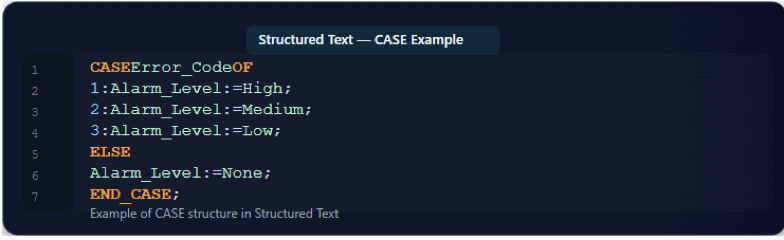
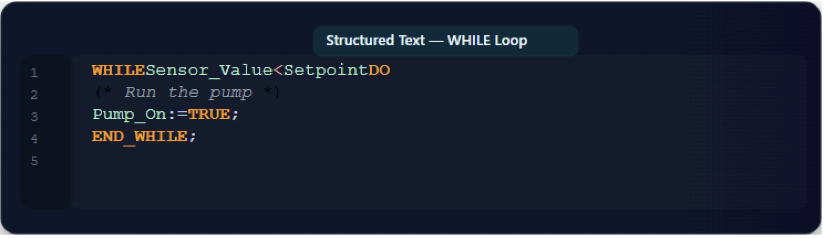
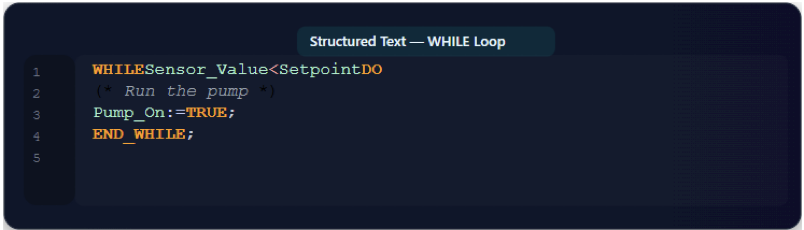
      ST provides advanced programming constructs like FOR, WHILE and REPEAT loops, as well as CASE statements, which are very difficult or impossible to implement cleanly in Ladder Logic.

      Data handling

      ST is a natural fit for working with strings, arrays, and complex data types, making it ideal for tasks like data logging, report generation, and communication protocols.

      Disadvantages of Structured Text

      Hard to Learn

      The biggest drawback of ST is its lack of visual representation, making it less intuitive for maintenance technicians without a programming background.

      Troubleshooting a problem requires a deeper understanding of the code rather than simply looking at a visual flow.

      Debugging challenges

      While modern IDEs offer watch windows to monitor variable states, debugging ST is generally more abstract than the visual animation provided by graphical languages. 

      Higher entry barrier

      ST requires a higher level of programming knowledge to use effectively, which can increase training costs and limit the pool of available personnel.

      Poor readability for simple logic

      While excellent for complex tasks, Structured Text can be less readable and less immediately clear than Ladder Logic for simple, discrete logic sequences.

      A straightforward interlocking circuit is much more intuitive when represented graphically.

      What Language to Use?

      The choice between Ladder Logic, Function Block Diagram, and Structured Text is not a matter of one being inherently superior, but rather of selecting the right tool for the specific application and environment.

      For simple, discrete logic and high-speed troubleshooting

      Ladder Logic is the clear winner. Its visual nature aligns with the skills of electrical and maintenance personnel, minimizing downtime when problems arise.

      For complex, continuous processes and modularity

      Function Block Diagram is the better choice. It provides a clean, modular structure for complex algorithms like PID control and makes data flow easy to follow.

      For complex math, data handling, and large projects

      Structured Text is the most powerful and efficient. It offers the flexibility and advanced control structures needed for sophisticated, algorithm-intensive applications.

      In reality, most modern industrial projects use a combination of these languages within the same PLC program.

      A common approach is to use Ladder Logic for simple I/O and discrete control, while using Function Blocks for analog control and Structured Text for complex calculations or data manipulation. 

      This blended strategy leverages the strengths of each language, creating a robust, efficient, and maintainable program that is accessible to a wider range of technical personnel.

      Conclusion

      This article reviewed three PLC programming languages, Ladder Logic, Function Block Diagram, and Structured Text. It also studied the foundation of each one, their advantages and disadvantages. 

      Finally, it showed an analysis of which language to choose between the three. So, any language of the three can be chosen depending what function, projects, or what is you are trying to achieve in your application.

      FAQ: Ladder Logic vs Function Block diagram vs Structured Text

      What are these languages—and are they officially recognized?

       Ladder logic (LD), Function Block Diagram (FBD) and Structured Text (ST) are standard PLC programming languages. Yes, they are recognized under IEC-61131-3 standard.

      What is the origin and core purpose of each?

      The LD was designed to get rid of relay-control systems due to larger numbers of relay in one system. FBD for reusable modular and ST to get high level languages advantage.

      What are the strengths of each?

      LD is simple good for those who start to learn about PLC. FBD is modular, so good for large scale project. While ST is better for complex data manipulation

      What are the challenges or limitations of each language?

      LD is not well for data manipulation, FBD may have complex layout when it comes to big program and ST as it’s high-level language, hard to learn and debug.

      Which language is best for which scenarios?

      LD simple to learn and for simple calculation, FBD for its modularity and ST for data manipulation and complex projects.

      Is it common to use multiple languages in one project?

      Yes, for example a PID controller block in many PLC as been implemented using all these languages.

      Which language should beginners learn first?

      Ladder Logic is usually the best starting point due to its intuitive visual nature and strong prevalence across PLC systems. Once you are comfortable, you can expand into FBD the ST.

      What is a PLC and how does it work?

      A PLC, which stands for Programmable Logic Controller, is an industrial computer that acts as the “brain” that processes input to obtain the desired/controlled output, such as induction motor speed and industrial robot arm position, among others. 

      The PLC works similarly to any computer, but it is just designed to work in an industrial environment.

      So, it can survive in tough conditions such as excessive heat, dust, vibration, and electrical noise. 

      In this article I share a brief history of a PLC, how a PLC is composed, how many types of PLCs there are, how many languages PLCs speak, and finally, the ways to connect a PLC to the load in a correct manner.

      The Journey of a PLC

      Relay logic is a method of electrical control that uses electromechanical relays to perform logical operations and control circuits.

      Before PLCs, industrial automation relied on relay logic systems, large panels full of relays, timers, and wiring.

      These were bulky, hard to troubleshoot, and expensive to modify whenever a production line changed.

      This was back then in the 1960s; the technology changed, and today we have the PLCs that we are talking about in this article. So, in 1968 the engineers came up with the idea of substituting these bulky relays.

      The Main Parts of a PLC

      A PLC generally contains four main sections: A power supply, an input part, a Processor (CPU/brain) part, and an output part.

      Power Supply

      The power supply is the one that gives energy to the CPU. It has a DC-DC converter that takes the normal line voltage to 24VDC to provide DC power to the rest of the connected devices. 

      Input Section

      This is where the PLC receives signals from the outside world, just like your desktop PC when you click a mouse or when you type something using your keyboard (mouse and keyboard are the inputs).

       But when it comes to a PLC input can be sensors, switches, buttons, or any device that sends information (for example, a temperature sensor or a start button).

      Processor (CPU/Brain)

      As aforementioned, the CPU is the brain of the PLC. It reads the inputs, processes them according to the program written by the user, and decides/controls what the outputs should do.

      Programming Device

      Usually it’s a normal PC; after programming using special software, the instructions are loaded to the PLC CPU memory. Then the PLC will be ready to execute these instructions to get the desired output signal.

      Output Section

      Devices such as motors, lamps, valves, or relays are located at the output section of a PLC.

      They are also known by the name of actuators. The CPU tells them when to turn ON or OFF or when to act. 

      Note that the devices connected to the input section, as well as those that are connected to the output section, are in general called the field devices.

      Types of PLC

      PLCs are mainly categorized into two types based on their hardware design: Compact (or Fixed) PLCs and Modular PLCs. 

      Although as the technology keeps growing, other classifications have emerged such as Nano/Micro/Mini PLC, safety PLCs and Soft PLCs.

      Compact (Fixed) PLC

      • All components (CPU, power supply, and I/O modules) are housed in a single unit.
      • Pros: Simple and low cost.
      • Cons: Limited expansion options.
      • Use: Small, dedicated automation tasks.

      Modular PLC

      • Components are separate: CPU, I/O modules, and power supply are installed in racks.
      • Pros: Scalable and flexible.
      • Cons: More expensive and larger.
      • Use: Medium- to large-scale automation.

      Other Classifications

      • Nano/Micro/Mini PLCs: These are small in size and have low processing power of the PLC, typically used in very small-scale operations.
      • Safety PLCs: Designed with enhanced safety features to control hazardous processes and protect personnel.
      • Soft PLCs: A general-purpose computer that runs PLC software and functions as a PLC, rather than using a dedicated hardware controller.

      Sinking and Sourcing in PLCs

      In PLCs, the terms “sinking” and “sourcing” are very important when it comes to physical connection of the PLCs with the input/output (I/O) devices.

      They describe how current flows between the PLC I/O terminals and the field devices (sensors, switches, actuators). 

      So, during sourcing, current goes from the PLC to the field device, and during sinking, current flows from the field device to the PLC.

      Please refer to the diagram shown below for more understanding of these important terminologies. 

      The difference between sink and source

      Introduction to PLC Programming Languages

      For the PLC brain (CPU) to do its job, it needs to be programmed with some instructions (Programming language). A PLC brain understands/talks the following languages.

      Ladder Diagram (LD)

      This is a graphical language equivalent to traditional electrical relay logic diagrams. It uses contacts as inputs, such as switches, sensors, and coils, and outputs, such as motors and lamps, to represent logical operations.

      Function Block Diagram (FBD)

      This is also a graphical language that uses predefined function blocks to represent logical functions.

      The blocks can be fully functioning components such as timers, counters, and PID controllers, among other components. 

      Structured Text (ST)

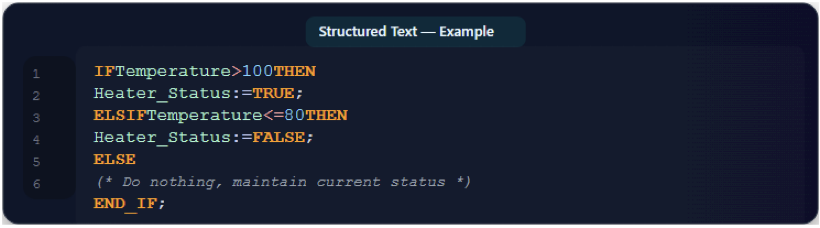
      This language has the ability to use the standard low-level programming instructions like IF-THEN-ELSE, FOR loops, and WHILE loops.

      Instruction List (IL)

      This also has low-level capability, but it’s a text-based, assembly-like language that uses instructions like LD for load and AND for logical AND.

      Sequential Function Chart (SFC)

      A graphical language used to organize and structure a PLC program into a sequence of steps, transitions, and actions. 

      Main PLC Brands

      There are brands like Delta and Noark that are good choices if you have a small project.

      But the main brands of PLCs include Siemens, Rockwell Automation (Allen-Bradley), Schneider Electric, Mitsubishi Electric, Omron, and ABB. 

      These companies are known for offering innovative, reliable, and extensive ranges of products for industrial automation, though specific brand choice depends on application needs, budget, and industry focus. 

      Key Takeaways: What is the PLC?

      This article addressed a brief history of a PLC, how a PLC is composed, and types of PLCs.

      Furthermore, it discussed how many languages PLCs speak and finally the ways to connect a PLC to the load in a correct manner.

      As a result, it can be proved that PLC is indeed the brain of industrial automation. Furthermore, understanding concepts like sinking and sourcing also helps to ensure proper and safe connections between the PLC and field devices, as well as the field personnel/operator. 

      If you’re just starting out, remember: learning PLCs is a step-by-step journey, but mastering them opens the door to countless opportunities in automation and control.

      Want to keep learning more about the PLCs? Please do not hesitate to read our next article for more beginner-friendly guides.

      FAQ: What is a PLC?

      What is a PLC and how does it work?

      A PLC, which stands for Programmable Logic Controller, is an industrial computer that acts as the “brain” that processes input to obtain the desired/controlled output, such as induction motor speed and industrial robot arm position, among others.

      Why were PLCs invented?

      Initially, industrial automation relied on banks of hard-wired relays—complex, bulky, and difficult to modify.

      PLCs were developed to replace these systems, offering flexibility through programmable logic. 

      Who invented the first PLC?

      The first PLC (Modicon-084) was created by Richard Morley in 1968, and his team at Bedford Associates. It was specifically made for General Motors.

      What are the main components of a PLC?

      A PLC generally contains four main sections: an input part, a Processor (CPU/brain) part, and the output part.It may also contain a power source, or you can just add it yourself.

      What programming languages are used in PLCs?

      PLCs are programmed using IEC 61131-3 standard languages, including:Ladder Diagram (LD): which is a graphical format resembling a relay circuit. Function Block Diagram (FBD): uses reusable logic blocks.

      Structured Text (ST): textual, high-level logic with IF/THEN/LOOP structures. Instruction List (IL): low-level, assembly-like text. Sequential Function Chart (SFC): flowchart-like steps and transitions.

      Where can I use a PLC?

      PLCs are mostly used in industries and control systems, including: Manufacturing lines, automotive assembly, packaging, and industrial robotics. Also, in building systems like elevators, traffic lights, and automatic doors.

      How do I choose the right PLC?

      This depends on your application requirements, such as the required number of inputs/outputs, Types of inputs/outputs (the latter could be either digital or analog), and the processing capability of a CPU, among other factors. 

      What are the steps to learn PLC programming?

      Start with beginner-friendly projects like switching the diode ON and OFF then proceed with traffic lights or sump pumps.

      Using vendor learning platforms such as Siemens S7-1200 or Rockwell CompactLogix is often recommended for ease of programming.

      How does a PLC read sensors?

      A PLC reads sensors through its input modules. The sensors send signals to the input modules, which convert them into digital data for the CPU (brain) to manipulate them before sending them to the output modules.

      Which of the PLC programming languages is easier to learn for PLC?

      Ladder Diagram (LD) is generally considered the easiest programming language to learn for PLCs, especially for beginners with a background in electrical circuits or relay logic.

      So, it is a graphical language equivalent to traditional electrical relay logic diagrams. 

      What Is Industrial Automation?

      Industrial automation is the use of computer‑based control systems, or sometimes even analog ones. It’s about letting machines manage themselves with minimal human intervention.
      It involves using machines, robots, and software to perform tasks that usually back then were performed by humans.

      Core Components & How It Works

      At the core of industrial automation systems are devices and technologies that monitor, control, and execute tasks, replacing or reducing the need for human intervention.

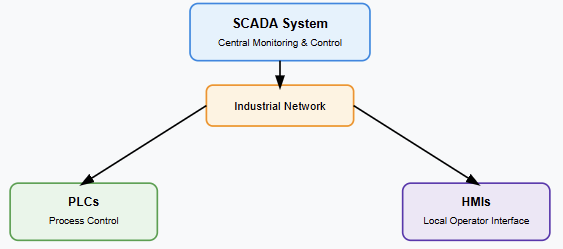
      This includes hardware like PLCs (Programmable Logic Controllers), sensors, actuators, robotic arms, HMIs (Human-Machine Interfaces), and software systems such as SCADA (Supervisory Control and Data Acquisition) and DCS (Distributed Control Systems).

      PLCs are industrial-grade computers that take input from sensors (such as temperature, pressure, or position sensors), execute programmed logic, and drive actuators (like valves, motors, or lights) accordingly.

      The control strategy can be simple—such as turning off a motor when a temperature threshold is reached—or complex, such as coordinating an entire assembly line with hundreds of input/output points.

      This is where SCADA systems or DCS platforms come in: they gather data from multiple PLCs or controllers, offer visualization dashboards, allow operators to supervise and control processes remotely, and provide historical logging for quality assurance and diagnostics.

      Another major component is CAD/CAM (Computer-Aided Design and Manufacturing), which not only designs parts but also feeds into CNC (Computer Numerical Control) machines and automation paths. This seamless integration is a hallmark of advanced automation.

      This control can be analog (e.g., pneumatic regulators, PID loops using analog signals) or digital (as in PLCs).

      The ultimate goal remains the same: orchestrate all system components to operate autonomously and precisely.

      Types of Industrial Automation

      Industrial automation isn’t one-size-fits-all. Depending on production needs, scale, and complexity, different types of automation systems are implemented. These fall into four primary categories:

      Fixed (Hard) Automation

      This type is designed for high-volume, repetitive tasks. The machinery is configured for a specific process and cannot be easily changed.

      Examples include automotive assembly lines or bottling plants. Fixed automation is known for high throughput but lacks flexibility.

      Programmable Automation

      Here, machinery can be reprogrammed to accommodate changes in product design or production sequence.

      It’s widely used in batch production, for example, in chemical or food industries. Reprogramming takes time and cost, but it offers more adaptability than fixed automation.

      Flexible (Soft) Automation

      Flexible systems, often found in CNC machining and robotic systems, can easily switch between different product types.

      The transition requires little to no downtime. This is where robots with vision systems, AGVs (Automated Guided Vehicles), and flexible manufacturing systems shine.

      Integrated Automation

      This is the future-focused approach combining all levels, from field devices to enterprise resource planning (ERP).

      It leverages digital communication, centralized control, and software platforms like MES (Manufacturing Execution Systems) and IIoT (Industrial Internet of Things).

      Integrated automation enables real-time data-driven decision-making, predictive maintenance, and seamless cross-system interaction.

      Each automation type reflects a different degree of self-management and adaptability. The more integrated and flexible the system, the closer we get to fully autonomous industrial environments.

      Benefits & Impact

      Industrial automation makes machines run themselves, reducing human involvement to the essentials.
      It enhances accuracy, efficiency, productivity, and safety while lowering operational costs.
      It will increase accuracy, efficiency, productivity, and safety, and at the same time, we reduce the operational cost for our factories.
      Automation frees workers from dangerous or monotonous tasks, enabling them to focus on higher‑value roles.

      Enabling Trends: Industry 4.0 & IIoT

      Industrial automation is being revolutionized by the Fourth Industrial Revolution, Industry 4.0, with smart devices, M2M communication, AI, and cloud integration.
      Concepts like IIoT, digital twins, machine learning, and industrial robotics make production smarter, safer, and more adaptable.

      Safety, Challenges & Future Outlook

      Using PICs and SCADA in safety‑critical environments requires robust protocols and regulatory compliance. Cybersecurity risks (e.g., PLC vulnerabilities) are significant.

      High upfront costs and complexity of integration can be barriers, yet trends like flexible and integrated automation systems lower these hurdles.

      Looking ahead, expect growth in AI-driven automation, digital twin simulations, and fully lights-out smart factories.

      FAQ: What Is Industrial Automation?

      What is an example of industrial automation?

      A classic example of industrial automation is a robotic assembly line in an automotive plant.

      Robots handle tasks like welding, painting, or assembling parts with minimal human oversight.

      These systems rely on PLCs, sensors, and actuators to perform repetitive actions with speed and precision.

      What is automation in the industry?

      Automation in the industry refers to the use of machines, software, and control systems to perform tasks that traditionally required human labor.

      This includes monitoring processes, adjusting equipment, handling materials, and even making decisions based on real-time data.

      What are the four types of industrial automation?

      The four primary types of industrial automation are:

      1. Fixed Automation – High-volume, repetitive tasks (e.g., vehicle assembly lines).
      2. Programmable Automation – Customizable control systems for batch production.
      3. Flexible Automation – Rapidly adjustable systems for varying products.
      4. Integrated Automation—Fully networked and data-driven production environments.

      Each of these represents a different approach to reducing manual labor and enhancing production flexibility.

      These systems scale from rigid to highly adaptive setups depending on the industry’s needs.

      What is a PLC in automation?

      A PLC (Programmable Logic Controller) is a rugged industrial computer used to automate processes by monitoring inputs and controlling outputs based on a custom logic program.

      They’re essential in managing repetitive tasks like turning motors on/off, adjusting valves, or reading sensor signals.

      In practical use, “the use of PLC” is one of the most fundamental tools in industrial automation.

      These controllers provide the decision-making brain of the system, ensuring operations run smoothly and according to programmed logic—even in harsh industrial environments.

      Conclusion: What Is Industrial Automation?

      Industrial automation means letting machines self-manage critical processes. It combines PLCs, robots, sensors, control systems and software to deliver safer, more accurate, efficient, and lower-cost operations.

      As IIoT, robotics and AI advance, automation will only deepen its impact across industries.

      How To Design A Gas Detection System For Boiler Rooms

      We commonly use natural gas for heating in industrial complexes; undetected gas leaks or incomplete combustion could cause an explosive hazard or an influx of carbon monoxide, resulting in loss of life, structural damage, or expensive waste of fuel.

      Why do we need a gas detection system for boiler rooms?

      The boiler room is not frequently occupied; this may lead to the leak remaining undetected.

      A continuous gas monitoring and detection system will provide early warning of a gas leak and prevent loss of life and material.

      What gases can be found in boiler rooms?

      Natural gas

      Natural gas is used in the industry for heating, and undetected leaks can be deadly. Nearly half of the natural gas is methane.

      Since natural gas is lighter than air, it will immediately rise to the ceiling or roof space of the boiler room.

      Carbon Monoxide

      Carbon monoxide is the result of the incomplete burning of hydrocarbon fuels such as wood products, natural gas, fuel oil, and coal.

      For this reason, carbon monoxide and natural gas monitoring are essential for gas detection in boiler rooms.

      Components of Boiler room gas detection system

      The boiler room’s gas detection system consists of sensors that are strategically placed to detect natural gas and carbon monoxide, with a controller that will have relays or that can connect to an external system.

      Gas sensors

      I recommend selecting catalytic bead sensors for boiler room applications. Catalytic bead sensors are less prone to false alarms than solid-state or semiconductor sensors.

      Catalytic bead sensors have a life expectancy of 3 to 5 years, sometimes even more depending on how well you take care of them and environmental factors like temperature and humidity.

      Boiler rooms are considered safe areas, i.e., you do not need explosion-proof sensors, but it is recommended to use them, and if possible, use class I Div I sensors.

      My recommendation for this would be Sensepoint XCD or E3point, both manufactured by Honeywell.

      Location of the sensors

      Natural gas is lighter than air, which means the gas will concentrate near the roof, so my recommendation would be to place at least one sensor on the roof (typically one foot from the roof), and the rest of the sensors should be located over potential leak areas.

      This includes

      • The gas burner assembly.
      • The gas train assembly.
      • The pressure boosters (if boosted).
      • The gas shut-off valve.
      • The combustion air intake.
      • The gas meter.

      Depending on the size of the boiler room, the rule of thumb is to install one sensor for each 25 feet of radius.

      The controller

      It is recommended to have at least one controller in the boiler room; as its name suggests, the controller will be the main brain of the gas detection system. You can set it up to shut down the valves, activate relays, or activate the horn and strobe.

      Here are my recommendations when it comes to selecting a controller for the boiler room gas detection system.

      Location of the controller

      I recommend having a controller outside the boiler room so that people can see what is going on in the boiler room before they enter it.

      Compatible with the sensors

      I have seen people buy sensors from one manufacturer and the controller from a different one, or the same manufacturer, but they are incompatible.

      Make sure the sensors you have can communicate with the controller; if you have 4-20 mA sensors, you need a controller that can take 4-20 mA input; if the sensors are Modbus, make sure the controller can accept Modbus inputs.

      The controller must have relays

      Depending on what you want to do, you may need a controller with relays; this can be to shut down a control valve, start or stop a fan, process, etc.

      Power Supply

      Most controllers run on 24 VDC; make sure that you have the power supply that can help the sensors and the controller.

      Visible Display

      I recommend a controller that has a visible display so that people can be able to see the reading in real-time.

      Integration Options

      Depending on whether the boiler room gas detection system is stand-alone or is integrated with a larger system.

      If you are going to connect it to a building management system (BMS), you probably need a controller that has BACnet (Building Automation Control Network) protocol as an output.

      FAQ: Gas Detection System For Boiler Rooms

      What detector do you need for a boiler room?

      You need two types of detectors for carbon monoxide and flammable gases (LEL).

      How many sensors do I need for a boiler room?

      It depends on how many potential leaks there are; I recommend one per potential leak. Make sure the sensors are placed near the potential leak.

      Is a carbon monoxide detector required in a boiler room?

      Each boiler room containing one or more boilers from which carbon monoxide can be produced shall be equipped with a carbon monoxide detector with a manual reset.

      Key takeaways: Gas Detection System For Boiler Rooms

      Most industries, including boiler rooms, use natural gas for heating; this poses the danger of explosion due to the natural gas leak, or the unburned gases can turn into carbon monoxide.

      To design a gas detection system for boiler rooms, you need to consider sensors that will detect methane (LEL sensors) and carbon monoxide.

      I recommend using electrochemical sensors because they have an expected life of 3 to 5 years and produce fewer false alarms.

      You need to place the sensors near the position where there is more possibility of a leak and the controller outside the boiler room where it is visible so that people can see the reading before they enter the boiler room.

      Bimetallic Strip – Everything You Need To Know

      Bimetallic strips are an ingenious invention that harnesses the different expansion rates of two metals to perform a variety of tasks.

      At its core, a bimetallic strip is made by bonding two strips of different metals together. These metals expand at different rates when heated, causing the strip to bend.

      This simple principle has given rise to numerous practical applications.

      The history of bimetallic strips

      The story of bimetallic strips begins with John Harrison, an 18th-century clockmaker who revolutionized timekeeping.

      By using bimetallic strips in his marine chronometers, Harrison was able to correct the timekeeping errors caused by temperature fluctuations, which was a game-changer for navigation at sea.

      Fast forward to today, and bimetallic strips are everywhere. You’ll find them in thermostats, where they help control heating and cooling systems, and in electrical devices, acting as a safeguard against overheating.

      In industrial settings, they’re crucial for various sensors and automatic controls, ensuring machines operate smoothly and safely.

      The choice of metals is crucial—typically, a high-expansion metal like brass or copper is paired with a low-expansion metal like steel.

      This combination creates the desired thermal sensitivity, making the strip bend predictably in response to temperature changes.

      In essence, bimetallic strips are a brilliant blend of materials science and thermal engineering.

      Their straightforward design and reliable performance make them a cornerstone in both everyday gadgets and sophisticated industrial systems.

      What Is A Bimetallic Strip?

      A bimetallic strip is a fascinating little device composed of two different types of metals bonded together.

      These metals have different coefficients of thermal expansion, meaning they expand and contract at different rates when exposed to temperature changes.

      When the temperature changes, one metal expands or contracts more than the other, causing the strip to bend or curve.

      This bending action can be used to measure temperature changes or to act as a switch in various applications.

      You’ll often find bimetallic strips in thermostats, where they help control heating and cooling systems by responding to temperature changes.

      They’re also used in electrical devices as thermal protectors, shutting down circuits when things get too hot.

      In industrial settings, they’re crucial components of sensors and control systems, ensuring safe and efficient operation.

      In essence, a bimetallic strip is a simple yet incredibly effective way to harness the physical properties of metals for practical applications.

      Who Invented The Bimetallic Strip?

      The bimetallic strip was invented by John Harrison, an English clockmaker, in the mid-18th century.

      Harrison developed the bimetallic strip for his third marine chronometer (H3) in 1759 to compensate for temperature-induced changes in the balance spring.

      This invention significantly improved the accuracy of timekeeping, which was crucial for navigation at sea.

      How Does a Bimetallic Strip Work?

      A bimetallic strip operates on a simple yet effective principle that leverages the differing thermal expansion rates of two metals.

      Here’s a detailed explanation of how it works:

      Composition

      A bimetallic strip is made by bonding two thin strips of different metals together. These metals are chosen because they have distinct coefficients of thermal expansion, meaning they expand and contract at different rates when exposed to temperature changes.

      Thermal Expansion

      When the temperature changes, each metal expands or contracts by a different amount. If the temperature increases, the metal with the higher coefficient of thermal expansion (let’s call it Metal A) will expand more than the metal with the lower coefficient (Metal B). Conversely, if the temperature decreases, Metal A will contract more than Metal B.

      Bending Action

      Because Metal A and Metal B are bonded together and can’t move independently, this difference in expansion rates causes the bimetallic strip to bend. When heated, the strip bends towards the metal with the lower coefficient of thermal expansion (Metal B). When cooled, it bends towards the metal with a higher coefficient of thermal expansion (Metal A).

      What is a Bimetallic Strip Used For?

      Bimetallic strips are incredibly versatile and find application in a wide range of fields due to their ability to convert temperature changes into mechanical movement. Here are some of the primary uses:

      Thermostats

      One of the most common applications of bimetallic strips is in thermostats. In these devices, the strip bends in response to temperature changes, either closing or opening an electrical circuit.

      This action regulates heating and cooling systems in homes, appliances, and industrial equipment, maintaining a desired temperature.

      Thermal Switches

      In electrical devices, bimetallic strips serve as thermal protectors. When a device overheats, the strip bends, breaking the circuit and preventing further heating. This helps in avoiding damage to the device or potential fire hazards.

      Thermometers

      Bimetallic strips are used in dial thermometers, where the bending of the strip is converted into a rotary motion that moves a needle across a scale to indicate temperature. These thermometers are simple, durable, and do not require batteries or external power.

      Industrial Controls

      In industrial settings, bimetallic strips are integral to various sensors and control systems. They help in monitoring and regulating the temperature of machinery and processes, ensuring operational safety and efficiency.

      Clocks and Chronometers

      The invention of bimetallic strip was invented by John Harrison primarily for use in marine chronometers to compensate for temperature-induced errors in timekeeping.

      This application is still relevant in precision instruments where temperature stability is crucial.

      Fire Alarms

      Some fire alarms use bimetallic strips to detect heat. When a certain temperature is reached, the strip bends and triggers the alarm, alerting occupants to the presence of a fire.

      Automotive Applications

      Bimetallic strips are used in various automotive components, such as temperature sensors for engine management systems, where they help maintain optimal performance and prevent overheating.

      Household Appliances

      Common household appliances like irons, ovens, and toasters use bimetallic strips to regulate temperature.

      The strip ensures the appliance maintains a consistent temperature, preventing overheating and ensuring safety.

      Electrical Overcurrent Protection

      In circuit breakers, bimetallic strips are used to detect overcurrent conditions. When excessive current flows through the circuit, the strip heats up, bends, and trips the breaker, cutting off the electrical supply to prevent damage.

      What Happens When A Bimetallic Strip Is Heated?

      When a bimetallic strip is heated, an interesting process occurs due to the different thermal expansion rates of the two metals bonded together. Here’s what happens:

      Differential Expansion

      Each metal in the strip has a different coefficient of thermal expansion, meaning it expands at different rates when subjected to heat.

      Typically, one metal (let’s call it Metal A) has a higher coefficient of expansion than the other metal (Metal B).

      Bending or Curving

      As the bimetallic strip is heated, Metal A expands more than Metal B. Since these two metals are rigidly bonded, the difference in expansion rates causes the strip to bend or curve. The strip bends towards the metal with the lower coefficient of thermal expansion (Metal B).

      Mechanical Movement

      The bending of the strip can be harnessed to perform mechanical work. For example, in a thermostat, the bending action of the strip can open or close an electrical contact, thereby turning heating or cooling systems on or off.

      Thermal Sensitivity

      The degree of bending is proportional to the temperature change. This property allows the bimetallic strip to be used as a precise temperature-sensitive device in various applications.

      Which Is The Principle On Which The Bimetallic Strip Works?

      The bimetallic strip operates on the principle of differential thermal expansion. When two metals with different coefficients of thermal expansion are bonded together and subjected to temperature changes, they expand or contract at different rates.

      This difference in expansion causes the strip to bend or curve, as one metal expands or contracts more than the other.

      This bending motion, which is directly proportional to the temperature change, is harnessed for various practical applications such as temperature measurement and control, acting as a switch in devices like thermostats and thermal protectors.

      What Is The Principle Of Bimetallic Expansion?

      The principle of bimetallic expansion is based on the concept that different metals expand at different rates when exposed to temperature changes.

      When two metals with distinct coefficients of thermal expansion are bonded together into a strip, any temperature change will cause them to expand or contract at different rates.

      This differential expansion leads to the bending or curving of the strip because one metal elongates more than the other.

      This bending action is utilized in various practical applications, such as in thermostats, thermal switches, and temperature gauges, to measure and respond to temperature changes efficiently.

      Which Metal Expands More In A Bimetallic Strip?

      In a bimetallic strip, the metal that expands more when heated is the one with the higher coefficient of thermal expansion.

      Common examples of such metals include brass and copper, which typically expand more than metals like steel or Invar.

      The difference in expansion rates between the two metals is what causes the bimetallic strip to bend or curve when subjected to temperature changes.

      Conclusion

      Bimetallic strips exemplify the elegant synergy between materials science and thermal engineering.

      By leveraging the differing expansion rates of two bonded metals, these strips convert temperature changes into mechanical movement.

      This principle of differential thermal expansion has led to numerous practical applications, ranging from household thermostats and appliances to industrial controls and precision instruments.

      Bimetallic strips are fundamental components in many devices, ensuring reliable temperature measurement and control.

      Their simplicity, reliability, and effectiveness make them a cornerstone of modern technology, continuing to play a vital role in our everyday lives and various industries.