The demand for cleaner energy continues to grow. Renewable sources such as solar, wind, hydro, and geothermal power are the solution. However, these advanced systems cannot run independently.
They need a reliable control. This is where Programmable Logic Controllers (PLCs) play a vital role.
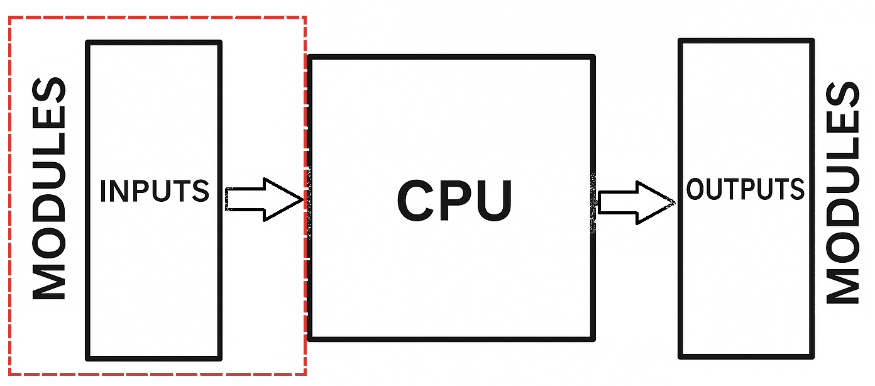
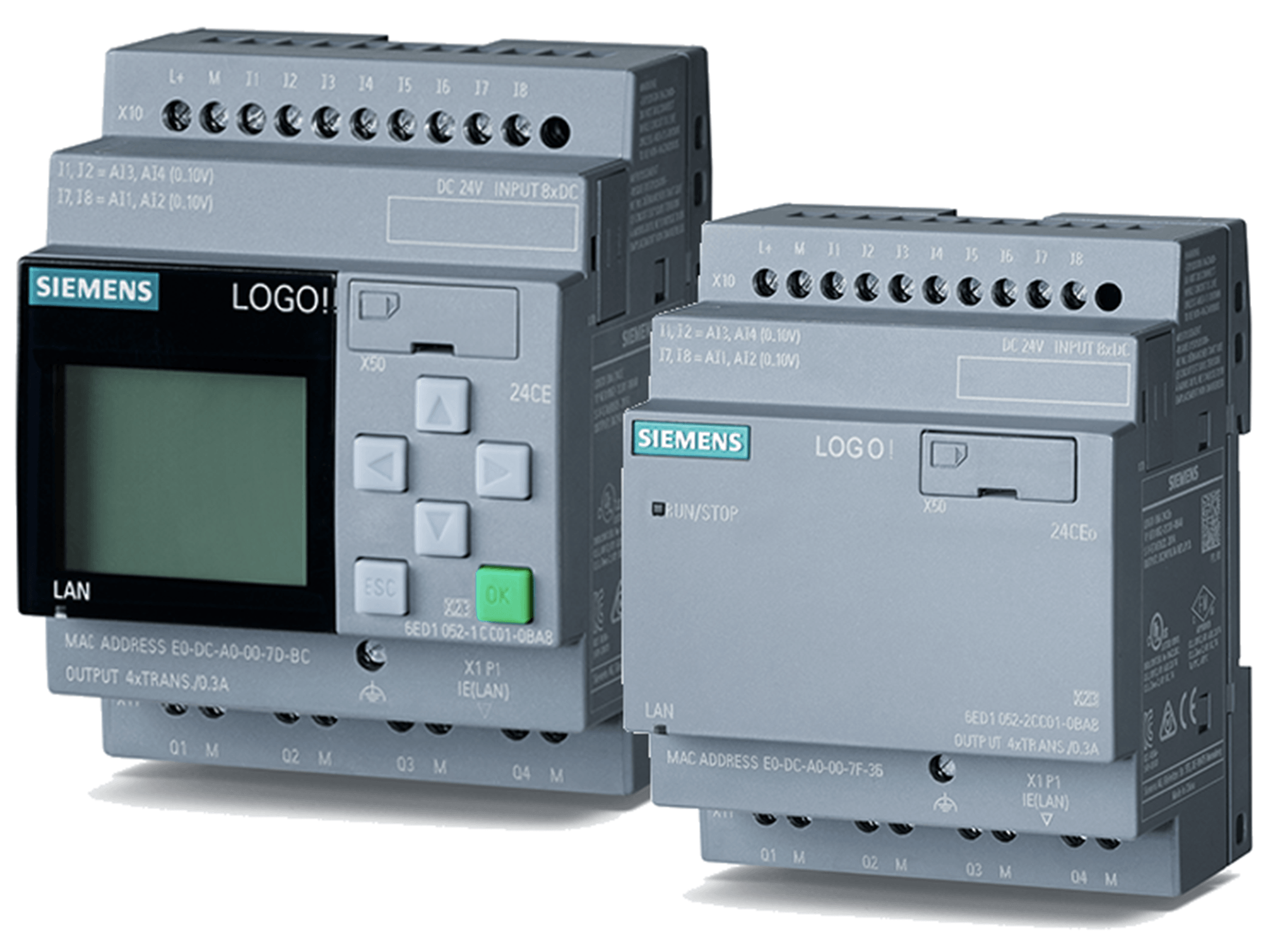
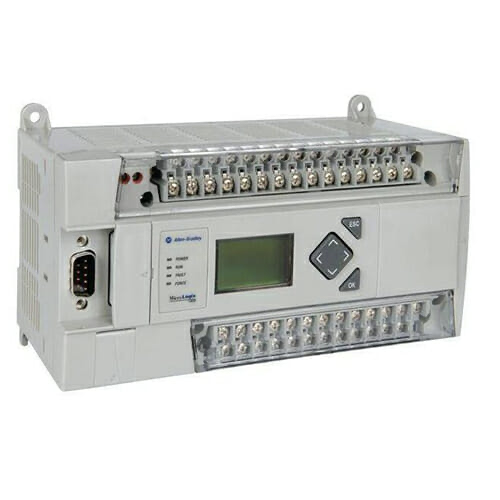
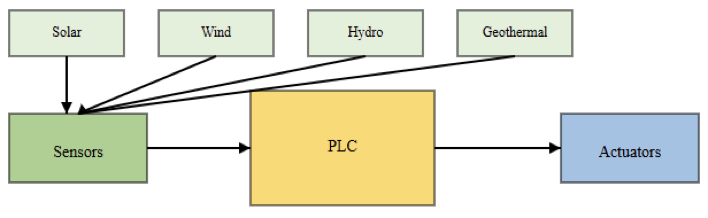
PLCs act as the brain to any automation systems, including renewable energy facilities as shown below (figure).
They control and regulate operations with accuracy. This automation improves both efficiency and dependability in renewable generation.
PLCs in Renewable Energy
This article examines how PLCs support different renewable energy sectors. It discusses applications in solar, wind, hydro, and geothermal power. It also considers how these technologies may evolve in the future.

PLCs in Solar Energy
Solar energy is one of the main renewable sources. It is naturally inconsistent and variable.
PLCs are crucial in stabilizing and optimizing solar power systems. They help solar farms reach maximum performance.
A key use is in solar tracking this is because the sun moves during the day, panels must adjust to its position.
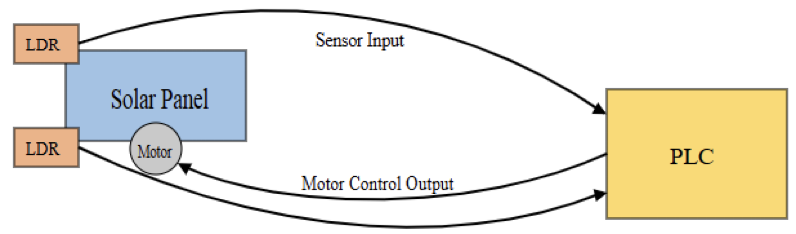
This ensures they capture the most sunlight possible. Light-dependent resistors (LDRs) identify the location of the sun and send signals to the PLC.
The PLC then directs a motor to reposition the panel. This forms a straightforward yet highly effective control mechanism, as illustrated in the figure below.
As we know that the solar plants consist of multiple panels and inverters, not just one unit.
Networks of PLCs coordinate these devices. Typically, a master PLC supervises several subordinate PLCs.
The subordinate units manage local equipment, while the master coordinates the plant as a whole. This distributed setup guarantees reliable, expandable operations.
Furthermore, PLCs regulate the grid interface. They control inverters, chargers, and other devices.
Their function ensures energy is supplied to the grid efficiently and safely. Another important task is Maximum Power Point Tracking (MPPT).
This algorithm continually adjusts conditions to maximize electricity output, boosting production.
In addition to generation, PLCs enhance safety and maintenance. They gather data from various sensors that measure temperature and solar radiation.
They also detect malfunctions. If an issue occurs, the PLC activates alarms, minimizing downtime and protecting equipment. The recorded data further supports long-term performance analysis.

PLCs in Wind Energy
Wind power systems are highly complex. They must perform reliably under constantly changing and sometimes harsh conditions. Wind direction and speed shift continuously.
But PLCs provide the advanced control necessary for stable, safe, and efficient operation (see the figure below).


One of their main applications is blade pitch control. The PLC modifies the angle of turbine blades based on wind speed.
For instance, at low speeds, it optimizes the angle to collect more energy. At high speeds, it adjusts the blades to prevent excess rotation. This phenomenon avoids over-speeding and safeguards the turbine.
Yaw control is another critical function not to forget. The PLC turns the nacelle so the blades face the wind.
Wind vanes supply real-time directional information. The PLC uses this data to align the turbine correctly, ensuring maximum output while minimizing structural stress.
Safety is also heavily supported by PLCs. They activate braking systems when conditions are dangerous, such as during extreme winds.
They monitor vibrations and overspeed conditions. If a hazard is detected, the PLC can safely shut down the turbine.
As with solar farms, wind farms use centralized management. Networks of PLCs communicate through industrial communication standards.
Supervisory Control and Data Acquisition (SCADA) platforms allow remote observation.
This enables operators to troubleshoot from a central station, a feature particularly valuable for offshore wind farms located far from land.
PLCs in Hydroelectric Energy
Hydropower plants exploit the kinetic energy of flowing water to produce electricity. Their operation demands careful coordination, and that is why PLCs automate and regulate these systems.
They control various processes, such as opening and closing gates and valves to adjust water flow into turbines. Level sensors monitor reservoir conditions to ensure optimal operation (see the figure below).

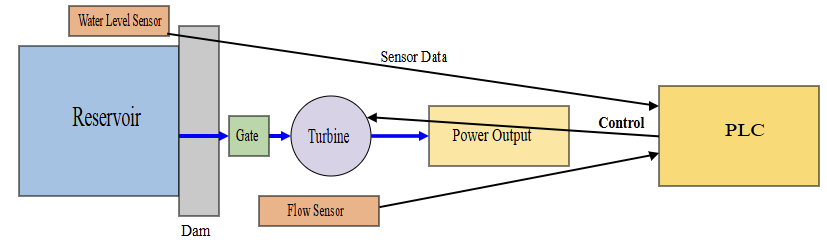
Precise turbine speed and load regulation is essential. PLCs employ control strategies like Proportional-Integral-Derivative (PID) algorithms to stabilize turbine speed, maintaining steady output even under varying loads (disturbances).
Because many hydro plants are situated in isolated areas, remote control is crucial. PLCs link to SCADA systems, enabling operators to monitor and control equipment without always being physically present.
This decreases the need for on-site staff while ensuring continuous oversight.
PLCs in Geothermal Energy
Geothermal power plants harness the internal heat of the earth. They use underground hot water to generate steam, which spins turbines and produces electricity. The entire process must be carefully regulated.
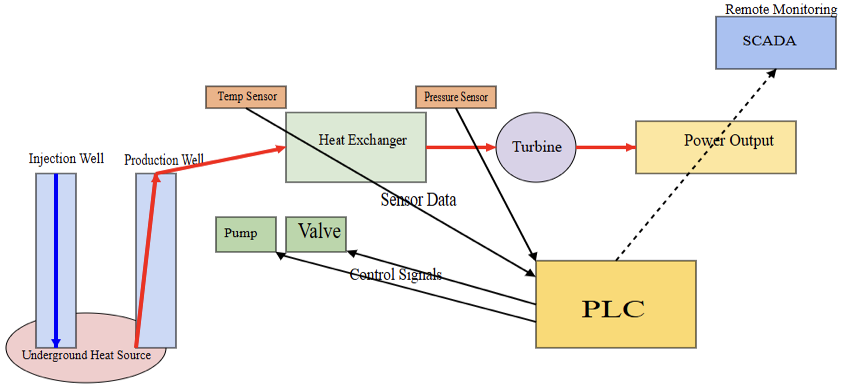
PLCs track essential conditions such as temperature and pressure. Sensors continuously feed data to the PLC, which then operates pumps and valves to maintain ideal working states.
The geothermal fluid must remain within a narrow temperature range. The PLC ensures these parameters are met, improving efficiency and preventing equipment stress or damage. Like hydro and wind plants, geothermal facilities are often in isolated regions.
PLCs integrate with SCADA systems to allow continuous, around-the-clock supervision.
Remote operation ensures the reliability of these plants without requiring constant on-site staffing as sketched below.

Advantages of PLCs in Renewable Energy
The application of PLCs provides multiple advantages in renewable systems:
Reliability and durability
PLCs are designed to endure industrial environments. They can resist extreme temperatures and vibration, which is vital for remote geothermal and wind sites. Their solid-state design makes them highly dependable.
Efficiency
With their precision and use of advanced algorithms like MPPT, PLCs maximize energy capture and minimize waste. Efficient energy output is essential for profitability.
Flexibility
PLCs are programmable, meaning their instructions can be updated or modified.
This allows upgrades, expansions, and the addition of new features without significant hardware changes.
Scalability
A single PLC can handle small systems, while networks of PLCs can manage large farms.
This modular approach makes scaling simple, whether expanding from one turbine to a full wind farm.
Safety
PLCs include protective interlocks. They can shut systems down during emergencies, shielding equipment and ensuring worker safety.
Remote management
As central components of SCADA systems, PLCs make remote monitoring and operation possible. Plants can be managed from distant locations, reducing operational costs.
Data collection
PLCs continuously log performance data. This information aids predictive maintenance, minimizing unplanned stoppages and boosting long-term reliability.
The Future of PLCs in Renewable Energy
The outlook for PLCs in renewable systems is promising. New technologies will enhance their role further.
IIoT integration
PLCs will increasingly integrate with the Industrial Internet of Things (IIoT), enabling improved connectivity, real-time data analysis, and smarter decision-making.
Cloud computing
Linking PLCs to cloud platforms will allow advanced analytics and plant-wide optimization. Operators will gain insights across entire fleets of assets.
Artificial intelligence
Combining AI and machine learning with PLCs will lead to predictive control, self-optimizing strategies, and early fault detection.
5G communication
Faster, more reliable connectivity through 5G will boost responsiveness and remote management.
Cybersecurity
Enhanced protections will safeguard these critical infrastructures from digital threats.
Energy efficiency
Next-generation PLCs will include improved algorithms for conserving energy and maximizing sustainability.
Key Takeaways: PLCs in Renewable Energy
In this article we detailed how PLCs support different renewable energy sectors. It furthermore talked about the applications of PLCs in solar, wind, hydro, and geothermal power. Finally, we considered how these technologies may evolve in the future.
From the above, we can conclude that PLCs serve as the backbone of automation in renewable energy, delivering accurate control that enhances efficiency, safety, and reliability.
Their ongoing development through integration with IIoT, AI, and cloud technologies will unlock new capabilities.
This evolution supports the global transition to clean energy while driving innovation toward a sustainable future.
FAQ: PLCs in Renewable Energy
What are the main functions of a PLCs in renewable energy systems?
Monitoring sensor inputs (e.g. wind speed, solar irradiance, temperature, water flow); Controlling actuators: motors, valves, gates, inverters, etc.; Data logging & diagnostics — detecting faults and triggering alarms; Real-time regulation / optimization (e.g. MPPT in solar, blade pitch in wind, load balancing); Integration with SCADA or centralized monitoring systems for remote operation.
Why use PLCs instead of simpler controllers or manual control?
High reliability in harsh environments; PLCs are built for industrial settings; Flexibility and scalability: modular designs, ability to add I/O, expand system functions; Efficiency gains by automating responses to changing conditions (weather, load, etc.); Safety: PLCs can implement shutdowns, over-speed protection, alarms.
What are common challenges or limitations when using PLCs in renewable energy applications?
Initial cost: high-performance, rugged PLC hardware + sensors + actuators + communication modules can be expensive; Maintenance in remote locations (difficulty of access, trained personnel); Interfacing and integration issues (compatibility with existing systems, communication standards, grid requirements); Complexity: implementing advanced control algorithms (MPPT, predictive maintenance, fault detection) requires good design and programming.
How do PLCs help with grid integration of renewables?
They help synchronize output (voltage, frequency) with grid requirements; They can manage energy storage systems, buffer variable generation, and smooth out fluctuations; Demand response capabilities: adjusting generation or load in response to grid signals.
What are some best practices when implementing PLCs in renewable energy plants?
Use redundant/backup PLCs for critical applications to improve availability; Ensure robust sensor calibration, and choose sensors suited for environmental stress (temperature, vibration, corrosion); Proper communication protocol / network structure (secure, low latency where needed); Regular firmware/software updates and having diagnostics and error logging; Planning for remote monitoring and maintenance (e.g. via SCADA).