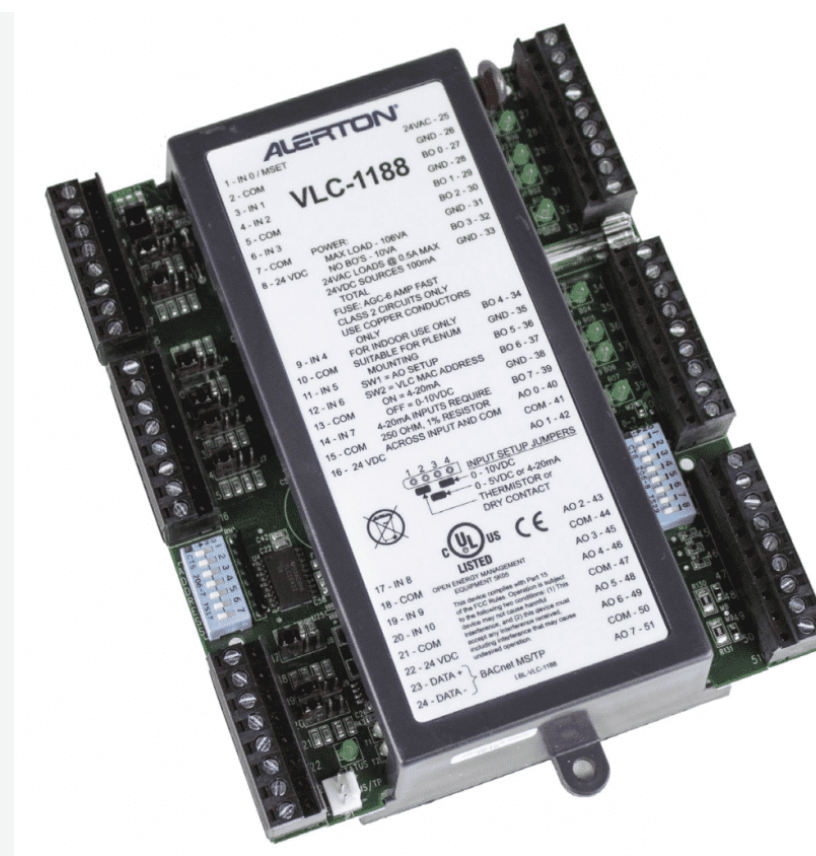
Choosing the wrong DDC controller doesn’t just cost you money. It costs you callbacks, retrofits, and a control system that can’t grow with the building it serves.
Whether you’re specifying a controller for a new air handling unit or replacing an obsolete panel in an existing BMS, the selection process comes down to a handful of technical decisions made in the right order.
This guide walks through exactly how to select a DDC controller, based on a field-tested five-step process, with two additional steps that experienced integrators rarely skip.
What Is a DDC Controller?
DDC stands for Direct Digital Control. A DDC controller is a microprocessor-based device that reads inputs from field sensors (temperature, pressure, humidity, CO₂, and status contacts) and uses programmed logic to drive outputs (valves, dampers, fans, compressors, and relays) to maintain a setpoint automatically.
Unlike older pneumatic or electromechanical control systems, a DDC controller executes its control sequences in software.
That means the logic (PID loops, staging sequences, scheduling, alarming) can be modified without rewiring the panel, and the controller can share its data over a communication network with a building automation system (BAS) or supervisory front end.
Every DDC controller generally has three functional layers:
- Input handling: converts field signals (analog, digital, or pulse) into usable data points
- Control logic: the programmed sequence of operation (PID control, staging, interlocks, scheduling)
- Output handling: drives actuators, relays, and variable frequency drives to execute the sequence
Common Applications of DDC Controllers
DDC controllers are the backbone of modern building automation and process control. Typical applications include the following.
HVAC equipment control
Air handling units (AHUs), rooftop units (RTUs), variable air volume (VAV) boxes, fan coil units, chillers, and boilers.
Central plant optimization
Chilled water and hot water plant sequencing, pump staging, and condenser water reset.
Lighting control
Occupancy-based and schedule-based lighting integrated with HVAC.
Energy management
Demand-controlled ventilation, economizer control, and load shedding.
Industrial and process applications
Smaller-scale process skids, utility monitoring, and building-adjacent industrial systems where full PLC control isn’t warranted
If the application involves maintaining an environmental setpoint through sensors and actuators tied into a larger automation network, a DDC controller is almost always part of the answer.
How to Select a DDC Controller: 7 Steps
Step 1: Understand the Application
Before opening a catalog, define what the controller actually needs to do. Is it controlling a single-zone VAV box, or is it the primary controller for a central chiller plant?
The application dictates everything downstream. Point count, processing power, and whether you need a unitary controller or a programmable general-purpose controller.
Ask
- What equipment is being controlled?
- Is this a standalone application or part of a larger sequence of operation?
- Does the controller need to run standalone control loops if it loses network communication?
Step 2: Determine the Number of Inputs Required (Digital and Analog)
Count every input point the sequence of operation requires and then add spare capacity. Inputs generally fall into two categories.
- Analog inputs (AI): temperature sensors, pressure transducers, humidity sensors, CO₂ sensors
- Digital inputs (DI): status contacts, dry contacts, proof-of-flow switches, alarm contacts.
Undersizing the input count is one of the most common and expensive selection mistakes, because it forces either a second controller or a field retrofit once the sequence of operation is finalized.
Step 3: Determine the Number of Outputs Required
This step is closely tied to Step 2 but deserves its own line item. Count the analog outputs (AO) needed to modulate valves, dampers, and VFD speed signals, and the digital/relay outputs (DO) needed to start and stop fans, pumps, and compressors.
Match output type to the actuator. A controller with only relay outputs can’t drive a modulating damper actuator that expects a 0–10V signal.
Step 4: Check Signal Type
Once point counts are confirmed, verify the controller supports the exact signal types the sequence requires:
- Analog: 4–20 mA, 0–10 VDC, 0–5 VDC, thermistor (10K Type II/III), RTD.
- Digital: dry contact, 24VAC/VDC status, pulse counting.
Mismatched signal types are a common source of field commissioning delays. A controller rated for 0–10V inputs won’t natively read a 4–20 mA transmitter without an added resistor or a controller with configurable input types.
Step 5: Check Communication Protocol
The controller has to speak the same language as the rest of the automation network. Common options include:
- BACnet MS/TP: the standard for unitary/terminal controllers on a low-speed RS-485 trunk.
- BACnet/IP: used for supervisory-level controllers on the Ethernet/IP backbone.
- Modbus RTU: common on mechanical equipment (chillers, VFDs, meters) as a serial protocol
- Modbus TCP/IP: the Ethernet variant of Modbus, common on newer equipment and meters
- Proprietary protocols: some manufacturers still use closed protocols; avoid these unless you’re locked into a single-vendor system by design
Confirm not just the protocol, but the specific implementation. A BACnet MS/TP device still needs its Protocol Implementation Conformance Statement (PIC Statement) checked against what the front end expects.
Step 6: Consider Expansion
A controller sized exactly to today’s point count leaves no room for tomorrow’s addition. Look for:
- Expansion modules or add-on I/O boards for the same platform.
- Spare point capacity (a common rule of thumb is 10–20% spare I/O).
- Compatibility with future protocol requirements, in case the owner’s standard changes.
Expansion planning is cheap during design and expensive during a retrofit.
Step 7: Evaluate Power Requirements, Environment, and Mounting
Two controllers with identical I/O and protocol support can still be the wrong pick if the physical installation doesn’t match. Verify the following.
- Power supply: 24VAC, 24VDC, or line voltage, and whether the controller needs a dedicated transformer
- Environmental rating: mechanical rooms, rooftop enclosures, and outdoor locations may require a NEMA-rated enclosure or an extended temperature range controller
- Mounting format: DIN rail, panel mount, or plenum-rated enclosure, depending on where it will live
- Programming tool compatibility: confirm you (or the owner’s service contractor) already have access to the manufacturer’s programming software, since some platforms require paid licensing per seat
Step 8: Confirm Vendor Support and Lifecycle
The best-specified controller is a liability if the manufacturer discontinues the platform or if local technical support and firmware updates are unreliable.
Before finalizing the selection, check the manufacturer’s typical product lifecycle, local distributor support, and whether replacement parts and firmware are easy to source in your region.
DDC Controller Selection Checklist
| Step | What to Confirm |
|---|---|
| 1. Application | Equipment type, sequence of operation, standalone vs. networked |
| 2. Inputs | Total AI/DI count, plus spares |
| 3. Outputs | Total AO/DO count, plus spares |
| 4. Signal type | 4–20 mA, 0–10 V, dry contact, thermistor, RTD, etc. |
| 5. Communication | BACnet MS/TP, BACnet/IP, Modbus RTU, Modbus TCP/IP |
| 6. Expansion | Add-on I/O modules, spare capacity, future protocol needs |
| 7. Power/environment | Voltage, enclosure rating, mounting format |
| 8. Vendor support | Product lifecycle, local support, firmware access |
FAQ
What is the difference between a DDC controller and a PLC?
A DDC controller is purpose-built for building automation sequences, HVAC control loops, scheduling, and alarming and typically ships with pre-engineered application logic or a simplified programming environment.
A PLC (Programmable Logic Controller) is a general-purpose industrial controller, more rugged and flexible, but usually requires ladder logic or structured text programming and lacks native building automation protocol support out of the box.
Can a DDC controller work without a network connection?
Yes. Most DDC controllers are designed to run their local control loops in standalone mode even if communication with the BAS front end is lost.
Only supervisory functions like scheduling overrides or trend logging from a central server are affected.
How many spare inputs and outputs should I include?
A common industry practice is to size for 10–20% spare I/O capacity beyond the current sequence of operation to accommodate minor scope changes without requiring a different controller.
Is BACnet or Modbus better for a DDC controller?
Neither protocol is universally “better.” The choice depends on what the rest of the system uses.
BACnet is the dominant open standard for building automation, while Modbus is common on mechanical equipment like chillers and VFDs. Many DDC controllers support both, or the integration is handled through a gateway.
Do I need a programmable controller or a unitary controller?
Unitary (application-specific) controllers come with pre-loaded sequences for common equipment like VAV boxes or fan coils and are faster to commission but less flexible.
Programmable general-purpose controllers take more engineering time upfront but can be adapted to nonstandard sequences of operation.
What happens if I undersize the point count on a DDC controller?
You’ll either need to add a second controller to cover the overflow points or replace the unit entirely, both of which typically cost more in labor and downtime than specifying adequate spare capacity from the start.
