What is a Sensor?

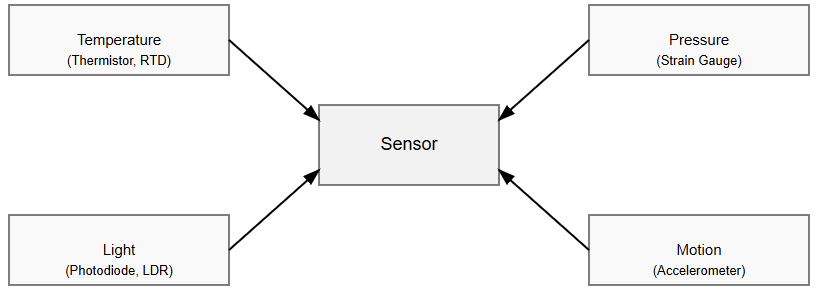
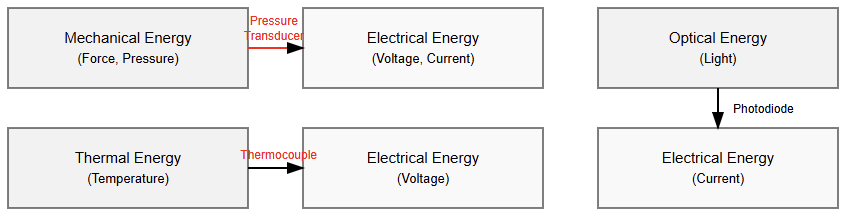
A sensor is a device that detects changes in its surroundings. It measures things like temperature, pressure, motion, or light. Then, it converts what it senses into an electrical signal that machines can understand.

Sensors act as the eyes, ears, and skin of modern technology. They help machines interact with the physical world. From your smartphone to a factory robot, sensors make intelligent actions possible.

Sensors are everywhere in modern life, from smartphones to cars. They act as a bridge between the physical and digital worlds. They play a critical role in robotics, medicine, transportation, and smart homes.

This article details what a sensor is, how it works, its types, applications, characteristics, challenges and future trends.

Sensors: Working Principle

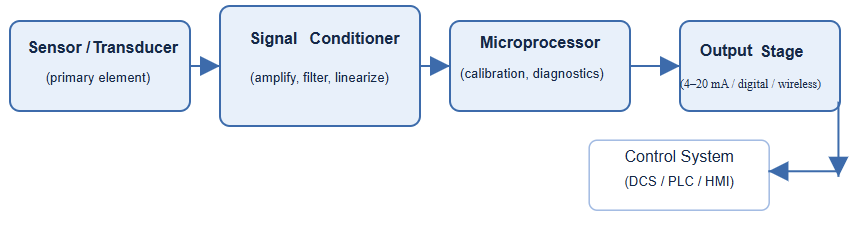
A sensor works by detecting a physical quantity and turning it into a readable signal. This could be heat, pressure, movement, or light. Every sensor has three main parts.

The first is the sensing element (receptor), which reacts to the environment. The second is the signal conditioning circuit, which amplifies or filters the signal. The third is the output, which sends the information to a controller or display.

For example, a temperature sensor uses materials that change resistance when heated. This change is converted into a voltage. The voltage then represents a specific temperature value.

A pressure sensor might use a flexible membrane that bends when pressure is applied. The bending changes its electrical characteristics, producing a measurable output. Many modern sensors include microcontrollers.

These chips clean up the signal, convert it to digital form, and transmit it. Some sensors even communicate through wireless links such as Bluetooth or Wi-Fi.

What is a Sensor?

Types of Sensors

Sensors vary widely and are categorized in different ways. One classification is based on power needs. Active sensors require external power to operate. They emit a signal and measure the response. Passive sensors function without external power. 

They detect existing environmental signals like heat or light. Sensors can also be grouped by what they measure. Common types include:

Temperature Sensors

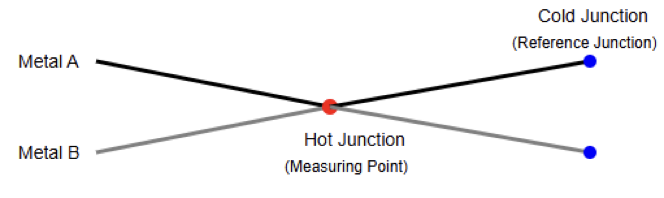
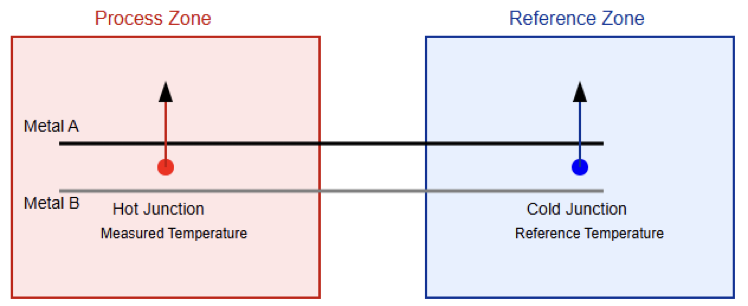
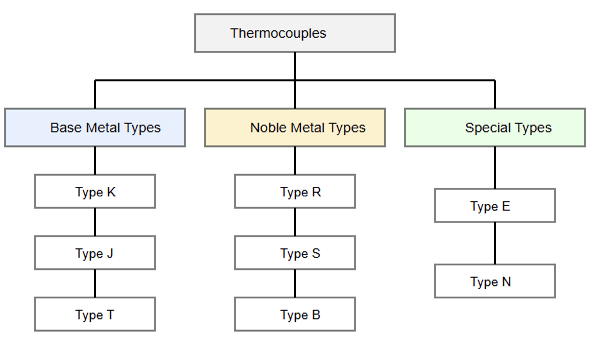
These measure heat. Examples include thermistors, RTDs, and thermocouples. They are used in ovens, air conditioners, and car engines.

Example: In cars, a temperature sensor ensures the engine does not overheat by sending data to the cooling system.

Pressure Sensors

These detect the force exerted by liquids or gases. They are found in hydraulic systems, weather stations, and aircraft.

Example: In airplanes, pressure sensors measure altitude and cabin air pressure to keep passengers safe.

Proximity Sensors

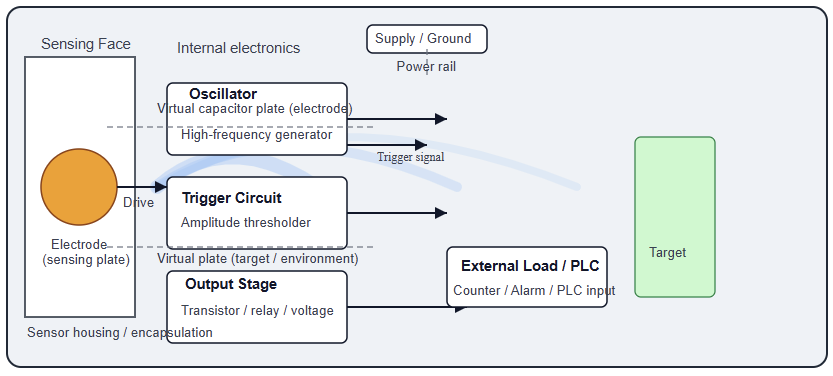
They detect nearby objects without touching them. They are used in smartphones, elevators, and automatic doors.

Example: When you approach a supermarket door, a proximity sensor triggers it to open automatically.

Light Sensors

These sense brightness or color. They are found in streetlights, cameras, and phones.

Example: Your phone uses a light sensor to adjust screen brightness for better visibility.

Motion and Vibration Sensors

They detect movement or acceleration. Accelerometers and gyroscopes are common examples.

Example: In a smartphone, motion sensors rotate the screen when you turn the device sideways.

Sound Sensors

These pick up vibrations in the air. Microphones and ultrasonic sensors belong to this group.

Example: In robotics, ultrasonic sensors measure distance by sending sound waves and listening for echoes.

Gas and Chemical Sensors

They detect the presence of gases or specific chemicals. They are critical for safety and environmental control.

Example: In homes, carbon monoxide sensors warn people of dangerous gas leaks.

Specialized sensors

For humidity, pH, magnetic fields, and radiation.
Every type helps humans and machines understand the world more precisely.

Sensor Characteristics

Not all sensors perform the same way. Each has features that define how well it works.

Sensitivity

shows how much the sensor’s output changes for a small input. A very sensitive microphone can detect faint sounds.

Accuracy

Tells how close the reading is to the true value. High-accuracy sensors are essential in medicine and aerospace.

Resolution

is the smallest change the sensor can detect. For instance, a digital scale that detects 0.01 kg has higher resolution than one that reads 0.1 kg.

Linearity

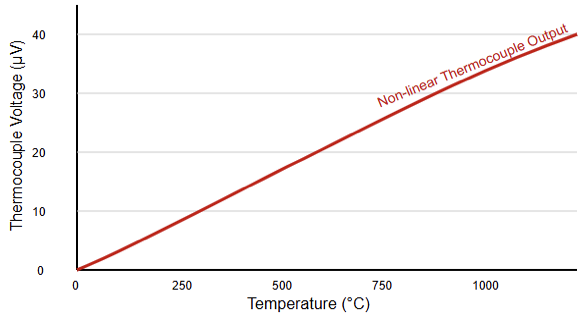
Means that the sensor’s output increases evenly with input. Non-linear sensors need correction or calibration.

Response Time

Shows how fast the sensor reacts to a change. A smoke sensor must respond within seconds to save lives.

Drift

Happens when readings change over time without any real change in input. This is why sensors need regular calibration.

Good sensors maintain accuracy, stability, and reliability under various conditions.

Applications of Sensors

Sensors appear in almost every field. They make systems efficient, safe, and intelligent.

Industrial Automation

Factories use sensors to monitor pressure, flow, and temperature. If a value goes out of range, the controller adjusts it automatically. Example, in a bottling plant, level sensors ensure each bottle fills to the same height.

Automotive Systems

Cars rely on dozens of sensors. They control fuel injection, braking, tire pressure, and airbags. Example, when you hit the brake, a wheel speed sensor checks for slip. The anti-lock brake system reacts instantly to prevent skidding.

Medical Devices

Sensors are essential in modern healthcare. They monitor heart rate, blood pressure, and oxygen levels. For example, a pulse oximeter uses light sensors to measure oxygen in a patient’s blood.

Consumer Electronics

Phones, TVs, and gaming devices all depend on sensors. They detect touch, movement, and light to improve user experience. For instance, in a smartwatch, accelerometers count steps and track sleep patterns.

Environmental Monitoring

Sensors measure air quality, humidity, and pollution levels. They help scientists track climate change. Example, weather stations use temperature and humidity sensors to predict local weather more accurately.

Smart Homes and IoT

Sensors are at the core of home automation. They turn lights on, adjust heating, and detect leaks. For instance, a smart thermostat uses temperature and motion sensors to reduce energy waste when no one is home.

Without sensors, automation and intelligent systems would not exist.

Sensor Technologies

Modern sensors are evolving rapidly. They are smaller, cheaper, and more capable than ever before.

Analog vs. Digital Sensors

Analog sensors produce continuous signals. Digital sensors produce discrete, numerical outputs. Digital sensors are less affected by noise and easier to integrate with computers.

MEMS Sensors

Microelectromechanical systems (MEMS) are tiny sensors built on silicon chips. They can detect acceleration, pressure, or sound.
Mini case study: In drones, MEMS gyroscopes and accelerometers help stabilize flight and control movement.

Wireless Sensors

Wireless sensors send data without cables. They use radio waves to communicate with a base station or cloud system.
Mini case study: Farmers use wireless soil-moisture sensors to check irrigation needs from their phones.

Smart Sensors

These sensors have built-in processors. They can filter signals, self-calibrate, and even make small decisions. This reduces the need for external controllers. As microelectronics improve, sensors continue to merge with computing and communication technologies.

Challenges in Sensor Design

Designing reliable sensors is not always easy. Many external factors affect performance. Temperature, dust, and humidity can change readings. Electrical noise can distort weak signals. Over time, materials age and calibration drifts. 

Power is another challenge, especially for portable or remote devices. Wireless sensors must work for months on small batteries.

Case study: In industrial environments, vibration sensors near large motors face high electromagnetic noise. Engineers use filters and shielding to protect the signal. Engineers solve these problems through better materials, signal processing, and maintenance. They also design fault-tolerant systems that keep running even if one sensor fails.

Future of Sensor Technology

The future of sensors is intelligent, connected and they will not only measure but also think and communicate.

AI and Smart Processing

Sensors are starting to include artificial intelligence. They can detect patterns, predict failures, and make autonomous decisions.

Case study: In factories, smart vibration sensors detect bearing wear before breakdowns occur, avoiding costly shutdowns.

Nanotechnology

Tiny sensors made from nanomaterials are extremely sensitive. They can detect single molecules or micro-changes in temperature. These are used in medicine and environmental science.

Wearable and Implantable Sensors

Health monitoring is becoming continuous and personal. Wearable sensors track heart rate and movement, while implantable ones monitor body chemistry in real time.

Edge and IoT Integration

Sensors connected to the Internet of Things share data instantly. Edge computing allows them to analyze information close to where it is collected. This makes systems faster and more efficient.

Energy Harvesting

Future sensors may power themselves from sunlight, motion, or heat. This will remove the need for frequent battery changes.

Sensors will become the nervous system of intelligent machines. They will learn, adapt, and interact with the world almost like living organisms.

Key Takeaways: What is a Sensor?

This article explained what sensor is, how it works, types, applications, characteristics, challenges and future trending. This study helped us to learn that sensors bridge the gap between the physical and digital worlds.

They allow machines to sense and respond just like humans do. Every modern system, whether in industry, healthcare, or daily life-depends on them. From measuring temperature to detecting motion, sensors make information visible. 

They guide smart systems to act safely and efficiently. As technology continues to advance, sensors will keep evolving, becoming smaller, smarter, and more connected. Understanding how sensors work helps us design better systems and imagine new possibilities for the future.

FAQ: What is a Sensor?

What is a sensor?

A sensor is a device that detects a physical quantity and converts it into an electrical signal.

How does a sensor work?

It senses a change, converts it to a signal, and sends it for processing.

What do sensors measure?

They measure temperature, pressure, light, sound, motion, and more.

What are the main types of sensors?

Analog, digital, active, passive, mechanical, and optical types.

Why are sensors important?

They connect the physical world to control systems and automation.

What’s the difference between a sensor and a transducer?

All sensors are transducers, but not all transducers are sensors.

What is sensitivity?


A sensitivity is how much the output changes for a small change in input.

Where are sensors used?

In cars, phones, factories, homes, and medical devices.

What makes a good sensor?

High accuracy, stability, fast response, and low drift.

What is a smart sensor?

A sensor with built-in processing and communication capability.

How a Pressure Transmitter Works with PLCs

In modern industrial automation, precise monitoring and control depend on the smooth communication between field devices and controllers.

One of the most important examples is the integration of a pressure transmitter with a Programmable Logic Controller (PLC).

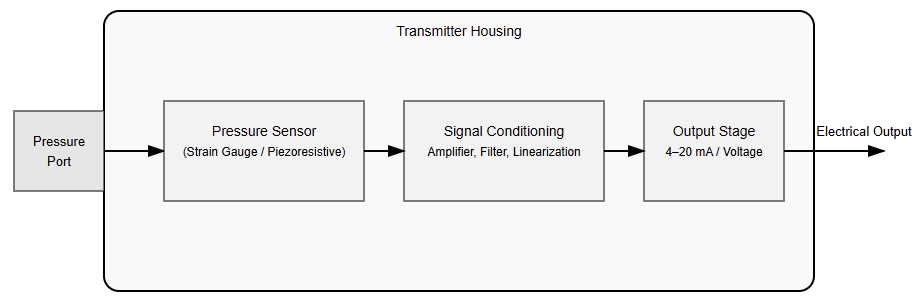
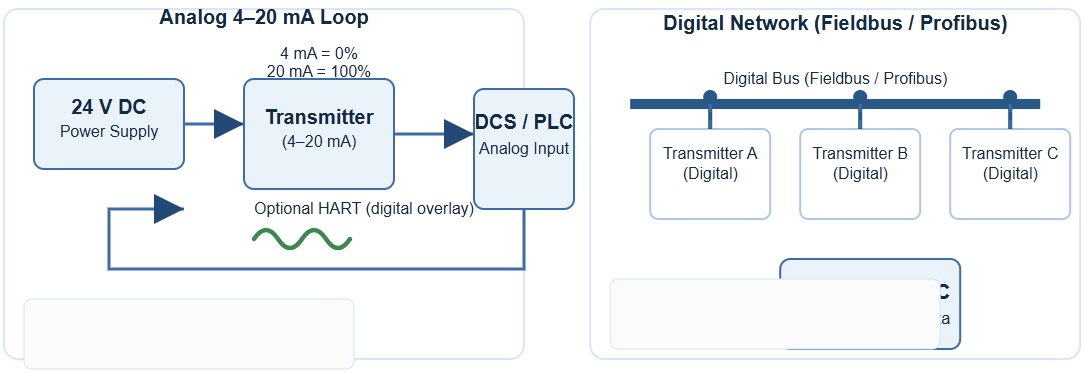
A pressure transmitter converts a physical pressure value into a standard electrical signal, usually 4–20 mA, that the PLC can interpret.

The PLC then uses this signal to make decisions, such as opening a valve, activating a pump, or triggering an alarm.

This interaction forms the foundation of automated systems in industries like manufacturing, chemical processing, oil and gas, and water treatment. The result is better efficiency, improved safety, and greater reliability.

This article details how a pressure transmitter works with a PLC, explaining the signal conversion process and integration steps.

It also introduces best practices, and common troubleshooting methods used in industrial automation.

Pressure Signal to PLC Program

The path from a process’s actual pressure to PLC decision making involves three main stages: Pressure sensing at the source, signal conversion and transmission and PLC processing and control

In the following subsections we will take a look at each step, in detail.

Pressure Sensing at the Source

The first task of a pressure transmitter is to sense the actual pressure of a fluid either gas or liquid.

Inside the transmitter, a sensing element (often a diaphragm) deflects slightly in response to changes in pressure. 

This mechanical deflection is the basis for the measurement. Different transmitters measure different pressure types:

  • Gauge Pressure: Compares pressure to the surrounding atmosphere.
  • Absolute Pressure: Compares pressure to a perfect vacuum.
  • Differential Pressure: Measures the difference between two separate pressure points, such as across a filter or tank.

Converting Pressure to Electrical Signal

Once the pressure is sensed, the transmitter’s internal electronics convert it into a standardized electrical signal.

The most widely used output is the 4–20 mA current loop. It’s preferred because current signals resist electrical noise and remain stable over long cable distances.

How the 4–20 mA Loop Works:

  • The transmitter typically operates as a 2-wire device.
  • The same two wires provide both power and signal.
  • The PLC supplies 24 V DC to power the transmitter.
  • The transmitter modulates the current between 4 mA (minimum) and 20 mA (maximum) to represent the measured pressure.
    • 4 mA = 0% of the pressure range
    • 20 mA = 100% of the pressure range
    • 12 mA = approximately 50% of the range
  • This current signal travels to the PLC’s analog input module, which measures it.

PLC Processing and Control

The PLC’s analog input module converts the received 4–20 mA signal into a digital integer value.

This raw number must be scaled into real world engineering units like bar or psi so that the control logic can use it.

Scaling the Input

    Scaling converts the raw input into readable engineering values. The general formula is:

    For example: 4 mA = 0 bar; 20 mA = 10 bar; A midrange signal (12 mA) represents about 5 bar.

    Once scaled, the PLC program uses this value for decision making.

    Executing Control Logic

      The PLC compares the scaled pressure with pre-set limits:

      • If the pressure drops below a lower limit, it may start a pump.
      • If it rises above a high limit, it can shut down equipment or trigger alarms.

      This ensures safe, automatic operation and reduces the need for manual intervention.

      Integrating the Pressure Transmitter with a PLC

      Integration requires correct hardware selection, proper wiring, and accurate software configuration.

      Step 1 – Selecting the Right Hardware

      Choose a pressure transmitter that fits the process requirements:

      • Pressure Type: Gauge, absolute, or differential
      • Range: The expected operating pressure range
      • Accuracy: Depending on process criticality
      • Material Compatibility: Must match the process fluid

      Also, ensure that the PLC’s analog input module supports the same signal type (e.g., 4–20 mA). Some modules accept voltage signals, so compatibility is important.

      Step 2 – Wiring the Components

      Before wiring, turn off all power sources and follow lockout/tagout safety procedures.

      Connecting a 2-Wire Transmitter:

      1. Connect the positive (+) terminal of the 24 V DC power supply to the positive (+) terminal of the transmitter.
      2. Connect the negative (–) terminal of the transmitter to the analog input channel of the PLC.
      3. Connect the common terminal of the analog input module back to the negative (–) terminal of the power supply.

      This completes the current loop.

      Grounding: Proper grounding is essential. It prevents electrical noise and ensures accurate signal transmission.

      Step 3 – Configuring the PLC

      Set the Input Range:

      In the PLC’s hardware configuration, define the analog input channel as 4–20 mA. This ensures the PLC interprets the signal correctly.

      Apply Scaling:

      Use scaling blocks or math functions in the PLC program to convert the raw digital input into engineering units.

      This allows operators to see the actual pressure on the HMI (Human-Machine Interface).

      Define Alarms and Logic:

      Program the PLC to take specific actions when pressure limits are reached:

      • Low-pressure alarm: Warns or starts a pump
      • High-pressure alarm: Shuts off valves or stops pumps
      • Critical limit: Activates an emergency shutdown (ESD)

      These logic steps transform raw data into actionable control.

      Best Practices and Troubleshooting

      Even well-designed systems can experience issues. Following installation best practices helps prevent problems and improves accuracy.

      Best Practices

      Avoid Electrical Noise

      Use shielded cables and route them away from power cables or variable frequency drives (VFDs).

      Stable Mounting

      Install transmitters away from vibration, heat, or direct sunlight.

      Regular Calibration

      Calibrate transmitters periodically to maintain accuracy. Calibration involves applying known pressures and adjusting the transmitter’s zero and span.

      • zero and span.

      Common Problems and Solutions

      ProblemPossible CauseSolution
      No signal (4 mA constant)No power, broken wire, or blocked sensorCheck power supply, wiring, and sensor diaphragm
      Full signal (20 mA constant)Pressure exceeds range or calibration errorVerify process pressure and recalibrate
      Erratic readingElectrical noise, loose wiring, or vibrationCheck shielding, grounding, and mounting

      Advantages of PLC-Integrated Pressure Transmitters

      Connecting pressure transmitters to PLCs brings multiple operational benefits.

      Enhanced Process Control

      Real-time data allows for precise and automated adjustments. Processes stay consistent and efficient, ensuring stable production quality.

      Increased Safety

      Continuous monitoring detects unsafe pressure levels early. PLCs can immediately shut down equipment or trigger alarms to prevent damage or accidents.

      Better Data and Analytics

      PLCs can log and trend pressure data. Engineers use this information to optimize performance, predict maintenance needs, and detect gradual system degradation.

      Reduced Costs

      Optimized operations lower energy consumption, reduce waste, and minimize downtime. Over time, these savings justify the investment in automation.

      Case Study: Tank Level Monitoring Using a Differential Pressure Transmitter

      To understand this integration in practice, consider a chemical plant where a PLC maintains the level in a storage tank using a differential pressure (DP) transmitter.

      Measurement

      The DP transmitter measures the pressure difference between the bottom and the top of the tank.

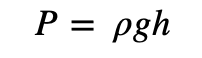
      This difference corresponds directly to the liquid height, since pressure at the base depends on fluid density and height.

      Signal Transmission

      The transmitter converts this pressure difference into a 4–20 mA signal and sends it to the PLC’s analog input.

      PLC Logic

      1. The PLC reads the 4–20 mA signal.
      2. It scales it into engineering units (for example, 0–10 meters of tank level).
      3. The ladder logic then executes the following:
        • If the tank level falls below 20%, the PLC turns on a pump to refill.
        • When the level reaches 90%, the pump turns off.
        • If the level exceeds 95%, a high-level alarm activates.

      Control Outcome

      This automation keeps the tank level within a safe and efficient range.
      It prevents overflow, reduces waste, and ensures continuous production without manual intervention.

      Key Takeaways: How a Pressure Transmitter Works with PLCs

      This article introduced how a pressure transmitter works with a PLC, by detailing the signal conversion process and integration steps.

      In addition, it studied the best practices, and common troubleshooting methods used in industrial automation.

      This leads to conclude that the pressure transmitter–PLC system is a cornerstone of industrial automation.

      It transforms physical pressure into a digital signal that drives intelligent control decisions.

      By following correct installation steps, configuring inputs properly, and maintaining calibration, engineers can create accurate, efficient, and safe control systems.

      The ability of PLCs to interpret and act on pressure data enables smarter factories, where processes are optimized, downtime is minimized, and safety is always prioritized.

      From simple tank monitoring to complex process control, the integration of pressure transmitters and PLCs continues to power the future of industrial automation.

      FAQ: How a Pressure Transmitter Works with PLCs

      What is the difference between a pressure transducer and a pressure transmitter?

      • A pressure transducer converts pressure into a small electrical signal (e.g., voltage or resistance).
      • A pressure transmitter includes signal conditioning and outputs a standardized signal (often 4–20 mA) that is easier for PLCs or other control systems to read. 

      Why is the 4–20 mA current loop standard used for transmitters?

      • The 4–20 mA loop is resistant to electrical noise over long cable distances, making it reliable in industrial environments. 
      • The current loop can both power the transmitter and carry the signal (in two-wire devices). 
      • Because the signal is current (not voltage), voltage drops in the wires don’t alter the reading. 

      How is a pressure transmitter wired to a PLC?

      • Most transmitters use two-wire wiring: the same pair carries power (often 24 V DC) and the signal (4–20 mA) to the PLC’s analog input.
      • Some transmitters are four-wire types: separate wires for power and signal.
      • In wiring, you must configure the PLC analog input module for current input and connect the loop correctly (positive end to transmitter, negative back to PLC).
      • Modules often support single-ended or differential wiring modes, affecting how you route the wires.

      How is the transmitter signal converted into meaningful pressure values in the PLC?

      • The PLC’s analog input module reads the 4–20 mA current and converts it to a raw digital count (integer).
      • Then you apply a scaling formula in the PLC logic to map raw counts to engineering units (e.g., psi, bar). 
      • For example, if your card is 14-bit (0 to 16,383 counts), the formula would subtract the counts representing 4 mA, divide by the span (counts for 4–20 mA), then multiply by the max pressure.

      What pressure types can the transmitter measure?

      • Gauge pressure (relative to ambient atmospheric pressure)
      • Absolute pressure (relative to vacuum)
      • Differential pressure (difference between two pressure points)

      Selecting the right type depends on your application (tank level, flow, sealing, etc.).

      What are common errors or issues when integrating transmitters with PLCs?

      • No output (4 mA stuck): Could be broken wiring, incorrect power supply, or a failed transmitter.
      • Max output (20 mA stuck): Could mean pressure outside range, calibration error, or internal fault.
      • Unstable or noisy readings: Often due to electrical noise, improper grounding, or poor shielding of wiring.
      • Incorrect scaling / mapping: If scaling is set wrong, the displayed pressure is incorrect. Check the formula and calibration points.

      How often should the pressure transmitter be calibrated?

      • Routine calibration is recommended to maintain accuracy over time, especially in critical processes.
      • Calibration involves applying known pressures, checking zero and span, and adjusting as needed.

      Can the transmitter be cleaned or repaired?

      • Cleaning: Yes, but with care. Use a soft cloth with alcohol or lukewarm water. Do not submerge or damage the sensor face.
      • Repair: Possible, but typically handled by specialists or manufacturers. Internal parts (strain gauges, electronics) are delicate.

      What is a span vs. range in transmitter terms?

      • The range is the lowest to highest pressure the device is specified to measure (e.g., 0–100 psi). 
      • The span is the difference between the highest and lowest values (so range = 0 to 100 psi gives a span of 100 psi). 

      Can a PLC read multiple transmitters from a single power supply?

      Yes. In many cases, multiple two-wire transmitters can share a single 24 V DC supply, each looped to a separate analog input channel, as long as the power supply’s capacity is sufficient.

      What Is a Multimeter? A Complete Guide for Beginners

      A multimeter is a versatile electrical tool used to measure key properties of electricity, such as voltage, current, and resistance.

      It’s also referred to as a volt-ohm meter or multi-tester and is essential for diagnosing electrical problems in circuits, batteries, and appliances.

      Whether you’re an electrician, a technician, or a DIY enthusiast, a multimeter is a must-have tool for ensuring electronic components are functioning properly.

      Types of Multimeters

      Multimeters come in two main types:

      Analog Multimeters

      Analog Multimeters use a needle to display readings. These are particularly useful for observing fluctuating signals.

      Digital Multimeters

      Digital Multimeters (DMMs) display numeric values on an LCD screen. They are more commonly used today due to their high precision, ease of use, and advanced features.

      Key Functions of a Multimeter

      A multimeter can measure:

      AC Voltage (V~)

      Alternating Current voltage is commonly used to test outlets and appliances.

      DC Voltage (V–)

      Most sensors and controllers use Direct Current (DC) voltage; also, you can find VDC in batteries and other direct current sources.

      Current (A)

      Measures the flow of electric charge, either in milliamps (mA) or amps (A).

      Resistance (Ω)

      Measures how much a component resists the flow of current.

      Advanced digital models may also support additional functions like continuity testing, capacitance, temperature, frequency, and duty cycle measurements.

      Multimeter Parts and Symbols

      Understanding the parts of a multimeter helps you use it more effectively:

      Display

      Shows readings; either analog (needle) or digital (numbers).

      Selector Knob

      Used to choose what you’re measuring—voltage, current, resistance, etc.

      Probes (Leads)

      Two wires—black (common/ground) and red (positive)—used to test components.

      Ports (Jacks):

      • COM (Common): Black probe goes here.
      • VΩmA: Red probe goes here for most measurements.
      • 10A or 300mA Jack: For high current measurements.

      Common symbols include:

      • V~ or ACV: AC Voltage
      • V– or DCV: DC Voltage
      • A or mA: Current
      • Ω: Resistance
      • hFE: Transistor testing mode

      Technical Characteristics of a Multimeter

      When comparing multimeters, consider the following:

      Resolution

      This is the smallest change the multimeter can detect. Higher resolution is useful for precise readings.

      Accuracy

      An accuracy is the degree to which the measurement reflects the true value. Consumer-grade DMMs typically offer ±0.5% accuracy.

      Input Impedance

      Input impedance should be high to avoid altering the circuit under test. Most DMMs offer 1 MΩ to 10 MΩ.

      Burden Voltage

      The voltage drop caused by the multimeter when measuring current. Lower is better.

      Practical Uses of a Multimeter

      Multimeters are widely used for:

      • Testing batteries (e.g., checking if a battery is dead or charged).
      • Identifying live wires in AC outlets.
      • Diagnosing faulty components like resistors or capacitors.
      • Checking continuity in cables like coaxial or jumper wires.
      • Verifying power supply voltages in appliances or DIY electronics.
      • Detecting faulty chips or overheating on circuit boards.

      How to Use a Multimeter

      Here are the most common uses of a multimeter.

      Testing Probes

      Before using your multimeter, inspect it and the probes for physical damage. To test probe continuity:

      • Set to resistance (Ω).
      • Touch black and red tips together.
      • You should get a reading close to 0.5Ω. Replace probes if significantly higher.

      How to measure AC Voltage with a multimeter

      • Turn the selector to AC voltage (V~).
      • Plug the black probe into COM and the red into VΩmA.
      • Insert probes into the wall outlet (black to neutral, red to hot).
      • Read the display, usually around 120V for standard US outlets.

      How to measure DC Voltage with a multimeter

      • Set the knob to DC voltage (V–).
      • Insert probes into the corresponding jacks.
      • Touch the black probe to the negative terminal and the red to the positive.
      • Read voltage. For example, a 9V battery should show close to 9V.

      Tip: If your digital multimeter reading is negative, switch the black and red probes for a positive reading. It should be the same number, but without a minus symbol.

      Don’t mix up the positive and negative sides with an analog multimeter. It may damage the tool.

      How to measure current with a multimeter

      • Set to the highest current range first.
      • Move the red probe to the 10A or 300mA jack, depending on the expected current.
      • Break the circuit and insert probes in series.
      • Read the current and adjust the range if needed.

      How to measure resistance with a multimeter

      • Remove the component from the circuit.
      • Set to resistance (Ω).
      • Touch probes to either side of the component.
      • Adjust the range until a proper reading appears.

      How to test transistor with a multimeter

      • Set the multimeter to hFE.
      • Insert transistor legs into the labeled hFE socket.
      • Compare the displayed gain to datasheet values.

      Safety Tips When Using a Multimeter

      • Never touch metal parts of probes during live testing.
      • Set the correct range before measuring.
      • Start with the highest range, then step down.
      • Always disconnect power before testing resistance.
      • Store the multimeter and probes properly to prevent damage.
      • Remove batteries from the device if storing long-term.

      How to chose the right multimeter

      Now that you understand the basics, you can pick the right multimeter for your job. Both types measure DC voltage, AC voltage and resistance. However, they have different strengths and weaknesses.

      Digital Multimeters

      Digital multimeters are ideal for heavy day-to-day users. They’re also a smart investment for homeowners who want simple and clear readings. Basic models are less expensive than more complex ones.

      Key features include:

      • Easy-to-read digital display
      • Auto-shutoff to save battery
      • Auto-ranging to simplify measurement
      • High reliability and precision

      Analog Multimeters

      Analog multimeters are more affordable. They’re a good fit for DIYers who only need one occasionally. Avoid dropping an analog multimeter, as the impact can damage it.

      These multimeters are known for these characteristics:

      • Cost-effectiveness
      • Taking longer to dial in a measurement
      • Measuring amps well, especially milliamps.

      FAQ: What Is a Multimeter?

      What is a multimeter used for?

      A multimeter is used to measure electrical values like voltage, current, and resistance. It helps diagnose problems in outlets, batteries, appliances, circuit boards, and electronic components.

      Can I use a multimeter to test a battery?

      Yes. Set your multimeter to DC voltage, connect the probes to the battery terminals, and compare the reading to the battery’s rated voltage. This tells you if the battery is charged, low, or dead.

      What is the difference between analog and digital multimeters?

      Analog multimeters use a needle to show readings and are better for monitoring rapidly changing signals.

      Digital multimeters provide precise numeric readings on a screen and are more common due to their accuracy and ease of use.

      How do I measure resistance with a multimeter?

      Set the multimeter to the resistance (Ω) function, disconnect the component from power, and place the probes on each side of the resistor. The display will show the resistance value.

      Can a multimeter test AC and DC voltage?

      Yes, most multimeters can test both. Use the V~ setting for AC voltage and V– for DC voltage. Always start at a higher range and work your way down for safety.

      What are the common symbols on a multimeter?

      • V~: AC voltage
      • V–: DC voltage
      • A or mA: Current (amps or milliamps)
      • Ω: Resistance
      • hFE: Transistor gain

      Is it safe to use a multimeter on a live circuit?

      Yes, if used properly. Always hold the probes by their insulated grips, never touch the metal tips, and use a multimeter rated for the voltage range you’re testing.

      For high-voltage mains, use Category II or higher-rated meters and consider calling a professional.

      Why is my multimeter reading “1” or “OL”?

      This means the resistance is too high for the current range setting. Try adjusting the range down until the multimeter provides a readable value.

      How do I test continuity with a multimeter?

      Set your multimeter to the continuity or resistance setting (often with a sound wave symbol).

      Touch the probes to both ends of the wire or component. A beep or near-zero reading indicates good continuity.

      How do I choose the right multimeter?

      For basic use, a digital multimeter with auto-ranging and clear display is recommended. For occasional or budget use, analog models may suffice. Consider features like accuracy, resolution, and safety ratings when choosing.

      Key Takeaways: What is a multimeter?

      A multimeter is a powerful tool that combines multiple functions into one handheld device.

      Whether you’re checking an old wall socket, verifying a car battery, or troubleshooting an electronic board, a multimeter provides the data you need to diagnose and fix problems with confidence.

      By understanding its components, measurement types, and safety precautions, you can use a multimeter effectively and safely across a wide range of electrical tasks.

      How to Convert 360 Fahrenheit to Celsius

      Converting Fahrenheit to Celsius is one of the most complicated measurement conversions out there.

      Today I am going to share with you how to do that, and I am going to provide an example of how to convert 360 Fahrenheit to Celsius.

      Why is converting temperature units more complicated?

      All measurement units have the same starting point; for example, the distance units cm and meters all start at zero. When you advance, you just add the units you advanced.

      The most commonly used temperature units, Celsius, Fahrenheit, and Rankine, do not start at the same point; for example, water freezes at 0°C or at 32°F, so you cannot just do the simple conversion; you will need to run through an equation to get an answer.

      The Difference Between Degree Celsius (°C) and Degree Fahrenheit (°F)

      A thermometer can help us determine how cold or hot a substance is. Temperature is in most of the world measured and reported in degrees Celsius (°C). In the U.S. it is common to report the temperature in degrees Fahrenheit (°F). In the Celsius and Fahrenheit scales the temperatures where ice melts (water freezes) and water boils are used as reference points.

      • In the Celsius scale, the freezing point of water is defined as 0 °C and the boiling point is defined as 100 °C
      • On the Fahrenheit scale, the water freezes at 32 °F and boils at 212 °F

      The Difference Between Degree Celsius (°C) and Degree Fahrenheit (°F)

      A thermometer can help us determine how cold or hot a substance is. Temperature is in most of the world measured and reported in degrees Celsius (°C). In the U.S. it is common to report the temperature in degrees Fahrenheit (°F). In the Celsius and Fahrenheit scales the temperatures where ice melts (water freezes) and water boils are used as reference points.

      • In the Celsius scale, the freezing point of water is defined as 0°C, and the boiling point is defined as 100°C.
      • On the Fahrenheit scale, water freezes at 32 °F and boils at 212°F.

      How to convert Fahrenheit to Celsius

      0 degrees Fahrenheit is equal to -17.77778 degrees Celsius:

      0 °F = -17.77778 °C

      The temperature T in degrees Celsius (°C) is equal to the temperature T in degrees Fahrenheit (°F) minus 32, times 5/9:

      T(°C) = (T(°F) – 32) × 5/9

      or

      T(°C) = (T(°F) – 32) / (9/5)

      or

      T(°C) = (T(°F) – 32) / 1.8

      360 Fahrenheit to Celsius conversion

      How to convert 360 degrees Fahrenheit to Celsius.

      The temperature T in degrees Celsius (°C) is equal to the temperature T in degrees Fahrenheit (°F) minus 32, times 5/9:

      T(°C) = (T(°F) – 32) × 5/9 = (360°F – 32) × 5/9 = 182.2222°C

      So 360 degrees Fahrenheit is equal to 182.2222 degrees Celsius:

      360°F = 182.2222°C.

      How do you convert C to F without a calculator?

      Without a calculator, there are many means to convert Celsius to Fahrenheit. Multiply the Celsius temperature by 1.8 and add 32 to get the Fahrenheit conversion. With this method you get the exact temperature conversion degree.

      If I wanted to convert 182.2°C to F, I would take 182.2 x 1.8+32=359.96°F.

      What is the difference between 1 degree Celsius and 1 degree Fahrenheit?

      On the Celsius scale, there are 100 degrees between the freezing point and the boiling point of water compared to 180 degrees on the Fahrenheit scale. This means that 1 °C = 1.8 °F.

      Which is colder C or F?

      They are equally cold. It is at -40 that the two scales give the same reading. “The Fahrenheit and Celsius scales converge at −40 degrees (i.e. −40 °F and −40 °C represent the same temperature).

      What is the Fahrenheit to Celsius ratio?

      To convert temperatures in degrees Celsius to Fahrenheit, multiply by 1.8 (or 9/5) and add 32.

      Conclusion

      That is it; this is how to convert 360 Fahrenheit to Celsius. I hope it was somehow useful to you. Thank you for reading.