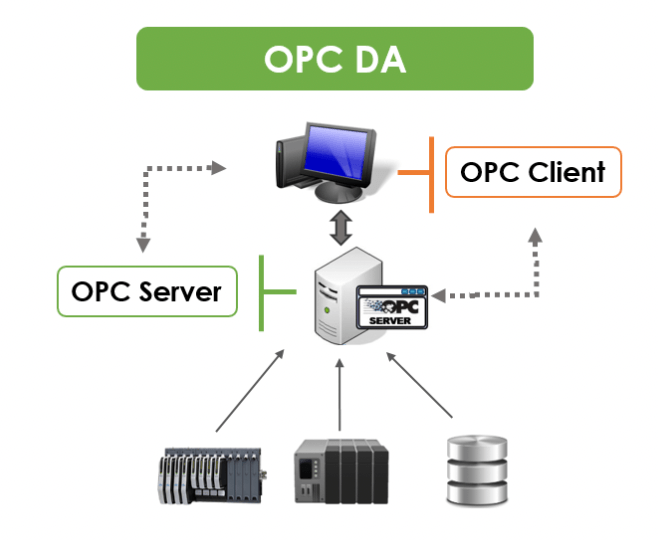
OPC DA is one of the most widely used industrial communication technologies for exchanging real-time data between PLCs, SCADA systems, HMIs, historians, and other automation software.
Although newer technologies such as OPC UA are becoming increasingly common, OPC DA remains important because thousands of industrial systems still depend on it.
In this guide, we explain what OPC DA is, how OPC Data Access works, the components involved, its advantages and limitations, and how it compares with OPC UA.
Whether you are working with a PLC, SCADA system, DCS, HMI, historian, or industrial PC, understanding OPC DA can help you troubleshoot communication problems and design more reliable automation architectures.
What Is OPC DA?
OPC DA (OPC Data Access) is a communication specification used in industrial automation to exchange real-time process data between software applications and automation devices.
OPC DA was designed to provide a standardized way for Windows-based industrial applications to access data from devices and systems from different manufacturers.
Before OPC became widely adopted, automation software often needed a dedicated driver for every PLC, RTU, DCS, or other industrial device it needed to communicate with.
OPC introduced an intermediary architecture.
PLC → Device Driver → OPC Server → OPC Client → SCADA/HMI/Application
Instead of every application communicating directly with every device, an OPC client can communicate with an OPC server using the OPC Data Access specification.
For example, a manufacturing facility might have:
- Allen-Bradley PLCs
- Siemens PLCs
- Modicon PLCs
- A SCADA system
- An industrial historian
- An HMI
- Engineering workstations
Rather than requiring every application to have individual drivers for every PLC, OPC provides a standardized interface between applications and the device communication layer.
What Does OPC Stand For?
OPC originally stood for OLE for Process Control.
The technology was developed in the 1990s by the OPC Foundation and was based heavily on Microsoft’s OLE, COM, and DCOM technologies.
Today, OPC is generally described as Open Platform Communications because the technology has expanded well beyond its original Windows-based architecture.
The term “OPC” therefore does not refer to only one protocol.
There are several OPC specifications, including.
- OPC DA: Data Access
- OPC HDA: Historical Data Access
- OPC A&E: Alarms & Events
- OPC UA: Unified Architecture
- OPC XML-DA
- OPC Batch
- OPC Security
When people refer to OPC DA, they specifically mean the classic OPC specification used primarily for real-time process data.
How Does OPC DA Work?
OPC DA uses a client-server architecture.
There are two primary software components.
OPC DA Server
The OPC DA server communicates with industrial devices and makes their data available to OPC clients.
The server may communicate with devices using protocols such as:
- EtherNet/IP
- Modbus TCP
- Modbus RTU
- PROFINET
- Siemens S7
- DeviceNet
- ControlNet
- BACnet
- proprietary PLC protocols
The exact communication protocol depends on the manufacturer’s driver and the device being connected.
OPC DA Client
The OPC DA client is the application that requests or subscribes to data from the OPC server.
Examples include:
- SCADA software
- HMI software
- historians
- MES systems
- reporting applications
- energy management systems
- custom Windows applications
- data acquisition software
A simplified architecture looks like this:
Industrial Device → Driver → OPC DA Server → OPC DA Client → Application
For example.
Siemens PLC → Siemens Driver → OPC DA Server → SCADA
The OPC server handles communication with the PLC while the SCADA system acts as the OPC client.
OPC DA Architecture
Understanding the architecture is important when troubleshooting OPC DA communication.
A typical system contains several layers.
Field Devices
The bottom layer consists of industrial devices such as the following.
- PLCs
- RTUs
- DCS controllers
- sensors
- meters
- drives
- analyzers
These devices generate process data.
For example.
A PLC may contain tags such as the following.
- Motor_1_Status
- Tank_Level
- Pump_Speed
- Temperature
- Pressure
- Flow_Rate
Communication Driver
The driver provides communication between the OPC server and the industrial equipment.
For example, an OPC server might use an Ethernet/IP driver to communicate with an Allen-Bradley PLC.
The driver converts between the PLC’s native communication protocol and the data representation expected by the OPC server.
OPC DA Server
The OPC DA server exposes the device data through the OPC DA interface.
The server organizes data into a hierarchy of items or tags.
For example.
OPC Server
   |
   +-- Factory1
       |
       +-- PLC1
           |
           +-- Motor1
           |    +-- Running
           |    +-- Speed
           |    +-- Current
           |
           +-- Tank1
                +-- Level
                +-- Temperature
The exact organization depends on the OPC server.
OPC DA Client
The OPC client connects to the OPC server and requests data.
A SCADA application might subscribe to the following items.
PLC1.Motor1.Running
PLC1.Motor1.Speed
PLC1.Tank1.Level
PLC1.Tank1.Temperature
The client can then display the information to an operator.
OPC DA Tags and Items
One important concept in OPC DA is the OPC item.
An OPC item represents a data point exposed by the OPC server.
For example,
Plant1.PLC1.Pump01.Status
Plant1.PLC1.Pump01.Speed
Plant1.PLC1.Tank01.Level
An OPC item generally has several important properties.
Value
The actual process value.
For example,
Tank_Level = 75.4
Quality
The quality indicates whether the data should be considered valid.
Examples can include:
- Good
- Bad
- Uncertain
Timestamp
The timestamp indicates when the value was associated with a particular time.
A SCADA system can use the value, quality, and timestamp together to determine whether the displayed process information is reliable.
What Is OPC DA Data Quality?
Data quality is particularly important in industrial automation.
A value of
75.4
does not necessarily mean that the value is trustworthy.
The OPC DA client also needs to know whether the server considers the value valid.
For example,
Value: 75.4
Quality: Good
Timestamp: 10:15:24
indicates a healthy data point.
But
Value: 75.4
Quality: Bad
could indicate that the PLC is offline, communication has failed, or the value is otherwise invalid.
This is why industrial applications should not simply display OPC values without considering the OPC quality status.
OPC DA Read vs Subscribe
OPC DA clients can obtain data using different mechanisms.
One approach is to read values from the server.
Another is to subscribe to changes.
With subscriptions, the client can ask the OPC server to notify it when values change.
This is useful for SCADA systems because the application does not need to continuously poll every tag itself.
For example,
PLC
 ↓
OPC DA Server
 ↓
Value changes
 ↓
OPC DA Client receives update
 ↓
SCADA display updates
This can reduce unnecessary communication and provide efficient real-time data delivery.
What Is DCOM in OPC DA?
One of the most important concepts to understand when troubleshooting OPC DA is DCOM.
OPC DA is based on Microsoft’s COM/DCOM technology.
DCOM stands for Distributed Component Object Model.
It allows COM components to communicate across Windows computers.
This means an OPC DA client can potentially connect to an OPC DA server running on another computer.
For example,
Computer A
SCADA
OPC DA Client
       |
       | DCOM
       |
       ↓
Computer B
OPC DA Server
       |
       ↓
PLC
This architecture was common in industrial automation systems.
However, DCOM can make OPC DA configuration significantly more complicated.
Why Is OPC DA Difficult to Configure?
One of the biggest complaints about OPC DA is that configuring communication between computers can be complicated.
Because OPC DA relies on Windows COM/DCOM, communication can depend on several Windows security and networking settings.
Potential configuration issues include:
- Windows Firewall
- DCOM permissions
- Windows user accounts
- authentication
- authorization
- RPC communication
- network connectivity
- hostname resolution
- domain configuration
- local security policies
- antivirus software
- Windows updates
This means an OPC DA problem may not actually be an OPC problem.
For example, the PLC may be communicating correctly with the OPC server, but the SCADA computer may be unable to connect to the OPC server because of DCOM security settings.
OPC DA Local vs Remote Communication
OPC DA can be used locally or across a network.
Local OPC DA Communication
In a local architecture, the OPC client and OPC server run on the same computer.
SCADA
  |
OPC DA Client
  |
OPC DA Server
  |
PLC
This configuration is generally easier because DCOM does not have to traverse the network between separate computers.
Remote OPC DA Communication
In a remote architecture, the OPC client and server are on different computers.
SCADA Computer
     |
 OPC DA Client
     |
   Network
     |
 OPC DA Server
     |
    PLC
This introduces additional dependencies.
If the OPC client cannot connect to the server, troubleshooting should include the following.
- Can the computers ping each other?
- Can the client resolve the server’s hostname?
- Is the OPC server running?
- Is the Windows firewall blocking communication?
- Are DCOM permissions correctly configured?
- Are the appropriate Windows users and permissions configured?
- Is RPC functioning?
- Is the OPC server configured to allow remote clients?
OPC DA and SCADA Systems
OPC DA has historically been widely used with SCADA systems.
A SCADA system needs process data from controllers, and OPC provides a standardized interface for obtaining that information.
A typical architecture might look like this.
PLC 1 ──┐
PLC 2 ──┤
PLC 3 ──┤
PLC 4 ──┤
        ↓
   OPC DA Server
        ↓
   SCADA System
        ↓
     Operators
The SCADA application can use OPC DA to access the following.
- digital inputs
- digital outputs
- analog inputs
- analog outputs
- calculated values
- alarms
- status information
- controller variables
OPC DA and PLC Communication
OPC DA does not replace the PLC’s native communication protocol.
This distinction is important.
For example, an OPC DA server may communicate with an Allen-Bradley PLC using EtherNet/IP.
The architecture might be
SCADA
  |
OPC DA
  |
OPC Server
  |
EtherNet/IP
  |
Allen-Bradley PLC
In this architecture, OPC DA provides the standardized interface between the application and the OPC server.
The underlying device driver is responsible for communicating with the PLC.
Similarly, a Siemens PLC could use a Siemens-specific communication driver underneath an OPC DA server.
What Is an OPC DA Server?
An OPC DA server is software that exposes real-time process data through the OPC DA interface.
Examples of OPC server products have historically included software from companies such as.
- Kepware
- Matrikon
- Softing
- Siemens
- Rockwell Automation
- Schneider Electric
- ICONICS
- Unified Automation
The OPC server typically performs several functions.
- communicates with industrial devices
- manages device connections
- organizes tags
- exposes data to OPC clients
- provides data quality
- provides timestamps
- manages subscriptions
- handles communication errors
The OPC server therefore acts as a bridge between industrial equipment and software applications.
OPC DA vs OPC UA
One of the most common questions in industrial automation is.
What is the difference between OPC DA and OPC UA?
The two technologies serve similar high-level purposes but use significantly different architectures.
| Feature | OPC DA | OPC UA |
|---|---|---|
| Technology | COM/DCOM | Platform-independent architecture |
| Primary era | Classic OPC | Modern OPC |
| Windows dependency | Strong | No |
| Remote communication | DCOM | TCP/HTTPS and other mechanisms |
| Security | Windows/DCOM security | Built-in security architecture |
| Platform support | Primarily Windows | Windows, Linux, embedded systems, etc. |
| Data modeling | Limited | Advanced |
| Scalability | More limited | More scalable |
| Modern deployments | Legacy systems | Preferred for new systems |
OPC UA was designed to address many of the limitations associated with classic OPC.
Why Was OPC UA Developed?
OPC DA worked well in Windows-centric industrial environments, but the industrial automation landscape changed.
Modern systems increasingly require the following.
- Linux
- cloud computing
- edge computing
- embedded devices
- industrial IoT
- secure remote connectivity
- platform independence
- structured data
- scalable architectures
DCOM-based communication was not ideal for these environments.
OPC UA was therefore designed as a new architecture rather than simply an updated version of OPC DA.
OPC DA vs OPC UA Security
Security is one of the most important differences.
OPC DA depends heavily on Windows and DCOM security mechanisms.
This can make secure deployment complicated, especially across networks.
OPC UA was designed with security as part of the architecture.
OPC UA provides mechanisms for:
- encryption
- authentication
- signing
- certificates
- user identity
- application identity
For modern industrial networks, these capabilities are extremely important.
Is OPC DA obsolete?
No.
OPC DA is old technology, but it is not necessarily obsolete.
Many industrial facilities have equipment and software that were installed years or even decades ago.
Replacing a functioning automation system simply because newer technology exists may not be economically or operationally practical.
As a result, OPC DA remains relevant for the following.
- legacy SCADA systems
- older HMIs
- existing historians
- older PLC installations
- Windows-based automation systems
- legacy manufacturing applications
However, for new projects, OPC UA is generally the more future-oriented choice.
Can OPC DA and OPC UA Work Together?
Yes.
In many real-world industrial systems, OPC DA and OPC UA coexist.
A common architecture is the following.
Legacy PLC
     ↓
OPC DA Server
     ↓
OPC DA Client
     ↓
OPC UA Gateway
     ↓
Modern Applications
Another approach is to use an OPC gateway that consumes OPC DA data and exposes it through OPC UA.
This allows organizations to modernize their architecture without immediately replacing every legacy device and application.
OPC DA to OPC UA Gateway
An OPC DA-to-UA gateway can be particularly useful when modernizing an existing automation system.
For example.
Legacy PLC
    ↓
Legacy OPC DA Server
    ↓
OPC DA
    ↓
OPC UA Gateway
    ↓
OPC UA
    ↓
Modern SCADA / MES / Cloud / Analytics
The gateway effectively creates a bridge between legacy OPC infrastructure and modern OPC UA applications.
This can be a practical migration strategy.
Common OPC DA Problems
OPC DA troubleshooting often involves more than simply checking whether the PLC is online.
Common problems include the following.
OPC Server Not Running
If the OPC server service or application is stopped, clients cannot obtain data.
Verify the following:
- Windows Services
- OPC server application status
- server logs
- Device connection status
PLC Communication Failure
The OPC server may be running but unable to communicate with the PLC.
Verify the following:
- Ethernet connectivity
- IP address
- PLC status
- communication driver
- routing
- VLAN configuration
- firewall rules
- PLC connection limits
DCOM Configuration Problems
For remote OPC DA communication, DCOM configuration is a common source of problems.
Verify the following:
- Launch and activation permissions
- Access permissions
- user accounts
- authentication settings
- identity configuration
- Windows security policies
Windows Firewall
A firewall can prevent OPC DA communication even when basic network connectivity works.
For example,
Ping = Successful
OPC DA = Not Working
This does not necessarily mean the OPC server is broken.
The firewall may be blocking the required RPC/DCOM traffic.
Incorrect OPC Item
The client may be connected to the server but attempting to access an incorrect item name.
For example,
PLC1.Motor01.Speed
might not exist if the actual item is
PLC1.Motor_01.Speed
Always verify the item name and OPC server namespace.
Bad OPC Quality
If the client sees a tag but the quality is bad, investigate the communication path.
A useful troubleshooting sequence is,
PLC
 ↓
Driver
 ↓
OPC Server
 ↓
OPC Item
 ↓
OPC Client
Determine exactly where the data becomes invalid.
OPC DA Troubleshooting Checklist
When an OPC DA client cannot obtain data, work systematically.
Step 1: Check the PLC
Verify:
- PLC is powered
- Controller is running
- Network interface is operational
- IP address is correct
- PLC program is running
Step 2: Check Network Connectivity
Verify communication between
OPC Server ↔ PLC
and, if applicable
OPC Client ↔ OPC Server
Step 3: Check the OPC Server
Verify the following:
- OPC server is running
- Driver is running
- Device connection is healthy
- Tags are configured
- Server logs show no errors
Step 4: Test Locally
If possible, test an OPC client directly on the OPC server computer.
This can help determine whether the problem is
PLC → OPC Server
or
OPC Server → Remote OPC Client
Step 5: Check DCOM
If local communication works but remote communication fails, investigate DCOM and Windows security.
Step 6: Check Firewall
Verify that Windows Firewall and network firewalls are not blocking required communication.
Step 7: Check OPC Item Quality
Look at the following:
- value
- quality
- timestamp
These three pieces of information can provide valuable diagnostic information.
Advantages of OPC DA
Despite its age, OPC DA has several advantages.
Standardized Interface
Applications do not need to understand every PLC manufacturer’s proprietary protocol.
Large Existing Installed Base
Many industrial facilities already use OPC DA.
Wide Software Support
Numerous legacy SCADA, HMI, historian, and industrial applications support OPC DA.
Real-Time Data
OPC DA is designed specifically for real-time process data.
Mature Technology
OPC DA has been deployed in industrial environments for decades.
Disadvantages of OPC DA
OPC DA also has significant limitations.
Windows Dependency
Classic OPC DA is strongly associated with Microsoft Windows technologies.
DCOM Complexity
Remote communication can require significant configuration.
Security Challenges
Securing DCOM-based industrial communication can be difficult.
Limited Platform Independence
OPC DA was not designed for today’s heterogeneous industrial computing environments.
Legacy Architecture
Modern IIoT and cloud architectures generally favor OPC UA.
OPC DA and Industrial IoT
The growth of Industrial IoT has accelerated the move toward OPC UA.
Modern industrial systems often need to move data from the following sources.
Field Devices → PLC → SCADA → Edge → Cloud → Analytics
OPC DA can participate in older portions of this architecture, but OPC UA is generally better suited to modern applications.
A legacy factory might therefore use the following.
PLC
 ↓
OPC DA
 ↓
SCADA
 ↓
OPC UA Gateway
 ↓
Edge Platform
 ↓
Cloud Analytics
This approach allows companies to preserve existing automation investments while gradually modernizing their data architecture.
Should You Use OPC DA or OPC UA?
For a new automation project, OPC UA is usually the better choice.
For an existing legacy system, OPC DA may still be the most practical solution.
A useful rule is:
New system → Prefer OPC UA
Existing OPC DA system → Maintain it when practical
Legacy OPC DA system requiring modernization → Consider an OPC DA-to-UA gateway
The correct decision depends on the equipment, software, cybersecurity requirements, budget, and expected lifetime of the system.
Frequently Asked Questions About OPC DA
What is OPC DA?
OPC DA, or OPC Data Access, is a classic OPC specification used to exchange real-time process data between industrial devices, OPC servers, SCADA systems, HMIs, historians, and other applications.
Is OPC DA a protocol?
OPC DA is better described as a specification/interface rather than a traditional field-level industrial protocol such as Modbus TCP or EtherNet/IP.
It defines how OPC clients and OPC servers interact.
Does OPC DA use DCOM?
Yes. Classic OPC DA relies on Microsoft’s COM/DCOM technologies, particularly when communication occurs between different Windows computers.
Is OPC DA still used?
Yes. Many legacy industrial automation systems continue to use OPC DA.
What is the difference between OPC DA and OPC UA?
OPC DA is a classic Windows/COM/DCOM-based technology, while OPC UA is a newer, platform-independent architecture designed with modern security, scalability, and information modeling capabilities.
Can OPC DA communicate with a PLC?
Yes. An OPC DA server can communicate with PLCs through an appropriate device driver and expose the PLC’s data to OPC clients.
Can OPC DA work over Ethernet?
Yes. OPC DA itself operates at the software/application level. The OPC server may communicate with PLCs over Ethernet using protocols such as EtherNet/IP, Siemens protocols, Modbus TCP, or other supported protocols.
Is OPC DA secure?
OPC DA relies heavily on Windows and DCOM security mechanisms. It can be secured, but remote OPC DA deployments can be more difficult to secure and manage than modern OPC UA systems.
Can OPC DA and OPC UA coexist?
Yes. OPC DA and OPC UA can coexist in the same industrial architecture. Gateways can also be used to expose legacy OPC DA data through OPC UA.
Final Thoughts
OPC DA remains an important technology in industrial automation because of its enormous installed base and long history of use in SCADA, HMI, PLC, DCS, and historian applications.
Its fundamental purpose is straightforward: to provide a standardized interface through which industrial applications can access real-time process data.
However, understanding OPC DA also means understanding its limitations.
Its dependence on Windows COM/DCOM can make remote communication, security, and troubleshooting challenging.
For this reason, OPC UA has become the preferred technology for many modern automation and industrial IoT architectures.
The most important distinction is therefore not that OPC DA is “bad” and OPC UA is “good.”
Instead:
OPC DA is a mature technology that remains valuable for legacy systems, while OPC UA is the modern architecture designed for new industrial applications.
If you work with industrial automation, SCADA, PLCs, or industrial networking, knowing how both technologies work and, especially, how to troubleshoot OPC DA is still a valuable technical skill.
Quick OPC DA Reference
| Topic | OPC DA |
|---|---|
| Full name | OPC Data Access |
| Original OPC meaning | OLE for Process Control |
| Current OPC meaning | Open Platform Communications |
| Primary purpose | Real-time process data |
| Architecture | Client/server |
| Technology | COM/DCOM |
| Typical OS | Windows |
| Common applications | SCADA, HMI, historians, MES |
| Data | Values, quality, timestamps |
| Modern successor | OPC UA |
| Still used? | Yes |
| Best for new projects? | Generally no; prefer OPC UA |
| Useful for legacy systems? | Yes |
