BACnet/IP vs. BACnet MS/TP: Which Should You Use?

If you work with building automation systems long enough, you will eventually face this question on a real project: should the devices communicate over BACnet/IP or BACnet MS/TP?

Both are official data link options defined in the BACnet standard (ASHRAE 135), and both carry the same BACnet objects, properties, and services.

The difference is not what they say; it’s how the message travels. One rides on Ethernet and standard IP networking. The other runs on twisted-pair RS-485 cable daisy-chained from device to device.

BACnet/IP vs. BACnet MS/TP: Which Should You Use?

Use BACnet/IP for your network backbone, supervisory controllers, and anywhere Ethernet already exists; use BACnet MS/TP for field-level devices like VAV controllers, thermostats, and unitary equipment where low cost per point matters more than speed. Most real buildings use both, connected through BACnet routers.

The longer answer, including speed, cost, wiring, troubleshooting, and the failure modes of each, is what this guide covers.

Where IP and MS/TP Fit in BACnet

BACnet is a layered protocol. The application layer (the objects and services: Analog Inputs, Binary Outputs, ReadProperty, and COV subscriptions) is identical no matter which network you use.

Underneath that, the standard defines several data link/physical layer options, and these two dominate the market.

BACnet/IP

BACnet/IP encapsulates BACnet messages inside UDP/IP packets (default port 47808, or 0xBAC0 in hex) and sends them over standard Ethernet infrastructure, the same switches, routers, and cabling as your IT network.

BACnet MS/TP

BACnet MS/TP (Master-Slave/Token-Passing) runs over an RS-485 serial network: a shielded twisted-pair cable daisy-chained through up to 32 devices per segment (more with repeaters), passing a software token that controls which device may transmit.

Because the application layer is shared, a chiller on BACnet/IP and a VAV box on MS/TP can read and write each other’s points seamlessly as long as a BACnet router connects the two networks.

BACnet/IP Explained

BACnet/IP treats the building automation system as just another application on the IP network.

Each controller gets an IP address, plugs into an Ethernet switch, and communicates at 100 Mbps or 1 Gbps.

Key characteristics

Speed

Ethernet is thousands of times faster than any MS/TP segment. Trend data uploads, graphics refreshes, schedule downloads, and firmware updates that crawl on serial networks happen almost instantly over IP.

Topology freedom

In a star topology with switches, a damaged cable takes down one device, not the whole chain. You can also use fiber for long runs and VLANs to segment traffic.

Broadcast management

BACnet relies on broadcasts for device discovery (Who-Is/I-Am). IP routers block broadcasts between subnets, so BACnet/IP uses BBMDs (BACnet Broadcast Management Devices) to forward broadcasts across subnets, plus Foreign Device Registration for devices like remote workstations.

Getting BBMD configuration right exactly one per subnet, is the single most common stumbling block on multi-subnet BACnet/IP jobs.

IT involvement

IP addressing, switch ports, VLANs, and firewall rules usually mean coordinating with the IT department. On some projects that’s a five-minute conversation; on others it’s the longest lead-time item on the schedule.

BACnet MS/TP Explained

MS/TP was designed for exactly one purpose: cheap, reliable communication for the hundreds of small controllers scattered through a building.

Key characteristics:

Token passing

Devices on the segment take turns transmitting by passing a token in address order. It’s deterministic and collision-free, but every device added to the trunk slows the token rotation, and one misconfigured device can disrupt the entire segment.

Baud rates

Standard speeds are 9,600, 19,200, 38,400, and 76,800 bps. Even at the top rate of 76.8 kbps, an MS/TP trunk is more than a thousand times slower than 100 Mbps Ethernet. Every device on a segment must run the same baud rate.

Wiring rules

RS-485 demands discipline: a single daisy chain (no stars, no tees), shielded twisted-pair cable, end-of-line termination resistors at both physical ends of the trunk, proper biasing, and consistent polarity (+/−) at every device.

In my experience, the majority of “MS/TP communication problems” traced back in the field are physical-layer issues: a swapped pair, a missing terminator, or a star splice hidden above a ceiling tile.

Addressing

Each master device needs a unique MAC address from 0 to 127 on its segment, and the segment’s Max Master setting should match the highest address in use; leaving it at the default 127 when your highest device is 24 wastes token time polling addresses that don’t exist.

Cost

This is MS/TP’s entire reason to exist. A twisted-pair trunk looping through forty VAV boxes costs a fraction of pulling Ethernet home runs and providing a switch port for every controller. The controllers themselves are also cheaper without an Ethernet interface.

BACnet/IP vs. BACnet MS/TP: Side-by-Side Comparison

FactorBACnet/IPBACnet MS/TP
Physical mediumEthernet (Cat5e/6, fiber)RS-485 shielded twisted pair
Typical speed100 Mbps – 1 Gbps9.6 – 76.8 kbps
TopologyStar (via switches)Daisy chain only
Devices per segmentLimited mainly by subnet design32 per segment (more with repeaters), max address 127
Cost per deviceHigher (switch port, Ethernet interface)Lower (shared trunk cable)
Failure behaviorOne cable fault equals one device downOne trunk fault can take down the whole segment
Common failure causesBBMD misconfiguration, duplicate IPs, IT firewall rulesTermination, polarity, baud mismatch, duplicate MACs
Best suited forBackbones, supervisory controllers, plant equipment, large AHUsVAV boxes, fan coils, thermostats, unitary field devices
IT coordinationUsually requiredRarely required

Performance: How Big Is the Speed Gap Really?

On paper, 100 Mbps versus 76.8 kbps looks absurd, and for bulk operations, it is. But for steady-state control traffic, the honest engineering answer is that a well-designed MS/TP trunk performs perfectly well.

A VAV controller reporting zone temperature and receiving a setpoint doesn’t need megabits.

The gap becomes painful in three situations. First, long trunks with many devices: token rotation time grows with device count, so a 60-device trunk at 38.4 kbps can see multi-second update latency.

Second, trend log uploads and graphics-heavy front ends that hammer the trunk with read requests.

Third, firmware updates and database downloads, which can take the better part of an hour per device over serial versus seconds over IP.

Practical rule

Keep MS/TP segments to a sensible device count (many integrators target 20–30 devices per trunk rather than the theoretical limits), run 76.8 kbps if all devices support it, and put anything data-hungry on IP.

Cost and Installation: Where MS/TP Still Wins

Consider a floor with 30 VAV controllers. On MS/TP, you pull one twisted-pair trunk that daisy-chains through all thirty.

On BACnet/IP, you either pull 30 Ethernet home runs to an IDF closet and provide 30 switch ports, or you distribute small switches through the ceiling, adding cost, power requirements, and points of failure either way.

Multiply that across a mid-size commercial building, and the cabling and hardware difference is substantial.

This is why, even as IP-based controllers get cheaper, MS/TP still dominates the terminal-unit layer of most new construction.

That said, the gap is narrowing. If a building is already getting dense Ethernet for other systems (lighting, cameras, access control), the marginal cost of adding BAS controllers to that infrastructure drops, and some owners now mandate IP-to-the-edge for exactly that reason.

Troubleshooting and Reliability

This comparison matters more over the 15–20 year life of the system than on installation day.

MS/TP failure modes are physical and shared

Because every device sits on the same electrical trunk, a single failed transceiver, water-damaged splice, or contractor who tees into the cable can degrade or kill communication for the entire segment.

Diagnosing it often means splitting the trunk in half repeatedly until the fault is isolated tedious work above ceiling tiles. Tools: a multimeter, a protocol analyzer with an RS-485 tap, and patience.

BACnet/IP failure modes are logical and isolated

A bad cable takes out one device. The harder problems are configuration-level: duplicate IP addresses, duplicate device instance numbers, more than one BBMD on a subnet, or an IT firewall silently dropping UDP 47808.

These are invisible to a multimeter but quick to find with Wireshark and a BACnet discovery tool.

Neither is inherently more reliable, but IP faults tend to be isolated and diagnosable from a desk, while MS/TP faults tend to be shared and diagnosable from a ladder.

When to Use BACnet MS/TP

Choose MS/TP when the devices are numerous, small, and geographically clustered and when per-point cost drives the budget.

Typical cases: VAV and fan coil controllers on a floor, zone thermostats and sensors with native MS/TP, small packaged rooftop units, retrofit projects where pulling new Ethernet is impractical, and any job where the IT department cannot or will not support BAS devices on the network.

When to Use BACnet/IP

Choose BACnet/IP for the building backbone connecting supervisory controllers and the operator workstation.

For large equipment with many points (chillers, boilers, large AHUs, and plant controllers); for anything that generates heavy trend or graphics traffic.

For campus-wide integration across multiple buildings and for any device you’ll want to update or commission remotely.

If structured Ethernet cabling already reaches the device location, IP is usually the better long-term choice even at slightly higher first cost.

The Real-World Answer: Use Both, Connected by Routers

Walk into almost any commercial building automation system installed in the last decade, and you’ll find the same architecture: a BACnet/IP backbone at the top, with supervisory or plant controllers acting as BACnet routers down to multiple MS/TP trunks serving the field devices.

This hybrid design gives you Ethernet speed where traffic is heavy and RS-485 economy where device counts are high.

The BACnet standard was explicitly built for these network numbers, and routing is native to the protocol, so a workstation on IP reads a point on trunk 3 as transparently as a point on its own subnet.

Design tips for hybrid networks: assign unique BACnet network numbers to every MS/TP trunk and to the IP network itself; keep Device Instance numbers globally unique across the entire internetwork, not just per trunk; document baud rate, Max Master, and MAC addressing per trunk; and resist the temptation to overload any single router with too many segments.

FAQ: BACnet/IP vs. BACnet MS/TP

Is BACnet/IP faster than MS/TP?

Yes, dramatically, 100 Mbps or more versus a maximum of 76.8 kbps. For routine control traffic, the difference is often unnoticeable, but for trend uploads, graphics, and firmware updates, IP is far faster.

Can BACnet/IP and MS/TP devices talk to each other?

Yes. A BACnet router (often built into a supervisory controller) joins the two networks, and devices on each side exchange data transparently because the application layer is identical.

How many devices can be on one MS/TP trunk?

Up to 32 devices per electrical segment without repeaters, with master addresses ranging from 0 to 127. In practice, many integrators limit trunks to 20–30 devices to keep token rotation fast.

Does MS/TP need termination resistors?

Yes, one at each physical end of the trunk, and only at the ends. Missing or extra terminators are among the most common causes of intermittent MS/TP communication failures.

Is MS/TP obsolete?

No. Despite the growth of IP-to-the-edge controllers and newer options like BACnet/SC, MS/TP remains the most cost-effective choice for dense terminal-unit networks and continues to be installed in new buildings today.

What port does BACnet/IP use?

UDP port 47808 (0xBAC0 in hexadecimal) by default. Firewalls between BACnet subnets must allow this traffic.

Final Verdict

Don’t frame it as either/or. BACnet/IP is the right backbone; BACnet MS/TP is the right last hundred feet.

Put your supervisory controllers, plant equipment, and anything bandwidth-hungry on IP. Put your dense field-level devices on well-designed MS/TP trunks that are short, properly terminated, correctly addressed, and at the highest common baud rate.

Connect them with BACnet routers, keep your network numbers and device instances clean, and both data links will serve the building reliably for decades.

What Is BACnet? The Building Automation Protocol Explained (2026 Guide)

If you’ve ever worked on a commercial HVAC system, a building management system (BMS), or any modern smart building project, you’ve almost certainly come across the term BACnet.

But what is BACnet exactly, and why has it become the dominant language of building automation worldwide?

In this guide, I’ll break down what the BACnet protocol is, how it works under the hood, where it came from, where it’s used, and how it stacks up against other industrial communication protocols like Modbus, LonWorks, and KNX.

Whether you’re a controls technician, an automation engineer, or a facility manager trying to make sense of your BMS documentation, this article will give you a solid working understanding of BACnet.

What Is BACnet Protocol?

BACnet stands for Building Automation and Control Network. It is an open, vendor-neutral data communication protocol designed specifically for building automation and control systems.

In simple terms, BACnet is the common language that allows devices from different manufacturers, thermostats, chillers, air handling units, lighting controllers, fire panels, and and access control systems to talk to each other on the same network.

BACnet is defined by the standard ANSI/ASHRAE 135, and it is also recognized internationally as ISO 16484-5.

Because it is an open standard maintained by ASHRAE (the American Society of Heating, Refrigerating, and Air-Conditioning Engineers) rather than owned by a single company, any manufacturer can implement BACnet in their products without paying licensing fees.

That openness is the key to BACnet’s success. Before open protocols like BACnet existed, building automation was dominated by proprietary systems.

If you installed Brand X controllers, you were locked into Brand X software, Brand X sensors, and Brand X service contracts for the life of the building.

BACnet broke that lock-in by giving the industry a shared, standardized way for equipment to exchange data.

Key Characteristics of BACnet

Open and non-proprietary

Maintained by ASHRAE’s SSPC 135 committee, free for any vendor to implement.

Purpose-built for buildings

Unlike general-purpose industrial protocols, BACnet includes native concepts for schedules, alarms, trend logs, and HVAC-specific data.

Interoperable

Devices from different manufacturers can share data and be managed from a single front-end.

Scalable

BACnet works in everything from a single rooftop unit controller to campus-wide networks with tens of thousands of points.

Transport-flexible

BACnet can run over IP networks, twisted-pair serial links, Ethernet, and even wireless connections.

The History of BACnet

Understanding the history of BACnet helps explain why it was designed the way it was.

The Problem: Proprietary Chaos in the 1980s

In the 1980s, building automation systems were entirely proprietary. Each manufacturer used its own communication scheme, which meant building owners couldn’t mix equipment brands, couldn’t competitively bid expansions, and were often stuck with expensive single-vendor service agreements. Facility managers and engineers grew increasingly frustrated with this vendor lock-in.

The Birth of BACnet (1987–1995)

In June 1987, ASHRAE formed a committee to develop a standard communication protocol for building automation, with the first meeting held at Cornell University under the leadership of H. Michael Newman, who is widely regarded as the “father of BACnet.”

The committee’s goal was ambitious: create a single, open protocol that could handle all building systems, HVAC, lighting, life safety, access control, and more.

After nearly a decade of development, committee ballots, and public reviews, BACnet was published as ANSI/ASHRAE Standard 135 in 1995.

Growth and International Adoption (1995–Present)

Some key milestones in BACnet’s evolution.

  • 1995: BACnet published as ANSI/ASHRAE Standard 135-1995.
  • 1999: The BACnet/IP annex was formalized, allowing BACnet to run natively over IP networks, a huge step for integration with corporate IT infrastructure.
  • 2003: BACnet adopted as international standard ISO 16484-5, cementing global acceptance.
  • 2000s–2010s: BACnet Testing Laboratories (BTL) established a certification program so buyers could verify that products genuinely conform to the standard.
  • 2010s: Continuous addenda added support for new object types, web services, and integration with modern IT systems.
  • 2019 onward: BACnet Secure Connect (BACnet/SC) was introduced, adding TLS encryption and modern cybersecurity to address the growing threat landscape in connected buildings.

Today, BACnet is the most widely used building automation protocol in the world, with thousands of certified products and adoption across commercial, institutional, and industrial buildings on every continent.

How Does BACnet Work?

Now for the interesting part: how does BACnet actually work? BACnet’s architecture is built on three core concepts: objects, properties, and services, running over several possible network transports.

BACnet Objects and Properties

BACnet represents every piece of information in a device as an object. An object is a standardized data structure that models something real: a temperature sensor input, a fan command output, a schedule, or an alarm.

Common BACnet object types include.

  • Analog Input (AI): e.g., a space temperature sensor reading
  • Analog Output (AO): e.g., a valve or damper actuator position command
  • Analog Value (AV): e.g., a software setpoint
  • Binary Input (BI): e.g., a fan status contact (on/off)
  • Binary Output (BO): e.g., a pump start/stop command
  • Binary Value (BV): e.g., an occupancy mode flag
  • Multi-State objects: for equipment with multiple modes (off/low/high)
  • Schedule and Calendar objects: for time-based control
  • Trend Log objects: for historical data recording
  • Notification Class objects: for alarm routing

Each object contains property attributes that describe it. Every object has at minimum an object identifier, an object name, and an object type, and most have a present value property, which holds the live data (the actual temperature, the actual command state, and so on).

Other properties handle units, alarm limits, reliability status, and priority arrays for command arbitration.

This object model is what makes BACnet devices “self-describing.” A BACnet workstation can discover a device on the network, ask it what objects it contains, and immediately understand what data it offers without needing a proprietary driver.

BACnet Services

Services are the standardized messages devices use to interact with each other’s objects. Think of services as the verbs of the BACnet language. The most important ones include:

  • Who-Is / I-Am: Device discovery. A workstation broadcasts “Who-Is” and devices respond “I-Am,” announcing their presence and device ID.
  • ReadProperty / ReadPropertyMultiple: Request the value of one or more properties (e.g., read the present value of a temperature sensor).
  • WriteProperty: Command a value (e.g., write a new setpoint).
  • Subscribe COV (Change of Value): Instead of constantly polling, a device can subscribe to be notified only when a value changes — reducing network traffic.
  • Event Notification Services: For alarms and events routed to operators.
  • File transfer and device management services: For backups, restores, and reinitializing devices.

BACnet Network Types (Data Link Layers)

One of BACnet’s smartest design decisions was separating the application layer (objects and services) from the transport. The same BACnet messages can travel over several different network types.

BACnet/IP

BACnet messages carried in UDP/IP packets over standard Ethernet networks (default port 47808 / 0xBAC0).

This is the dominant choice for supervisory networks, building controllers, and front-ends because it rides on standard IT infrastructure.

BACnet MS/TP (Master-Slave/Token-Passing)

Runs over RS-485 twisted-pair wiring. This is the workhorse for field-level devices: VAV controllers, unitary controllers, and sensors, because RS-485 is cheap, robust, and easy to daisy-chain. Typical speeds range from 9,600 to 115,200 bps.

BACnet Secure Connect (BACnet/SC)

The newest transport, using WebSockets and TLS encryption. BACnet/SC eliminates the broadcast dependency of BACnet/IP, works through NAT and firewalls, and provides authentication and encryption, making it the future-proof choice for IT-managed and cloud-connected buildings.

BACnet over Ethernet, ARCNET, LonTalk, ZigBee

Historical or niche options defined in the standard, rarely used in new projects today.

Routers connect these different network types together. A typical building might have a BACnet/IP backbone connecting building controllers, with each building controller acting as a router down to MS/TP trunks of field devices.

A Typical BACnet Architecture in Practice

Here’s how it all comes together in a real building.

  1. An operator workstation (the BMS front-end) sits on the BACnet/IP network.
  2. Building controllers (plant controllers for chillers, boilers, AHUs) also sit on BACnet/IP.
  3. Each building controller routes down to MS/TP trunks with dozens of field controllers (VAV boxes, fan coils, terminal units).
  4. The workstation discovers all devices, reads their objects, displays live graphics, logs trends, schedules equipment, and routes alarms regardless of which vendor made each controller.

Applications of the BACnet Protocol

Where is BACnet actually used? The short answer: almost everywhere in modern commercial buildings.

HVAC Control

This is BACnet’s home turf. Chillers, boilers, air handling units, rooftop units, VAV systems, heat pumps, and exhaust systems all commonly communicate over BACnet.

Native BACnet interfaces are now standard on most commercial HVAC equipment.

Lighting Control

Networked lighting systems integrate with the BMS over BACnet for scheduling, occupancy-based control, daylight harvesting coordination, and energy reporting.

Energy Management and Metering

Power meters, gas meters, water meters, and energy dashboards use BACnet to feed consumption data into energy management systems critical for LEED certification, utility rebate programs, and net-zero initiatives.

Life Safety Integration

Fire alarm panels and smoke control systems expose status information over BACnet so operators can monitor life safety events from the BMS (control typically remains within the listed fire system for code compliance).

Access Control and Security

Door controllers, intrusion systems, and video management platforms increasingly offer BACnet interfaces so security events can be tied to building responses, for example, switching HVAC to occupied mode when a zone is accessed after hours.

Data Centers, Hospitals, Airports, and Campuses

Mission-critical facilities rely on BACnet to integrate thousands of points across multiple systems and multiple vendors into unified monitoring platforms from CRAC units in data centers to isolation-room pressure monitoring in hospitals.

Smart Buildings and IoT Integration

Modern analytics platforms, fault detection and diagnostics (FDD) tools, and cloud-based supervisory systems pull data from buildings via BACnet, increasingly through BACnet/SC for secure remote connectivity.

BACnet vs Other Communication Protocols

How does BACnet compare to the other protocols you’ll encounter in automation work? Here’s an honest engineering comparison.

BACnet vs Modbus

Modbus is older (1979), simpler, and extremely widespread in industrial equipment, meters, and packaged machinery.

FeatureBACnetModbus
OriginASHRAE, 1995Modicon, 1979
Designed forBuilding automationIndustrial/PLC communication
Data modelSelf-describing objects with propertiesRaw registers and coils (no context)
Device discoveryYes (Who-Is/I-Am)No
Alarms, schedules, trendsBuilt into the protocolNot defined, must be built manually
TransportsIP, MS/TP (RS-485), SCRTU (RS-485), TCP/IP
Integration effortLow, devices self-describeHigher, requires register maps from vendor documentation

Bottom line

Modbus is simple and universal but “dumb”: a Modbus register is just a number with no units, name, or meaning until you map it manually.

BACnet objects carry their own context. In practice, buildings often use both: BACnet for the automation network and Modbus gateways for meters and packaged equipment.

BACnet vs LonWorks

LonWorks (LON) was BACnet’s main rival in the 1990s and 2000s. It’s a flat, peer-to-peer control networking platform originally developed by Echelon Corporation.

  • LonWorks required licensed Neuron chips and tooling for years, which limited openness; BACnet has always been royalty-free.
  • LonWorks excels at peer-to-peer field-level control; BACnet excels at supervisory integration and enterprise connectivity.
  • Market momentum has decisively shifted toward BACnet; most new construction specifies BACnet, while LonWorks is now mostly encountered in legacy retrofits.

BACnet vs KNX

KNX is a European-rooted standard strong in lighting, shading, and room automation, especially in residential and light-commercial projects in Europe.

  • KNX dominates room-level control in European markets; BACnet dominates HVAC and supervisory levels globally.
  • The two frequently coexist: KNX handles rooms, and BACnet handles plants and the BMS backbone, with certified gateways between them.

BACnet vs Proprietary Protocols

Some manufacturers still layer proprietary extensions or closed protocols on their systems.

The risk is the same as it was in the 1980s: vendor lock-in, expensive service, and difficult expansion.

When specifying systems, look for BTL-listed (BACnet Testing Laboratories certified) devices and require open BACnet integration at the specification stage, not as an afterthought.

Advantages and Limitations of BACnet

Advantages

  • Open, license-free, internationally standardized
  • Purpose-built objects for building systems (alarms, schedules, trends)
  • Device discovery and self-describing data
  • Massive vendor ecosystem and BTL certification program
  • Scales from a single controller to campus-wide systems
  • BACnet/SC brings modern encryption and IT-friendly networking

Limitations

  • Classic BACnet/IP and MS/TP have no built-in security; network segmentation and BACnet/SC adoption are essential
  • Interoperability is real but not automatic; poorly implemented devices and inconsistent point naming still cause integration headaches
  • MS/TP networks require careful wiring, addressing, and baud-rate discipline
  • The standard is large and complex; two “BACnet” devices may support very different subsets of functionality (check PICS documents: Protocol Implementation Conformance Statements)

FAQ: What Is BACnet?

What does BACnet stand for?

BACnet stands for Building Automation and Control Network. It is defined in the ANSI/ASHRAE Standard 135 and internationally as ISO 16484-5.

Is BACnet the same as Modbus?

No. Both are open communication protocols, but Modbus is a simple register-based industrial protocol, while BACnet is an object-oriented protocol designed specifically for building automation, with built-in support for alarms, schedules, trends, and device discovery.

What port does BACnet/IP use?

BACnet/IP uses UDP port 47808 (hexadecimal 0xBAC0) by default.

What is the difference between BACnet/IP and BACnet MS/TP?

BACnet/IP runs over standard Ethernet/IP networks and is typically used for supervisory and building-level controllers.

BACnet MS/TP runs over RS-485 twisted-pair wiring and is typically used for field-level devices like VAV and terminal unit controllers. Routers connect the two.

Is BACnet secure?

Classic BACnet/IP and MS/TP were not designed with encryption or authentication. BACnet Secure Connect (BACnet/SC) solves this by adding TLS encryption and certificate-based authentication.

Until BACnet/SC is fully deployed, best practice is to isolate BACnet traffic on segmented, firewalled networks.

Is BACnet free to use?

Yes. BACnet is an open, royalty-free standard. Manufacturers don’t pay licensing fees to implement it, though the official standard document itself is purchased from ASHRAE, and product certification through BACnet Testing Laboratories (BTL) has its own process.

What is a BACnet object?

A BACnet object is a standardized data structure representing a piece of information in a device, like an Analog Input for a temperature sensor or a Binary Output for a fan command. Each object has properties, the most important being the Present Value.

Who uses BACnet?

Controls contractors, HVAC manufacturers, system integrators, facility managers, and building owners worldwide.

It’s the dominant protocol in commercial building automation, used in offices, hospitals, airports, data centers, schools, and campuses.

What is BACnet Secure Connect (BACnet/SC)?

BACnet/SC is the newest BACnet data link, introduced in 2019. It carries BACnet messages over WebSockets secured with TLS encryption, eliminates dependence on broadcast traffic, and works cleanly through firewalls and NAT, making BACnet networks compatible with modern IT security requirements.

Do I need special software to work with BACnet?

To engineer and commission BACnet systems, technicians typically use vendor tools plus generic BACnet explorers (such as Yabe or vendor discovery utilities) to browse devices, objects, and properties on the network.

Final Thoughts

So, what is BACnet? It’s the open, standardized language that transformed building automation from a collection of proprietary islands into an interoperable ecosystem.

Its object-and-service model, flexible transports, and building-specific features are why it has outlasted and outgrown every competitor since 1995, and with BACnet Secure Connect addressing cybersecurity, it’s positioned to remain the backbone of smart buildings for decades to come.

If you’re specifying, installing, or maintaining building systems, learning BACnet isn’t optional anymore; it’s a core skill.

Start by understanding objects and properties, get comfortable with the difference between BACnet/IP and MS/TP, and always demand BTL-listed products and proper PICS documentation on your projects.

What is Profibus?

Process Field Bus, also known as Profibus, is one of the standardized industrial communication protocols.

In this case, it is designed for fast, reliable data exchange between controllers and sensors. Also, with actuators and the rest of the automation devices. 

Profibus was developed in Germany in the late 1980s. Then it quickly became one of the most widely adopted fieldbus systems worldwide.

It enables real-time communication in industrial networks. This improves operational efficiency, process reliability, and plant safety. 

Profibus reduces wiring complexity in industrial systems. It enhances diagnostics and fault detection capabilities. It also allows interoperability among devices from multiple manufacturers. 

Its flexibility makes it suitable for both discrete manufacturing and continuous process industries.

This article reviews Profibus, its architecture, communication principles, variants, physical layer, applications, advantages, limitations, and comparisons with other industrial protocols.

What is Profibus?

Profibus is a digital fieldbus protocol that allows multiple devices to communicate over a shared communication medium.

It operates using master–slave or multi-master configurations, depending on system requirements.

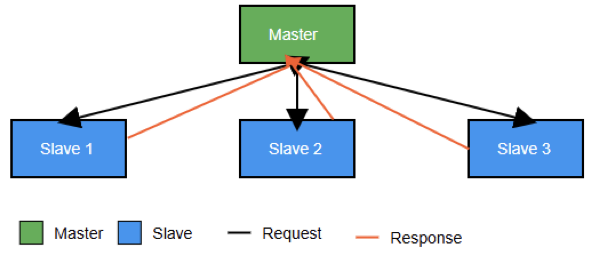
In a master–slave arrangement, the master device is typically a programmable logic controller (PLC). The master controls communication by sending requests. Slave devices respond with data. 

This structured approach ensures deterministic and predictable data exchange. Communication occurs within defined time limits.

This is essential for time-critical industrial control applications. Profibus supports cyclic real-time data transfer as well as acyclic communication for configuration and diagnostics.

What is Profibus?

Key Features of Profibus

One of the most important features of Profibus is deterministic communication. Data exchange occurs within fixed time intervals.

These intervals are predictable and repeatable. This ensures consistent system response and stable control behavior. This determinism makes Profibus suitable for applications requiring precise timing.

The rate of 12 Mbps is the maximum speed used by Profibus DP for data exchange. This allows fast cyclic communication.

Data is exchanged efficiently between controllers and field devices. This capability allows efficient control of machines, drives, and distributed I/O systems.

The protocol supports both master–slave and multi-master operation. Coexistence between multiple masters on the same network is possible.

This enables system redundancy. It improves availability in complex automation systems.

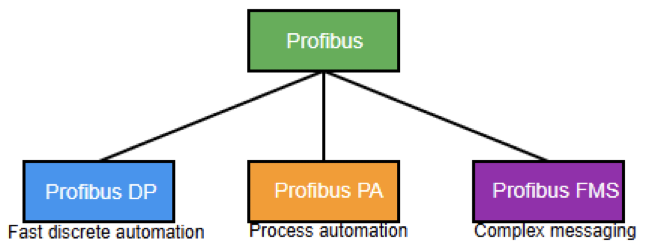
Profibus includes several protocol variants, including FMS, PA, and DP. Each variant is optimized for different industrial needs. These range from high-speed discrete automation to intrinsically safe process control.

Profibus is an internationally standardized protocol under IEC 61158. Interoperability can be ensured by this standardization.

Devices from different manufacturers can communicate reliably. This standardization reduces vendor lock-in. It also simplifies system integration.

Profibus significantly reduces wiring complexity. It replaces multiple point-to-point connections with a single bus cable.

This lowers installation costs and simplifies maintenance. Without forgetting, it improves system scalability.

Profibus supports flexible network topologies. These include line, tree, and star configurations.

This flexibility allows networks to adapt to different plant layouts.
It also supports future expansion requirements.

The protocol supports multiple physical layers. These include RS-485, Manchester Bus Powered (MBP), and fiber optics. Reliable performance is achieved in challenging and hazardous industrial conditions.

Profibus PA supports intrinsic safety. This enables safe operation in explosive process environments. Advanced diagnostic functions are provided.

Alarm mechanisms support early fault detection. They improve system uptime and streamline troubleshooting processes.

Types of Profibus

Profibus: Decentralized Peripherals

Shortly known as Profibus DP. This variant is the most widely used. Its primary application lies in discrete manufacturing and machine automation. It enables fast cyclic data exchange. 

Communication occurs between controllers and field devices. Connected devices include sensors, actuators, and drives. Remote I/O modules are also supported. Update times can be as low as 1.5 ms.

This performance suits fast industrial processes. Typical applications include assembly lines, robotics, and conveyors.

Profibus: Process Automation

Also known as Profibus PA, it is designed for process industries. Common applications include chemicals, oil and gas, and pharmaceuticals.

It uses Manchester Bus Powered technology. In this, power and data share the same two-wire cable. 

This simplifies wiring and supports intrinsic safety, making PA suitable for hazardous areas. PA devices typically include transmitters, valves, and analyzers installed in the field.

Profibus: Fieldbus Message Specification

Shortly known as Profibus FMS. It supports complex communication and messaging between controllers and intelligent devices.

Although it is less commonly used today due to the dominance of DP and PA, FMS is still found in some legacy systems requiring advanced device-to-device communication.

Profibus Communication Principle

Profibus operates on a deterministic communication principle that ensures data exchange occurs within predefined time limits. Bus access is carefully controlled to prevent collisions and data loss. 

Depending on network design, Profibus can operate using master–slave or multi-master communication.

In master–slave communication, the master initiates all data exchange by polling slave devices in a cyclic sequence. 

Slaves respond only when addressed. This approach ensures predictable communication behavior.

It is widely used in Profibus DP systems. In multi-master networks, multiple masters share the same bus. 

A token-passing mechanism controls bus access. Only one master communicates at a time.

The token circulates among masters in a predefined order. This ensures fair communication and improves reliability and redundancy.

Profibus supports cyclic data for real-time control. Acyclic data is used for configuration and diagnostics. Alarm data is applied for fault reporting.

This combination supports efficient operation and maintenance. Monitoring occurs without disrupting real-time control.

Device Addressing and Configuration

Each Profibus device requires a unique address. This can be configured using hardware switches or software tools. Network configuration includes setting addresses and transmission speeds.

It also involves defining cyclic data parameters and diagnostic options. GSD files describe device capabilities. They ensure compatibility during system integration.

Profibus Network Topology

Profibus supports three types of topologies: first line, second tree, and third star topologies

  • Line topology: Most common and cost-effective, using a daisy-chain connection. 
  • Tree topology: Introduces branches for large or distributed systems. 
  • Star topology: Uses active couplers to improve fault isolation and reliability.

Applications of Profibus

Profibus is widely used in manufacturing and process industries. It is also applied in building automation and the energy sector. 

  • Energy sector:  Profibus is used in renewable energy installations, substations, and power plants.
  • Building automation: Combining HVAC and lighting. Also, safety systems are considered. 
  • Manufacturing: Dealing with high-speed machine control and robotics.
  • Process industries: In hazardous areas, field instruments are connected by Profibus PA. 

Advantages and Disadvantages of Profibus

Profibus offers numerous advantages that make it a widely used industrial communication protocol. One key benefit is high-speed communication. This ensures timely control of devices in real-time applications. 

Next is determinism, providing predictable response times. This is essential for critical control systems. Profibus also reduces wiring complexity. Since it is a single bus, it can replace multiple point-to-point connections. 

This simplifies installation and maintenance. The protocol ensures the properties of interoperability.

It allows communication between devices from different manufacturers. In addition, advanced diagnostics provide real-time error detection. These characteristic aids to improve system reliability and reducing downtime. 

The latter helps to reduce downtime and streamline maintenance efforts. Profibus PA supports intrinsic safety.

Provides suitability for operation in hazardous areas. Finally, the system is highly scalable. Gives the ability to serve both small machines and large process plants effectively.

On the other hand, despite these advantages, Profibus has several limitations. Limited bandwidth is one of the major drawbacks.

The maximum data rates are 12 Mbps, which is slower than modern Ethernet. Also, it may be insufficient for high-data applications.

The data limit per node in Profibus DP is relatively low, around 244 bytes. The master-slave design may limit systems that need direct peer-to-peer communication.

Integration with IT systems is more limited than with Ethernet-based protocols such as PROFINET.

Hardware and installation costs can also be high. Due to specialized components such as ASICs, connectors, repeaters, and cables. 

Finally, cable length limitations are especially problematic at higher speeds. It may require repeaters, adding complexity and cost to network design.

Profibus vs Other Industrial Protocols

Modbus

Compared to Modbus, Profibus provides faster communication. It also ensures deterministic operation suitable for real-time control. Modbus is simpler and used mainly for monitoring.

Ethernet/IP

Compared to Ethernet/IP, Profibus offers predictable timing. However, it has lower bandwidth and less IT integration.

It is well-suited for deterministic industrial control.
On the other hand, Ethernet/IP excels in high-speed data transfer and provides superior network connectivity.

Profinet

Gaining popularity is a trend of Profinet and other Ethernet-based technologies. Despite this, Profibus remains common in many legacy systems. It provides robust and deterministic communication where reliability is critical.

CANopen

Compared to CANopen, Profibus supports larger networks. It also supports longer communication distances. This makes it more suitable for factory and process automation. 

Profibus provides advanced diagnostics for easier maintenance. It delivers higher data throughput and better integration with industrial controllers. These features improve overall system performance.

Key Takeaways: What is Profibus?

Profibus is a proven industrial communication protocol. This is because it is highly reliable.

It has played a major role in developing modern automation systems. Its variants include DP, PA, and FMS.

They address a wide range of industrial requirements. Applications range from high-speed machine control to intrinsically safe process automation. 

Profibus provides deterministic communication. It offers a flexible network design.
Advanced diagnostics enhance system reliability.

Strong standardization supports efficient industrial operations. Industrial Ethernet has grown rapidly. Despite this, Profibus remains important in many existing installations. It continues to demonstrate value in demanding industrial environments.

FAQ: What is Profibus?

What is Profibus?

A digital industrial communication protocol connecting controllers and field devices.

Why is it used?

It ensures reliable data exchange and reduces wiring complexity.

Main versions?

Profibus DP, PA, and FMS.

How does it communicate?

Master polls slaves in a cyclic process; slaves respond.

Difference from Profinet?

Profibus is serial and deterministic; Profinet is Ethernet-based with higher bandwidth.

Is it still used?

Yes, especially in legacy systems requiring reliable timing.

Is it standardized?

Yes, under IEC 61158.

Physical media?

RS-485, MBP cabling, and fiber optics.

What Is The Difference between Ethernet IP and Modbus TCP

In modern industrial automation, reliable communication between devices is essential.

Every process, from a simple sensor reading to a largescale production line, depends on seamless data exchange between controllers, sensors, and actuators. 

Two of the most widely used Ethernet-based protocols are EtherNet/IP and Modbus TCP.

At first glance, they appear similar since both use standard Ethernet networks for communication. 

However, beneath this shared foundation, they differ significantly in how they structure, transmit, and manage data.

This article details the key differences between EtherNet/IP and Modbus TCP, explaining their architectures, communication methods, performance, and best application areas.

 It aims to help engineers, integrators, and system designers choose the right protocol for their specific needs based on speed, complexity, interoperability, and security.

Overview and Background

Ethernet-based communication has become the backbone of industrial control systems.

It provides high speed data exchange, easy scalability, and the ability to integrate multiple layers from field devices to enterprise networks on a single platform.

Both Modbus TCP and EtherNet/IP take advantage of these benefits but in different ways.

Modbus TCP is valued for its simplicity and openness. It builds upon the traditional Modbus protocol and adapts it to modern Ethernet networks.

WhileEtherNet/IP, on the other hand, is feature-rich and powerful. It brings advanced capabilities from the Common Industrial Protocol (CIP), enabling real-time control, motion coordination, and system wide integration.

Understanding how each protocol works is essential to designing reliable automation systems that balance cost, performance, and scalability.

Architecture and Data Model

In this section we will review an architecture and data model of each of these communication protocols.

Modbus TCP

Modbus TCP is one of the easiest industrial communication protocols to implement.
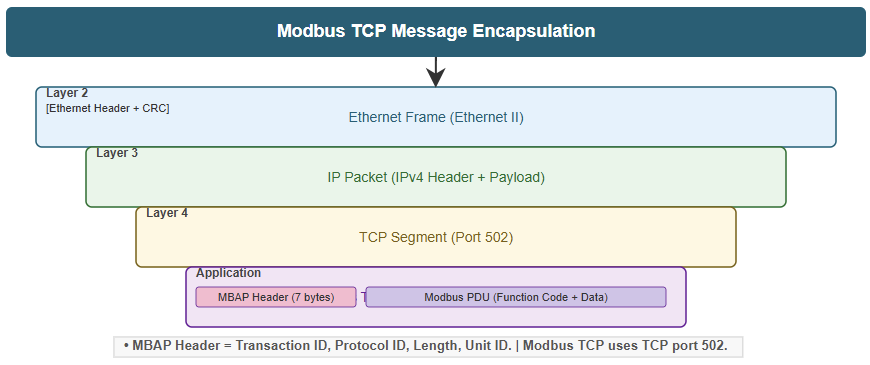
It is an open standard that encapsulates the traditional Modbus RTU frame inside a TCP/IP packet. 

So, this allows it to function over Ethernet without major modifications.

Key features:

  • Based on a client-server (or master-slave) communication model.
  • The client initiates a request; the server processes it and sends a response.
  • Data is represented in simple tables known as registers and coils.

Common data types:

  • Coils: Discrete on/off values used for digital outputs.
  • Input Status: Read only discrete inputs.
  • Holding Registers: 16-bit read/write registers used for analog values or process data.
  • Input Registers: 16-bit read-only registers used for sensor input data.

Each device on a Modbus TCP network is identified by a unique IP address. For systems connected through gateways to Modbus RTU networks, a Unit Identifier is used to route messages to the correct device.

A Modbus TCP message includes:

  • A 7-byte MBAPheader (Modbus Application Protocol header).
  • The Protocol Data Unit (PDU), which contains the function code and data.
  • The entire message is encapsulated inside a TCP/IP frame and transmitted via Ethernet.

This simple and consistent structure makes Modbus TCP highly transparent, easy to debug, and compatible with many devices and software tools.

EtherNet/IP

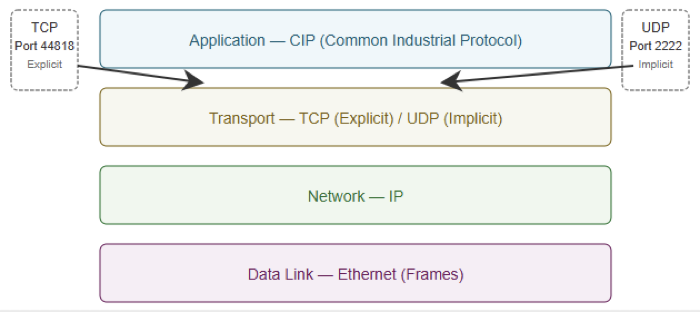
EtherNet/IP (Ethernet Industrial Protocol) is more sophisticated. It adapts the Common Industrial Protocol (CIP) to Ethernet, providing a consistent way to model data, manage devices, and control real-time operations.

Unlike Modbus TCP’s table based design, EtherNet/IP is object-oriented. Devices organize their data into logical objects, each containing multiple attributes that represent different parameters or values.

Communication models:

  • ExplicitMessaging (Client/Server): Used for configuration, diagnostics, and non-time-critical data. Operates over TCP for reliable delivery.
  • ImplicitMessaging (Producer/Consumer): Used for real-time I/O data exchange. Operates over UDP for high-speed, cyclic, multicast communication.

Addressing:

  • Devices are identified by IP addresses.
  • Specific data is accessed through a CIP path, which points to the object and attribute to be read or written.

Port usage:

  • TCP port 44818 for explicit messaging.
  • UDP port 2222 for implicit messaging.

Because of its object-oriented structure, EtherNet/IP supports complex applications such as synchronized motion control, advanced diagnostics, and flexible system integration.

Key Differences Between EtherNet/IP and Modbus TCP

While both protocols share Ethernet as a physical medium, their operation and capabilities differ considerably.

Main distinctions

Data Model

EtherNet/IP: Object-oriented using CIP; Modbus TCP: Simple, table based registers and coils.

Communication Style

EtherNet/IP: Producer/Consumer (implicit) and Client/Server (explicit); Modbus TCP: Client/Server only.

Real-Time Performance

EtherNet/IP: Excellent real-time behavior using UDP implicit messaging; Modbus TCP: Limited real-time capability; sequential requests can slow communication.

Addressing

EtherNet/IP: IP addr